
Plushie Pods
I don't know my version or loader
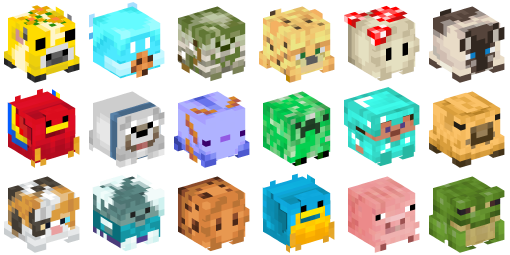
Plushie Pods


How to get Plushies?
Craft Plushie Pods with Emeralds and Wool or Diamonds and Wool. (Any wool, any shape)
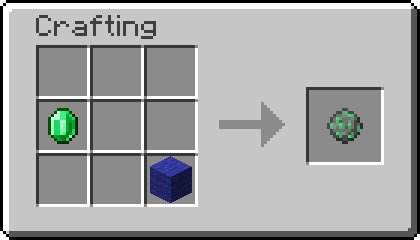
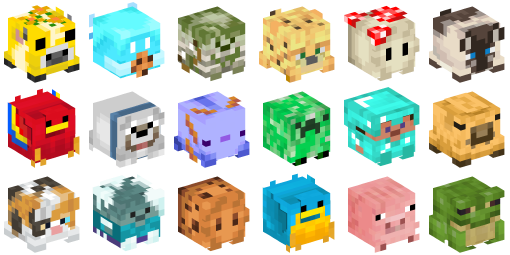
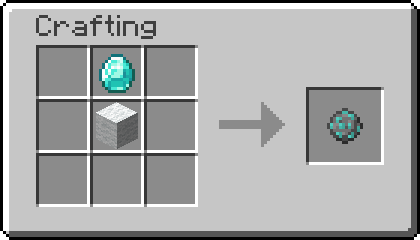 Right Click a Plushie Pod to open it. It will contain a random Plushie. Diamond Plushie Pods have a higher Chance of containing rare Plushies. There are currently 108 Plushies in total.
The Rarity System
The rarity system uses the Minecraft rarities!
- Common: white
- Uncommon: yellow
- Rare: cyan
- Epic: purple
🛠️ Installation
Datapack Installation Guide
Copy the .zip archive into the ".minecraft/saves/yourworldname/datapacks" folder, where yourworldname is the name of your world.
Mod installation Guide
Copy the .jar archive into the folder your Mod Loader of choice provides.
⚙️ Compatibility
An Internet Connection is required for the Textures to be loaded. Do not use an "Unlock all achievements" datapack after having installed this datapack!
🤝 Special Thanks, Attributions
I did not make the Art in this pack myself, the custom Blocks are all Player heads that already exist inside of Minecraft. Thanks to all the Creators and Contributors on minecraft-heads.com, who made this Data Pack possible!
❗Issues and Suggestions
Please report issues on My Discord or on GitHub.
- Edition: Minecraft Java
- File type: .jar
- Minecraft versions listed: 1.21.9, 1.21.10
- How to install: Install the matching mod loader (Forge, Fabric or NeoForge) for your Minecraft version. → Download the .jar. → Put it in the .minecraft/mods folder and launch that loader profile.
- Where to get it: Opens on Modrinth — not every file is mirrored on our own servers.
Install steps are the general flow for this file type — see the MC Java Mods guides for the full walkthrough.
- Downloads as plushiePods1.21.10.zip
- Download size: 32 KB
- Download link checked 28 Aug 2026 — working
These come from our own check of the pack file, not from the source page.