
Blue Grove
I don't know my version or loader
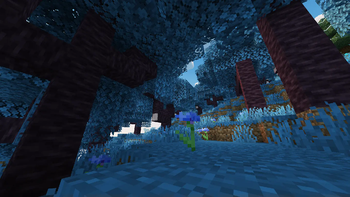
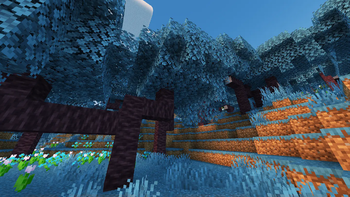
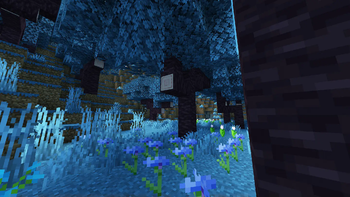
Blue Grove




New biome inspired by Cherry Grove, but with blue tones!
Not compatible with any mod thats change overworld generation.
📂 Installation
When creating your world, go to the More tab and click the Data Packs button. Drop the data pack into the area, then move it to the selected data packs section.
If you are in a world already created move the downloaded file in the path .minecraft/saves/[world]/datapacks
⌨️ Commands
Locate:
/locate biome blue_grove:blue_grove
🪪 License
👾 Bugs/Issues
Please report any problem/bug/issues in the Discord Server.
💌 Donate
🎁 Server Hosting
Creating your own server can be a very lengthy, tedious and costly process.
But with BisectHosting, you get your own server in just a couple of clicks! With their 24/7 support and fast-response time, no issues shall stand in your way! Interested? Then we've got a deal for you!
https://bisecthosting.com/lullaby

- Edition: Minecraft Java
- File type: .jar
- Minecraft versions listed: 1.21, 1.21.1, 1.21.2
- How to install: Install the matching mod loader (Forge, Fabric or NeoForge) for your Minecraft version. → Download the .jar. → Put it in the .minecraft/mods folder and launch that loader profile.
- Where to get it: Opens on Modrinth — not every file is mirrored on our own servers.
Install steps are the general flow for this file type — see the MC Java Mods guides for the full walkthrough.
- Downloads as Blue Grove v1.0.3 [1.21-1.21.6].zip
- Download size: 217 KB
- Download link checked 28 Aug 2026 — working
These come from our own check of the pack file, not from the source page.