
DatapacksJava
Coordinate Bar
I don't know my version or loader
Open the Minecraft launcher and look at the profile you play on — it names both, like fabric-loader-1.21.4. The version also shows in the bottom-right corner of the game's main menu.
No loader in the profile name? Then it's plain Minecraft, and these mods won't run — you need Fabric or NeoForge installed first.
📍 Coordinate Bar
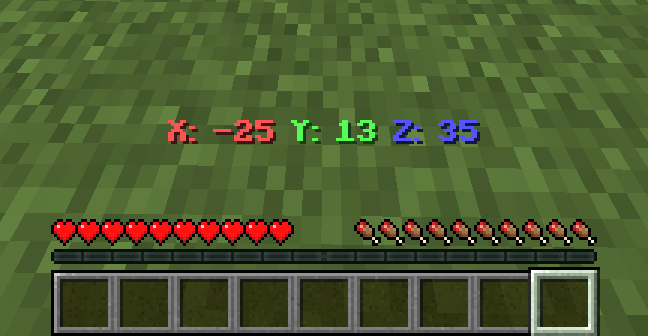
Coordinate Bar is a simple Minecraft datapack that shows your current coordinates (X, Y, Z) in the action bar.
✨ Features
- Shows coordinates in real-time.
- Works in singleplayer and multiplayer.
- Supports Smithed Actionbar Libary.
📦 Optional Library Support – Actionbar
This datapack allows the actionbar to be shared across multiple datapacks on a server, preventing conflicts and ensuring compatibility.
🔗 Download: Smithed – Actionbar Library
Enable support with the following command:
scoreboard players set .library thirstbar 1Disable support with the following command:
scoreboard players set .library thirstbar 0
📦 Installation
- Download the datapack
.zipfile. - Place it in your world's
datapacksfolder. - Use
/reloadafter joining the world. - You're all set! Move around and see your coordinates at the bottom of your screen.
🧱 Compatibility
- Minecraft Java Edition 1.20.2+
- No external resource packs needed
🌐 ITITAN Hosting
💬 Feedback and Request
If you have a request or feedback, please write them in to my discord 3geetr.
Quick facts
- Edition: Minecraft Java
- File type: .jar
- Minecraft versions listed: 1.21, 1.21.1, 1.21.2
- How to install: Install the matching mod loader (Forge, Fabric or NeoForge) for your Minecraft version. → Download the .jar. → Put it in the .minecraft/mods folder and launch that loader profile.
- Where to get it: Opens on Modrinth — not every file is mirrored on our own servers.
Install steps are the general flow for this file type — see the MC Java Mods guides for the full walkthrough.
Verified by MCModsHub
- Downloads as Coordinate Bar.zip
- Download size: 164 KB
- Download link checked 28 Aug 2026 — working
These come from our own check of the pack file, not from the source page.