
DatapacksJava
Create: Easier Goo
I don't know my version or loader
Open the Minecraft launcher and look at the profile you play on — it names both, like fabric-loader-1.21.4. The version also shows in the bottom-right corner of the game's main menu.
No loader in the profile name? Then it's plain Minecraft, and these mods won't run — you need Fabric or NeoForge installed first.
About
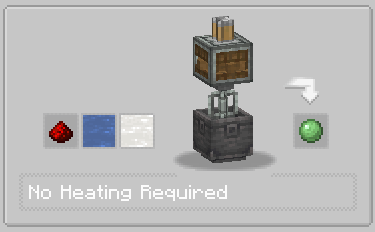
Too lazy to farm cactus or find a slimechunk for slimeballs? Me too. This tiny mod adds a Create-compatible recipe so you can craft slimeballs right in your factory. No farms needed.
Recipe

You only need 250 ml of water, 250 ml of milk, and 1 redstone.
Tutorial + No forge version
I'm was too lazy to make a forge version, but I made a datapack so you don't need to install another mod. Here's a little tutorial.
- First open Minecraft, and click on Singleplayer. If you've a server, just find the World folder, can't explain here sorry.
- Click on the world you want the recipe and then click on "Edit" on the bottom of your screen.

- Then click on "Open World Folder".

- After that, a bunch of folders will appear and you only need to find the "datapacks" one, if you can't find it, maybe try do create yourself, be careful because it need to be written exactly right, all lowercase.

- To finish, all you need to do is download the datapack and place it inside the datapacks folder, start Minecraft in the right version with Create and it should work.
Bugs
If somehow the recipe isn't right, you can send me a message in Twitter: @DayzWilliam.
Quick facts
- Edition: Minecraft Java
- File type: .jar
- Minecraft versions listed: 1.19, 1.19.1, 1.19.2
- How to install: Install the matching mod loader (Forge, Fabric or NeoForge) for your Minecraft version. → Download the .jar. → Put it in the .minecraft/mods folder and launch that loader profile.
- Where to get it: Opens on Modrinth — not every file is mirrored on our own servers.
Install steps are the general flow for this file type — see the MC Java Mods guides for the full walkthrough.
Verified by MCModsHub
- Downloads as create_easier_goo_1.19.2.zip
- Download size: 177 KB
- Download link checked 28 Aug 2026 — working
These come from our own check of the pack file, not from the source page.