
BlockBuster engine
Java data pack listed for Minecraft 1.21–26.x. Downloads from the MC Java Mods app on Android.
Blockbaster Engine is a Minecraft datapack for creating cinematics and cutscenes. The engine allows you to record player movements, create actors with…
I don't know my version or loader


#BlockbasterEngine
Cinematic Engine for Minecraft
Blockbaster Engine is a powerful datapack for creating professional cinematics, cutscenes, and animated sequences directly in Minecraft. The engine provides a complete set of tools for recording, editing, and playing back complex scenes with multiple actors.
🎬 Key Features
Actor System
Create and manage virtual characters for your scenes:
- Actor creation with unique names and IDs
- Custom skins — apply any skins to actors
- Visibility control of names and display parameters
- Actor database with the ability to save and load
- Interactive menu for editing actor properties
Motion Recording
Capture player actions in real time:
- Frame-by-frame recording of all player movements, turns, and actions
- Save to storage for later use
- Playback via mannequins — precise repetition of recorded actions
- Support for multiple recordings for a single scene
- Indexing system for organizing large numbers of recordings
Scene Editor
A professional tool for creating Cinematography:
- Create and manage scenes with unique IDs
- Add multiple recordings to a single scene
- Link actors to recordings for synchronized playback
- Load and edit existing scenes
- Interactive menu with a user-friendly control interface
Playback System (Player)
Smooth and synchronized playback:
- Frame-by-frame execution of recorded actions
- Synchronize multiple actors in a single scene
- Control the player's camera during cutscene playback
- Automatic player state restoration upon completion
- Callback system for integration with other systems
Mannequin System
Advanced NPC playback system:
- Dynamic creation of mannequins with specified skins
- Frame-by-frame animation of movements and rotations
- Support Indexed records for optimization
- Automatic cleanup after playback completes
- Macro system for efficient data loading
🚀 Quick Start
Installation
- Download the datapack
- Place the
blockbaster-enginefolder in thedatapacksdirectory of your world - Reload the world or run
/reload
Launching the Editor
To work with Blockbaster Engine, use the visual editor instead of commands:
/function _blockbuster:open
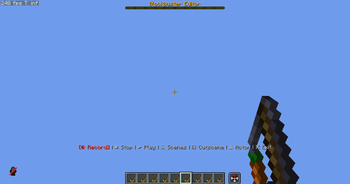
After launching, the editor interface will open with a menu in the actionbar (above the hotbar).
🎮 Working with the Editor
Interface Controls
Menu Navigation:
- Mouse Wheel (Slot Change) — Switch between menu items
- RMB (Right Mouse Button) — Select the current menu item
Main Menu Structure:
- 🔴 Record — Start recording movements
- ⏹ Stop — Stop the current recording
- ▶ Play — Play the last recording
- 🎬 Scenes — Open the scene management menu
- 🎞 Cutscene — Cutscene Editor
- 👤 Character — Actor Management Menu
- ❌ Exit — Close the editor
Creating Your First Scene
Step 1: Open Editor
/function _blockbuster:open
Step 2: Create a Character
- Scroll to 👤 Character
- Right-click to open the menu
- Select the desired action (create, list, edit)
Step 3: Record Actions
- Scroll to 🔴 Record
- Right-click to start recording
- Perform the desired actions (move, turn, jump)
- Scroll to ⏹ Stop and right-click
Step 4: Create a Scene
- Scroll to 🎬 Scenes
- Right-click to open the scenes menu
- Create a new scene and add recordings
Step 5: Play
- Select ▶ Play to preview the results
🎯 Character Menu
After selecting 👤 Character in the main menu:
- Character List — view all created actors
- Stop All — stop playback of all mannequins
- Back — return to the main menu
Working with Characters
- Create actors with unique names
- Assign custom skins
- Manage name visibility
- Link recordings to specific characters
🎬 Scene Menu
After selecting 🎬 Scenes in the main menu:
- Create Scene — new cinematic scene
- Scene List — all saved scenes
- Edit — change scene parameters
- Add Recording — link a recording to a scene
- Play — start a scene
Working with Scenes
- One scene can Contain multiple recordings
- Each recording is linked to a specific actor
- Automatic synchronization of all actors during playback
- Saving scenes to files for reuse
🔧 Technical features
Data Storage System
- Use of storage for temporary data
- Loot tables** for persistent storage of scenes and actors
- Predicates** for conditional logic and checks
Optimization
- Indexed system** for working with large numbers of records
- Macro functions** for dynamic data loading
- Efficient memory management** by cleaning up unused data
Integration
- Callback system** for interacting with other datapacks
- Cutscene Engine support** for advanced features
- Modular architecture** for easy functionality expansion
📋 Requirements
- Minecraft version**: 1.21.9+
- Game mode**: Any (Creative recommended for ease of use)
- Permissions**: Operator for executing commands
🎯 Usage Examples
Creating a Dialogue Scene
- Create two actors with different skins
- Record movements for each character
- Create a scene and add both recordings
- Adjust timing using the scene editor
- Play the final scene
Cinematic Cutscene
- Record camera (player) movement
- Add actor recordings for background characters
- Use the playback system to control the camera
- Integrate with Cutscene Engine for additional effects
🤝 Integration with Other Systems
Blockbaster Engine supports integration via:
- Callback Functions — calling custom functions when events occur
- Storage API — accessing scene and actor data
- Predicate System — conditional logic for complex scenarios
Create cinematic masterpieces in Minecraft with Blockbaster Engine! 🎬✨
- Edition: Minecraft Java
- File type: .jar
- Minecraft versions listed: 1.21.9, 1.21.10, 1.21.11
- How to install: Install the matching mod loader (Forge, Fabric or NeoForge) for your Minecraft version. → Download the .jar. → Put it in the .minecraft/mods folder and launch that loader profile.
- Where to get it: Opens on Modrinth — not every file is mirrored on our own servers.
Install steps are the general flow for this file type — see the MC Java Mods guides for the full walkthrough.
- Downloads as blockbaster-engine.zip
- Download size: 1.3 MB
- Download link checked 9 Oct 2026 — working
These come from our own check of the pack file, not from the source page.