


⚠️ IMPORTANT: USAGE GUIDELINES If you're planning to use this on a server or modpack, please refer to: https://gamedash43.github.io/dash-mcl-licenses/#usage

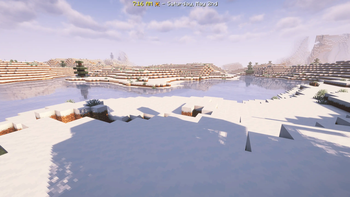
This add-on displays in-game time, weather conditions, weekdays, and dates using a day tracker that accurately mirrors real-world dates.
📜 Features
- Real Calendar Replica:
- Tracks days, months, years, leap years, and weekdays exactly like the real world.
- April 6 2025 in-game lands on the same weekday as April 6 2025 IRL.
- The date is recalculated every tick, so
/time setor lag can’t throw it off.
- Holiday Accuracy:
- Calculates movable holidays like Easter, Lunar New Year, and Thanksgiving with the same formulas used in astronomy software.
- Ready-made hooks let addon packs fire events on any holiday.
- Dimension-Aware Bossbars:
- Overworld: standard date + weather summary.
- Nether: distance from entrance portal.
- End: live Elytra flight-time estimate until next repair (Unbreaking factored in).
- Every bar is per-player, so what you see never collides with what your friends see.
- Clock+Sneak Toggle:
- Sneak while looking straight down with a clock to show/hide your bossbar instantly—no commands needed.
- Live Weather, Biome & Light Checks:
- Shows clear/rain/thunder, biome temperature class.
- Daily Announcements:
- At dawn (and on join) you’ll get a one-liner with the full date, total day count, and any holiday emoji.
- Display Options:
- An optional resource-pack skin hides the bossbar frame for players who prefer a minimalist look.
⚙️ Configuration
- For New Worlds:
- Use the config file located in
data/dash.date/function/config.mcfunctionto set your initial dates. Follow the instructions in the file carefully before starting a new world.
- Use the config file located in
- For Existing Worlds:
- Set the dates using the following scoreboard variables (all in the scoreboard
dash.date_arc):%start.yearand%display.yearfor the year.%ani.monthand%display.monthfor the month.%ani.dateand%display.datefor the day.
- After updating these values, run
/function dash.date:updateto let the system self-correct.
- Set the dates using the following scoreboard variables (all in the scoreboard
- Note: Read the instructions in the config file carefully before creating a new world if you plan on modifying it.
- Player Birthday Event:
- Set your birthday for a special event using:
/scoreboard players set @s dash.date_bd.month [birthday month]/scoreboard players set @s dash.date_bd.date [birthday date]
- Set your birthday for a special event using:
🌟 Planned Details
- This add-on was designed as an extremely accurate calendar system base with no extra items added to the game.
- In development is an additional add-on for this pack that will add a placable calender block that displays the current month, date, and upcoming holidays in a vanilla style.
- Future plans include events such as Christmas presents, dynamic Easter egg hunts, and other holiday-themed activities within the add-on for this pack.
❓ FAQ
Explained in nerd terms.Using division and modulo operations, the datapack converts game ticks into a 12-hour clock while computing the day-of-year by summing monthly offsets and adjusting for leap years using the standard 4-100-400 rule. Weekdays are determined with a variant of Zeller’s Congruence, and the daycounter algorithm calculates an absolute day value by summing full-year contributions (with leap day adjustments) and the current day-of-year before subtracting a defined start date. In addition, Easter is determined using a classical algorithm that applies modulo and floor division operations to compute the correct month and day, and the lunar new year is approximated by offsetting the year from 1900, taking the remainder modulo 19, and mapping that result to a specific day-of-year.
What special events are available?Special events include:
New Year's Eve: Chat message and firework show at midnight (if outdoors).
Lunar New Year: Fireflies appear on join and wake up.
Valentine's Day: Hearts appear when you join and wake up.
St Patrick's Day: Green particles appear when you join and wake up.
Easter: Green and White particles appear when you join and wake up.
Thanksgiving: Autumn leaves appear on join and wake up.
Winter Holidays: Snow appears when you join/wake up.
Birthday: Happy birthday song and message to all players.
World Anniversary: Firework show and commemorative message on the world's creation date. Other events, like New Year's Day and April Fools, are planned for future updates.
Spoiler- Halloween: A random jumpscare during the day.
Use the commands provided to set your birthday:
- Set the month:
/scoreboard players set @s dash.date_bd.month [birthday month] - Set the date:
/scoreboard players set @s dash.date_bd.date [birthday date]
Each player will then receive a special birthday event.
Just run the command /function dash.date:uninstall.
If you're updating from a previous version, you must set the start year with this command:/scoreboard players set %start.year 0 and /function dash.date:update
- Edition: Minecraft Java
- File type: .jar
- Minecraft version listed: 26.1
- How to install: Install the matching mod loader (Forge, Fabric or NeoForge) for your Minecraft version. → Download the .jar. → Put it in the .minecraft/mods folder and launch that loader profile.
- Where to get it: Opens on Modrinth — not every file is mirrored on our own servers.
Install steps are the general flow for this file type — see the MC Java Mods guides for the full walkthrough.
- Downloads as dp_dash_dt_display_V3.4.zip
- Download size: 316 KB
- Download link checked 29 Aug 2026 — working
These come from our own check of the pack file, not from the source page.