
DatapacksJava
Cauldron Expansion
I don't know my version or loader
Open the Minecraft launcher and look at the profile you play on — it names both, like fabric-loader-1.21.4. The version also shows in the bottom-right corner of the game's main menu.
No loader in the profile name? Then it's plain Minecraft, and these mods won't run — you need Fabric or NeoForge installed first.
Features
- All vanilla interactions should be unaffected
- If you find a bug report it on our discord
Custom Interactions
- Adding water to a lava cauldron will create obsidian
- More custom interactions coming soon
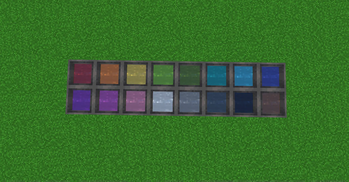
Dyed Water Cauldrons
- Use dye on a cauldron to color the water!
- Dyed cauldrons can be used to dye leather armor, leather horse armor, and wolf armor
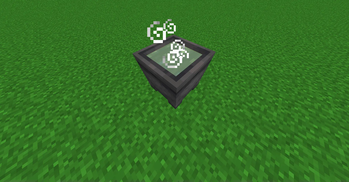
Potion Cauldrons
- Interacting with an empty cauldron while holding a potion to store the potion inside!
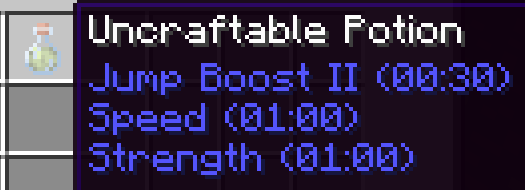
- Multiple potions can be combined in a cauldron reducing their effect durations
- Ex. Combining Strength II (1:30), Speed II (1:30), Jump Boost II (1:30), will create three potions of Strength II (0:30), Speed II (0:30), Jump Boost II (0:30)
- Adding water will also dilute the potions effects
- Strength II (1:30) plus 2 water bottles will provide three Strength II (0:30) potions
- Thick, awkward, and mundane potions behave as water bottles
- Interacting with a potion cauldron while holding arrows will tip them
- Each level of potion can tip up to 16 arrows
Known Issues
You must punch the cauldron before you can mine it
- This works as intended, but useful to know
Interacting with a cauldron less than 5 seconds after punching it will cause it to lose all custom data
Cauldrons pushed by a piston lose all custom data
Custom potions cannot be converted to splash or lingering potions in the brewing stand (MC-270706)
- I have a potential workaround that may be implemented in the future
Quick facts
- Edition: Minecraft Java
- File type: .jar
- Minecraft versions listed: 1.21, 1.21.1
- How to install: Install the matching mod loader (Forge, Fabric or NeoForge) for your Minecraft version. → Download the .jar. → Put it in the .minecraft/mods folder and launch that loader profile.
- Where to get it: Opens on Modrinth — not every file is mirrored on our own servers.
Install steps are the general flow for this file type — see the MC Java Mods guides for the full walkthrough.
Verified by MCModsHub
- Downloads as cauldron expansion v1.0.1.zip
- Download size: 28 KB
- Download link checked 29 Aug 2026 — working
These come from our own check of the pack file, not from the source page.