
Potato PC
I don't know my version or loader
Potato PC
The Potato PC is a literal computer powered by a literal potato. It has four apps you can use
Description
You can craft the Potato PC like this:
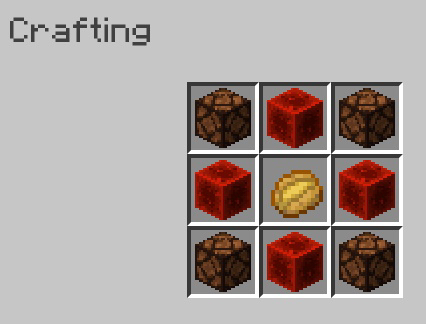 When you place it, right click on it to open the actual computer!
Potato Discord
Potato Discord has two servers you can visit by clicking the, on the sidebar. One is the Bear Cave, and one is the Potato Discord server.
Files
The Files app has 8 files - 3 are images and 5 are text documents. You can click on the files in the app to open them.
Images - The images app can only be opened by opening an image through the Files app.
Games
The games app has one game, and that game is Worship-a-Potato. When you worship the potato by pressing the button, you have a chance at getting a diamond in return.
Music
The music app lets you play Pigstep when you press the play button.
- Edition: Minecraft Java
- File type: .jar
- Minecraft versions listed: 1.17, 1.17.1, 1.18
- How to install: Install the matching mod loader (Forge, Fabric or NeoForge) for your Minecraft version. → Download the .jar. → Put it in the .minecraft/mods folder and launch that loader profile.
- Where to get it: Opens on Modrinth — not every file is mirrored on our own servers.
Install steps are the general flow for this file type — see the MC Java Mods guides for the full walkthrough.
- Downloads as potatopcdata.zip
- Download size: 16 KB
- Download link checked 29 Aug 2026 — working
These come from our own check of the pack file, not from the source page.