Mini-boss Boss Bars [Configuration Datapack]
Java data pack listed for Minecraft 1.20–1.21. File opened and checked on 4 Oct 2026; downloads from the MC Java Mods app on Android.
A configuration datapack for the Mini-boss Boss Bars mod that allows you to configure whichever boss you choose to not show their boss bar.
⬇ Download on CurseForgeNOTICE: Usage of the 1.20.1 version of this data pack has been deprecated due to the mod now having its own configuration file to do the job.
This data pack is used in tandem with the "Mini-boss Boss Bars" mod and allows the user to configure whichever boss they want to restrict from showing health bars at the top of the screen.
Instructions:
1. Navigate to "data > minibossbossbarsconfig_disable > functions" and search for the .mcfunction file with name of the mod containing the boss you are looking for. Open that .mcfunction file and proceed to the next step.
(The Elder Guardian and Warden are found in vanilla.mcfunction)
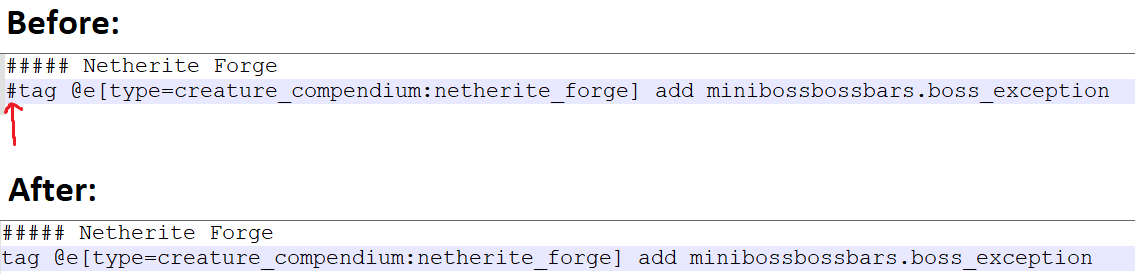
2. To disable a boss from showing displaying their boss bar, simply remove the hashtag situated in front of a command line under the name of the boss they correspond with.
FOR EXAMPLE:
TIP: Hit the "Ctrl" and "F" keys at the same time to look up specific terms and navigate to where they are located.
Recommended resources:
- Edition: Minecraft Java
- File type: .jar
- Minecraft versions listed: 1.21, 1.21.1, 1.20.1
- How to install: Install the matching mod loader (Forge, Fabric or NeoForge) for your Minecraft version. → Download the .jar. → Put it in the .minecraft/mods folder and launch that loader profile.
- Where to get it: Opens on CurseForge — not every file is mirrored on our own servers.
Install steps are the general flow for this file type — see the MC Java Mods guides for the full walkthrough.
- Downloads as Mini-boss Boss Bars Config Datapack 1.21.1 v1.0.38.zip
- Download size: 33 KB
- Download link checked 17 Nov 2026 — working
These come from our own check of the pack file, not from the source page.