
Kaths Heat&Cold
[2.0 Seasons Update!] A complex temperature system with seasons and other related features to add a new challenge to your playthrough.
I don't know my version or loader


| Bugs&News | All Projects |
|---|---|
 |
 |
| Direct link | Direct link |
Summery
Biomes have temperature now. Gear up correctly for the temperature, armor will react to the biomes, metallic armor will heats up and cools the player down faster. Leather in cold biomes and no armor in hot.
A few new crafting recipes and a new workstation, The drying rack, was added.
The best way to experience this pack is by choosing single biome and take Snowy tiaga. The beginning is hard, making you think of your next move to not freeze to death.
This description only descripts the newest (most recent uploaded) versions
Features
- First 3 days are easier
- Only on new world or after using the Reset World Days option.
- Multiplayer capable!
- Inside the advancements, there is a new tab where you can see if the pack is active.
- Note: The pack is updating many functions only once per second, not every tick, to reduce TPS-lag on servers.
Options: [ new 2.0 options! ]
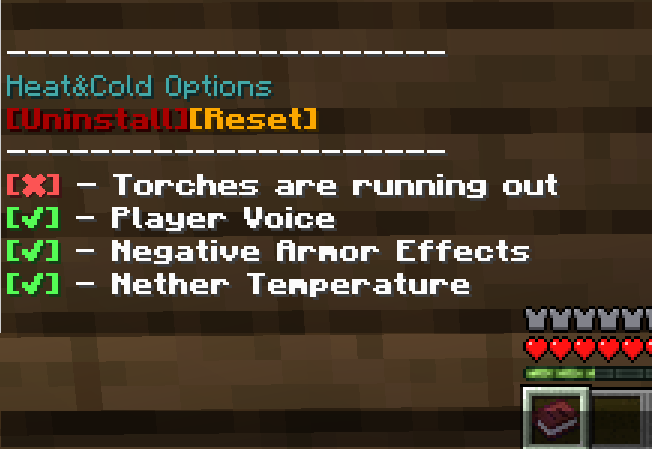
Open the option menu with this command:
/function k_hnc:options/menu
In here you can changes these options:
Torches run out [Defualt: off]
- Makes torches in hand run out after 10 minutes
- Times is not resetting if taken out of hand.
Player voice. [Defualt: On]
- Chatmessages if the body temperature is changing.
- Not effecting: Drinking Tea & Water; Placing campfires, Soul-campfires & Furnaces
Negative armor effects. [Defualt: On]
- Armor has a negative effect in biomes.
- Metallic armor cools and heats up the player faster.
- Leather armor is still giving heat in cold biomes.
Nether temperature. [Defualt: On]
- Hot temperature in the Nether
Temperature system [Defualt: On]
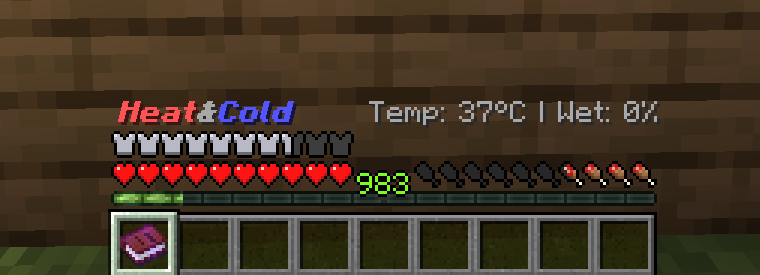
Body temperature of the player
Wetness-System [Defualt: On]
The player gets wet in water or rain.
Wetness has an inpact on the Tempsystem.
Extrem Temperature damage [Defualt: On]
Toggle if the player gets damage at the last stage of the temperature effects.
Sleep through Thunder
- Toggle if player can skip the day druing a thunder storm.
Player Stats Title
- Toggle if player see thier stats over the hotbar all the time without having the book in hand.
Seasons
Custom Daytime [Defualt: On]
- Days are still 20 min.
- Days have different length per month.
- If turned on, the sky will not moving smoothly anymore.
Announce days [Defualt: On]
- The game tells you which day it is in the Season
Custom Weather [Defualt: On]
- Weathersystem is linked to the Seasons.
- Rain can last longer and is more frequent in warmer month.
Heavy Storms [Defualt: On]
- Linked to custom weather option. Can't be on while the other is off.
- Can occur in warm month.
- Way more lightings
- Windsounds
- Have a range how severe their are.
Length of a month
- Set how long a month is
Start month
- Default is 3
- Depending on the start month, the difficulty can change.
Reset World Days
- The seasons are hooked to the world days. if installed on an existing world you might not start at day 1 month 3. Using this put the world to day 0.
Recover World Days
- Sets the Days of the world back to the original days.
Seasons
- 12 months
- 31 Days (Can be customized)
- Start month: 3 (Can be customized)
- Days are linked to world days (+1, cause MC-Day 0 is day 1)
Custom Weather
- Can be toggled
- Seasonal weather events
- More rain in summer
- Heavy storms in warm month
Custom Daylength
- Winter have longer Nights
- Summer has longer Days
- Days are still 20 min.
Daily Temperature changes
- The temperature is changing every day
- Winter is colder
- Summer is warmer
- Nights are colder
Hot Biomes:
- badlands
- desert
- eroded badlands
- savanna
- savanna plateau
- windswept savanna
- wooded badlands
Nether
- Note: For The Nether it's not that hot so it's not annoying to be in there for longer.
- Can also be turned for via options.
Cold Biomes:
- deep cold ocean
- deep frozen ocean
- cold ocean
- frozen ocean
- frozen peaks
- frozen river
- grove
- ice spikes
- jagged peaks
- snowy beach
- snowy plains
- snowy slopes
- snowy taiga
Normal Biomes
- Normalized temperature but still can get hot in summer and cold in winter.
Hot biomes:
- Soul campfire can cool down the player.
- All armor types heats up the player more.
- Underground is warm but not hot.
- Good to hide there in early game.
- Standing in water cools down and caps max heat.
- Nether
- The Nether is also hot, but is not heating up the player as fast to keep the player from needing to much water to take with him or existing the Nether every 2 minutes.
- Desert:
- At daytime it's hot.
- At nighttime is's cold.
Cold biomes:
- Campfire can heat up the player.
- Iron/Gold/Diamond armor cools down the player if worn.
- Leather armor is keeping the player warm.
- Netherite armor is a tiny bit worse then leather but still good for cold biomes.
- If it is raining, the player gets cold even faster.
- Underground is chilly but nor cold
- Good to hide there in early game.
Armor is effecting how fast the player cools down or heats up.
Negative armor effects can be turned of via options.
Metallic armor [Gold, Iron, Dia]
- is not good for keeping warm or holding back the cold.
- Is ok for keeping of the rain from your body.
Leather
- Is good for cold biomes, holding back the freezing temperature.
- wetness takes longer to dry off.
- Not good for warm biomes.
Netherite (currently inactive)
- Is a warm material and give off heat to the player.
- Not as good as leather armor.
- The worst in warm biomes.
Effects are the same in hot and cold
Stage 1 | 34°C & 40°C | slowness 1
Stage 2 | 29°C & 45°C | slowness 2
Stage 3 | 24°C & 50°C | Hunger
Stage 4* | 17°C & 57°C | 1dmg/5sec
First 3 days are easier.
*Stage 4 can be toggle so the player will not get damage.
After death the temperature of the player resets.
Campfires and Furnaces (that are buring) are heating up the player
Soul Campfires are cooling down the player
Cold Biomes are colder
Warm Biomes are warmer
Others are Normalized
Nether is warm but balanced
Rain cools down
Thunder even more
Havey storm the most.
Armor effects the Temperature
- See Armor Effects
V1.2.3+ & V1.1.2.1+
- Player get wet when standing in rain.
- 1% per second in rain
- Few less 0.% when worn armor (see below)
- 1% Drying if not raining
- Few less 0.% when worn armor (see below)
- Not underground
- Not in warm Biomes
- If player is completely wet, he will get cold everywhere
- 1% per second in rain
- Armor differs how fast the player gets wet.
- Leather - Slower wet / Drying slower
- Metal - Slower wet / Normal drying
- Nehterid - Slower wet / Drying faster (warm material)
- Chain has no effects.
- Impact on players Temperature
- Wet inside cold biomes - Player gets cold faster
- Wet inside warm biomes - Player gets warm slower.
- Getting in cover will not raise the wetness (see above about inside/covered)
- If it rains and the player is in cover, he will dry slowly.
- Standing near a campfire or furnace will dry the player quickly.
- Stepping into water will increase wetness
- Just feet - 50%
- Head underwater - 100%
- Player is dripping water if wet
- Water (Water bottle)
- If drank, the player get a bit of hunger.
- If the player drinks a water bottle, he will cool down.
- Good for hot Boimes and nether
- Cools down 200points (2°C)
- Tee
- Crafted with 1 water bottle and 5 sweet berries, next to a campfire.
- if drank, the player will get a bit of saturation.
- If the player drinks tee, he will warm up.
- Good for cold biomes.
- Cooldown of drinking is 30 sec.
- Also the next 30 sec. you not get hotter or colder.
- Drinking water in cold or tee in warm biomes are not giving cooldown and Temp resistance.
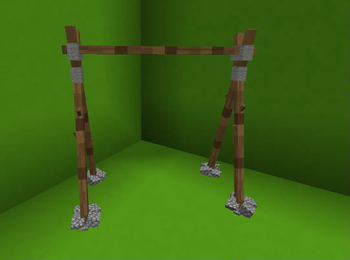
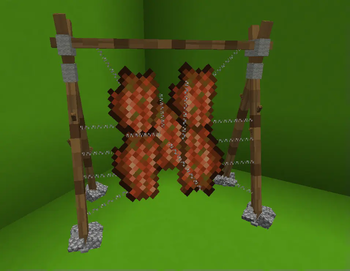
- Drying rack (Leather making)
- Exact 5 Stick and 3 String, throw on the ground at the same spot.
- Use it with 5 rotten flesh in mainhand and 3 String in offhand. (Right click)
- After 10 minutes it will turn into 1 leather and right clicking the rack to can take it off. (Right click)
- Endless use.
- Breaking it drops 3 sticks and 1 string. (Left click)
- Wool can be crafted into strings.
- 1 woolblock = 4 strings
- 1 carpet = 2 strings
- Tea
- Throw 1 water bottle and 5 sweat berries at the same spot next to a campfire.
- Will warm you up, if you in cold biomes.
- Also the next 30 sec. you not get hotter or colder.
- Drinking water in cold or tee in warm or anything outside the dedicated Biomes, doesn't do anything.
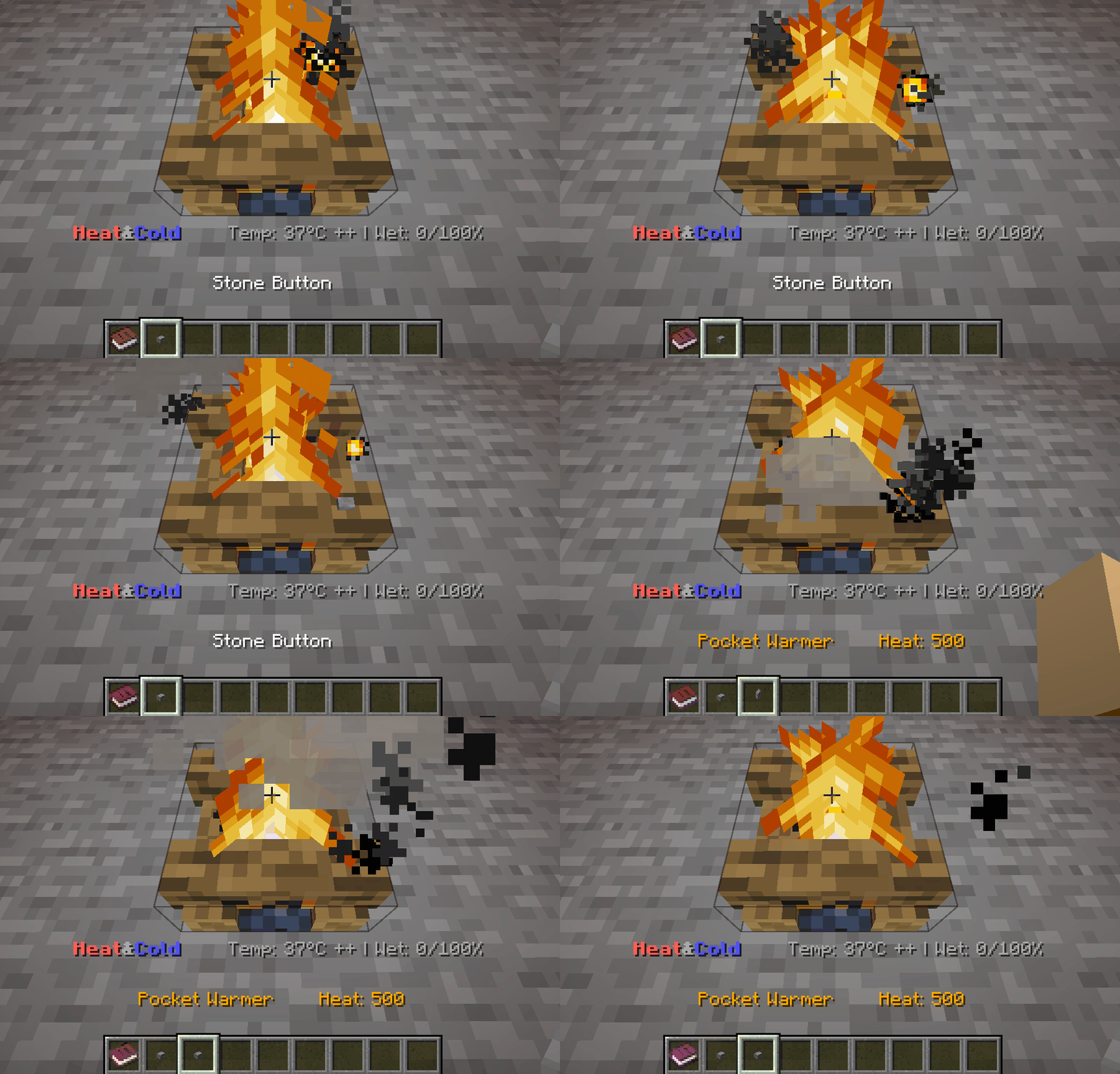
- Pocket Warmer
- Can be crafted by putting a stone on a campfire
- Stores 500 heat
- Loses 2heat/s if in main or offhand
- Warming the player while holding in of or mainhand if it has heat stored
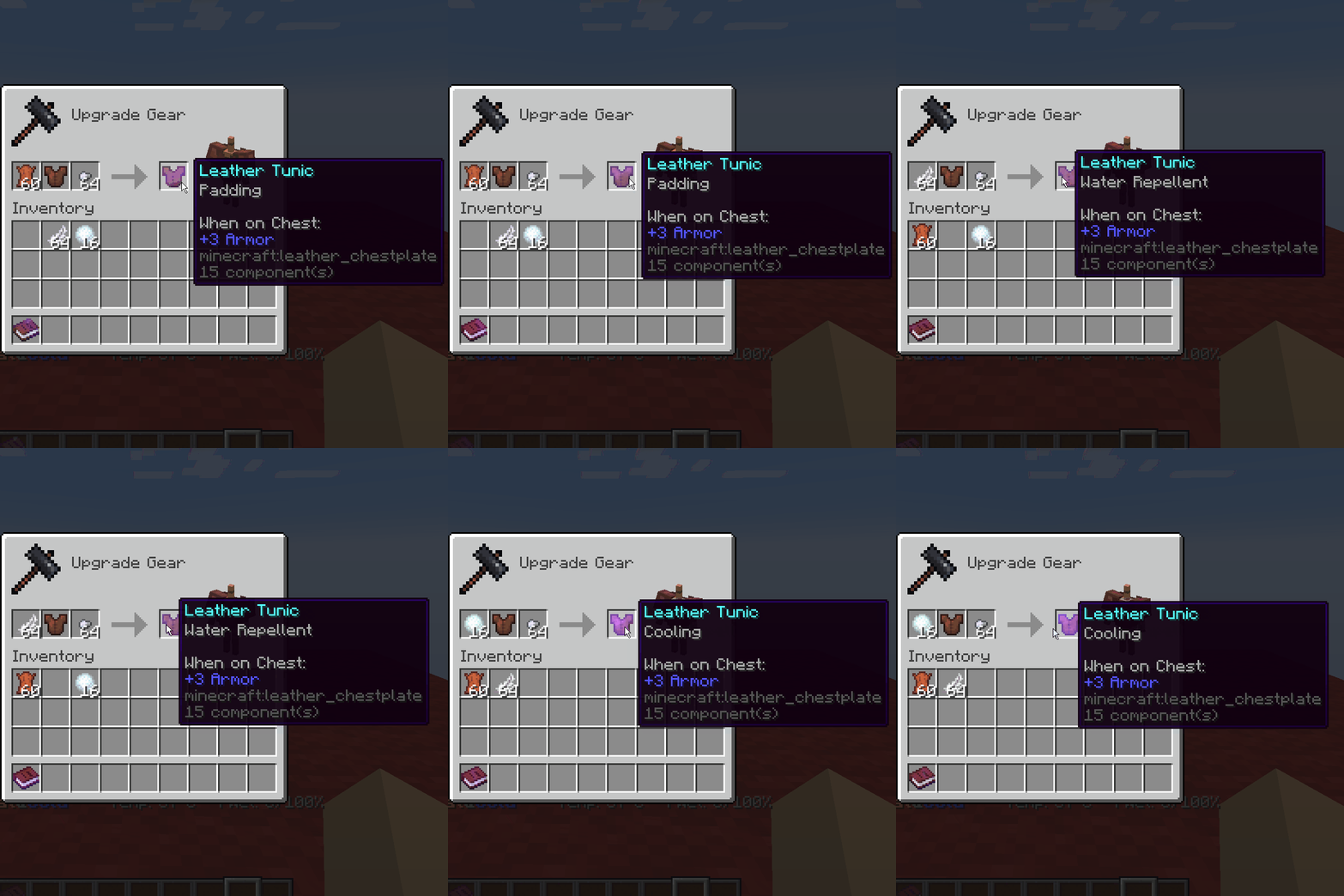
- Padding
- keep the player warmer
- Cooling
- keep the player colder
- Water repellent
- Does not get wett as fast
- Max wetness is reduced
Can be turned off via the options!
- If the player is getting hotter he will say that in the chat.
- Is he is cooling down afterwards he will also say something.
- If the player is getting cold he will say that in the chat.
- Is he warming up afterwards he will also say something.
- Placing a campfire, soul-fire & Furnaces
- If the player is not saying anything, it failed to initilize the funtion.
- Drinking Tea or Water
- Tutorial book is given at the start of the game or as new player on the server.
- System only effects player in gamemode survival.
- Torches held in hand will give some heat.
- Torches can run out if option is enabled.
- Even extinguished campfires are effecting the players temperature.
- Using a waterbottle on dirt to make mud will trigger drinking.
How to start
After installing the player gets a book upon joining the world. Also on servers, every player will get one book after joining the first time.
Start in cold biomes:
In early game, way to escape the heat/cold is by getting into a cave. Under Y50 the it's considered a cave and the negative effects are decreasing.
Get a campfire as soon as possibel and have always some in your pockets.
Sweet berries (sweet berry tea) are the next priority, having these allows you to stay way longer in the cold. But careful, you can't stack them so your use up lots of space.
Get Leather by killing cows or using the drying rack to convert rotten flesh into leather. For that you also need string, killing spiders at night or convert wool into strings to get a bunch of it. (Wool can be converted into strings by using them inside a crafting grid.)
With more and more leather armor, the more you can withstand the cool and you be able to walk around the cold for way longer. Also, wearing metal armor like Iron/Gold/Diamond will cool you down even more. only able to use leather armor, will make you more vulnerable.
Start in hot biomes:
Stating in hot biomes is easier then cold.
In warm biomes, as long you don't wear armor you can withstand the heat for way longer than in cold biomes. The same as in cold biomes, the underground is cool and is a good place to hide against the heat. Drinking a water bottle will also cool the player down and standing in water is cooling the player.
Because of that the heat is not building up as fast and there're easy ways to cool the player down the early game is way easier. But still you don't want to walk inside warm biomes without water.
Deserts are a bit different. Because of the sand it will act like a real desert. At daytime it's hot but at night the desert is getting cold and you need to be careful to not freeze to death inside a desert.
Note for content creators:
I'm interested in seeing people playing and/or giving feedback on my Datapacks. So if you are creating a video of any kind with or about my datapacks, I would be really happy to get notified on my discord about it, so I can see your feedback. Also if you allow me to, I would put it on the Modrinth page, so others can see a first impression. This is not necessary, you don't have to!
- Edition: Minecraft Java
- File type: .jar
- Minecraft versions listed: 1.21.5, 1.21.6, 1.21.7
- How to install: Install the matching mod loader (Forge, Fabric or NeoForge) for your Minecraft version. → Download the .jar. → Put it in the .minecraft/mods folder and launch that loader profile.
- Where to get it: Opens on Modrinth — not every file is mirrored on our own servers.
Install steps are the general flow for this file type — see the MC Java Mods guides for the full walkthrough.
- Downloads as Kaths-Heat&Cold.zip
- Download size: 105 KB
- Download link checked 29 Aug 2026 — working
These come from our own check of the pack file, not from the source page.