
Nice Huds
Bossbar Huds for players holding Clocks, Compasses and Recovery Compasses. Also adds a calendar/time based event system including seasons.
⬇ Download on Modrinth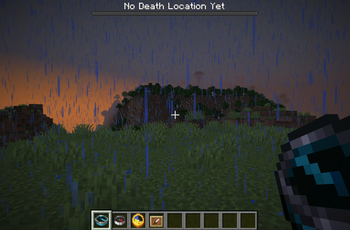
📖 Description
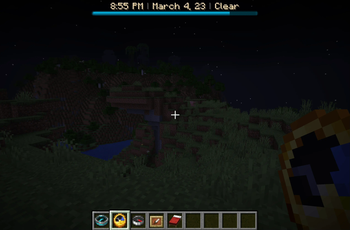
Nice Huds adds Bossbar Huds for players holding Compasses, Clocks and Recovery Compasses. It also adds an ingame calendar system and ingame events which are triggered on certain dates/times. The data pack is fully compatible with smp servers.
Features:
- Ingame Calendar and Time system which does not conflict with /time commands and the vanilla daycounter. Can be changed to display time in either 12h or 24h format.
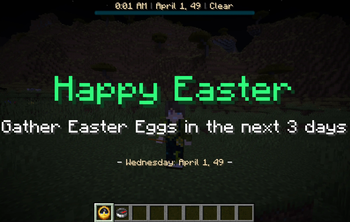
- 8 ingame events (Easter, Christmas, Halloween, Día De Muertos, Friday 13th, April Fools, Valentines Day, New Year's Eve)
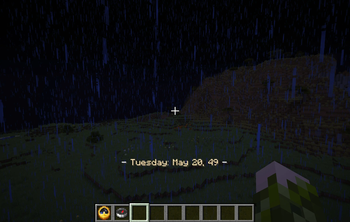
- Actionbar message showing the current weekday and date when a new day begins
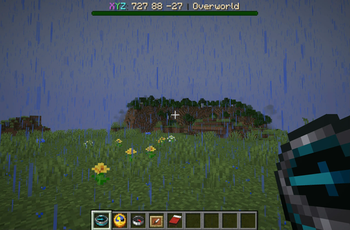
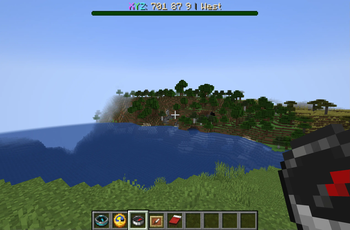
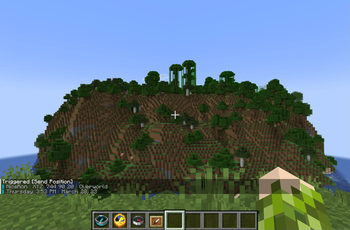
- Holding a Compass shows a Coordinates Hud including the direction the player is facing. The color of the Bossbar changes depending on the dimension the player currently is in.
- Holding a Recovery Compass shows the Coordinates of the last location the player has died. The color of the Bossbar changes depending on the dimension the player is currently in.
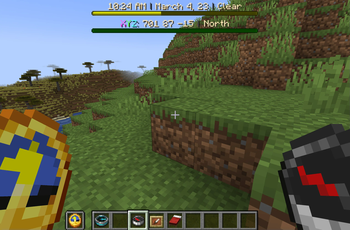
- Holding a Clock shows a Hud including the current ingame time, date and weather of the world based on the also included calendar system. The progress and color of the Bossbar changes depending on the daytime.
- Clocks placed in (Glow) Item Frames show a Hud including the current time and date. Only Item Frames placed on Walls are supported.
- A trigger command for sending a timestamped chat message containing the current position of a player.

Ingame Events:
- Easter: Occurs on April, 1st - April, 3rd each year. Rabbits sometimes drop Easter Eggs which can either be popped by a player (holding right click) for some loot or just placed down as with any other Player Head.
- Christmas: Occurs on December, 24th each year. Shows a title message to every player currently online.
- Halloween: Occurs on October, 31st each year. Some mobs have a 25% chance to spawn with either a Carved Pumpkin or a Jack o' Lantern.
- Día De Muertos: Occurs on November, 2nd each year. Undead mobs are stronger and have a small Regeneration effect.
- Friday 13th: Obviously occurs on every Friday, 13th. Changes the weather to Thunder & Rain for the whole day.
- April Fools: Occurs on April, 1st. Random mob sounds are played every full hour.
- Valentines Day: Occurs on February, 14th. Players have Heart particles over them.
- New Year's Eve: Occurs on December, 31st. Has a countdown leading up to the new year and a title message.
Commands:
Trigger commands are usable by every player. Function commands can only be used by Admins.
Change time format to 12h: /function huds:settings/12h_time_format
Change time format to 24h: /function huds:settings/24h_time_format

Enable Events: /function huds:settings/enable_events
Disable Events: /function huds:settings/disable_events

Send Position to Chat: /trigger send_position
Get the current date as chat message: /trigger get_date
Creating Add-Ons:
If you want to create your own add-ons (like new Events for example) for this data pack, you can. I highly encourage you to do so. I am excited to see what you will come up with and really hope that you either also share it on modrinth or at least on our Discord server.
You can utilize either the data from the storage or users of the scoreboard.
Storage: eden:calendar global
(The storage holds data about everything related to time/dates)

Scoreboard: huds.calendar
Users: $12_hour, $24_hour, $minute, $day, $month, $year
You can get an idea of how to setup new events by looking at the /data/huds/events/run.mcfunction file. If you got any questions or need a hand, then feel free to reach out on our Discord server.
🛠️ How to, Instructions & Commands
The datapack usually just needs to be installed. There is nothing else you have to do. It just works out of the box.
But if you are playing on a PaperMC Server (or a PaperMC Fork like Purpur) make sure to set allow-non-player-entities-on-scoreboards in your paper config files to true in order for everything to work properly.
✍️ Feedback, Questions & Suggestions
We're here to help! If you happen to have questions, suggestions or just encountered a bug, then feel free to hop on our discord server to ask for help in our Data Pack Section. Click to join the server
🎮 Explorer's Eden SMP
Join A Realm Recrafted, our Minecraft SMP! Enjoy a world featuring all of our (actively maintained) data packs, as well as some exclusive ones. It’s completely free without any microtransactions. Come build, explore, and craft with us today!
- Edition: Minecraft Java
- File type: .jar
- Minecraft version listed: 1.21.5
- How to install: Install the matching mod loader (Forge, Fabric or NeoForge) for your Minecraft version. → Download the .jar. → Put it in the .minecraft/mods folder and launch that loader profile.
- Where to get it: Opens on Modrinth — not every file is mirrored on our own servers.
Install steps are the general flow for this file type — see the MC Java Mods guides for the full walkthrough.
- Downloads as nice_huds_v1-7-2.zip
- Download size: 234 KB
- Download link checked 29 Aug 2026 — working
These come from our own check of the pack file, not from the source page.