![Toon's Partner Pokemon [Cobblemon]](https://cdn.modrinth.com/data/3epTJlzZ/cfb63b458698e418007432b676163527949b1eed.png)
DatapacksJava
Toon's Partner Pokemon [Cobblemon]
I don't know my version or loader
Open the Minecraft launcher and look at the profile you play on — it names both, like fabric-loader-1.21.4. The version also shows in the bottom-right corner of the game's main menu.
No loader in the profile name? Then it's plain Minecraft, and these mods won't run — you need Fabric or NeoForge installed first.
![Toon's Partner Pokemon [Cobblemon] — screenshot 1](https://cdn.modrinth.com/data/3epTJlzZ/images/3cd4112737561f6c7bc244104ffeacd0b26c82cf_350.webp)
![Toon's Partner Pokemon [Cobblemon] — screenshot 2](https://cdn.modrinth.com/data/3epTJlzZ/images/a1072731297dcc08e7783ff36a1edd6dd43d34df_350.webp)
![Toon's Partner Pokemon [Cobblemon] — screenshot 3](https://cdn.modrinth.com/data/3epTJlzZ/images/1c6f5868b98074011bacfe2b62bf38f42097e6c8_350.webp)
![Toon's Partner Pokemon [Cobblemon] — screenshot 4](https://cdn.modrinth.com/data/3epTJlzZ/images/14084c9fc905b14c2b5c2f1b1cff4ae99c808d6a_350.webp)
![Toon's Partner Pokemon [Cobblemon] — screenshot 5](https://cdn.modrinth.com/data/3epTJlzZ/images/92ac0840d7b1a4e6f3b9ea45efe240951565c61c_350.webp)
![Toon's Partner Pokemon [Cobblemon] — screenshot 6](https://cdn.modrinth.com/data/3epTJlzZ/images/fae7d6c1c6c0ff61f0f3b8ff806732b6152e9603_350.webp)
READ BEFORE PLAYING!!!!!!!!!!!! These Pokemon do NOT appear in the wild, they are meant to be unique so in order to obtain them you must add the custom starter config file to your instances config folder.
- Open the addon .zip.
- look for the folder that says "starter options"
- copy the config file in the "regular" folder if you just want the base forms. Copy the file in the "regular + shiny" folder if you want to have access to the shinies or want to give your server access to the shinies.
- paste that into the cobblemon folder inside of the config folder as seen below.
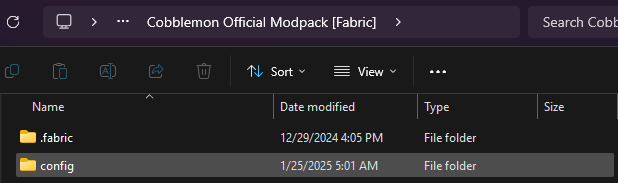
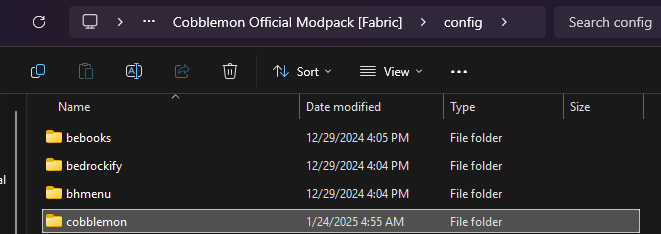
- load up a world with the datapack in it and test the starters. If it still doesnt work, follow the steps again carefully.
Currently has 5 unique partner pokemon to bring with you on your journey, all of which have shoulder animations so you never have to put them in a ball!
Quick facts
- Edition: Minecraft Java
- File type: .jar
- Minecraft versions listed: 1.20.1, 1.21.1
- How to install: Install the matching mod loader (Forge, Fabric or NeoForge) for your Minecraft version. → Download the .jar. → Put it in the .minecraft/mods folder and launch that loader profile.
- Where to get it: Opens on Modrinth — not every file is mirrored on our own servers.
Install steps are the general flow for this file type — see the MC Java Mods guides for the full walkthrough.
Verified by MCModsHub
- Downloads as Toon's Partner Pokemon.zip
- Download size: 82 KB
- Download link checked 29 Aug 2026 — working
These come from our own check of the pack file, not from the source page.