
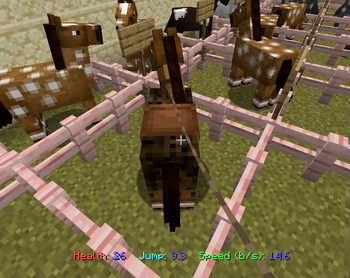
See a Horse's Stats when right-clicking them.
Note that on tamed horses, right-clicking will mount them, which overrides this display.
This can be circumvented by feeding the horse, using a lead, or shift-right-clicking (and closing the inventory after it opens)
This is a limitation of the datapack and circumventing it would either require spamming the client's chat (which I did not want to do), or using gaudy workarounds with something like a fishing pole.
Health is displayed in Max Half-Hearts. Note that Minecraft's display of Horse Health rounds down to full hearts. A horse's Health can range from 15 to 30
Jump is displayed as the internal value, which ranges from 4.0 to 10.0. There is no easy conversion factor. To quote the wiki: "A jump strength of 5.0 is enough to clear 1 9⁄16 blocks, while 10.0 is enough to clear 5 1⁄4 blocks."
Movement Speed is displayed in Blocks/Second, and can range from 4.85 to 14.60. This does not take into account Potions of Swiftness, Ice, or modded enchantments.
The minimum and maximum ranges here are Vanilla. Mods that change horse's min/max stats will be shown properly, unless they alter them outside of directly changing the horse's attributes.
Run "/function horsestats:start" in a world with the datapack in it to enable the datapack. This only has to be done once.
- Edition: Minecraft Java
- File type: .jar
- Minecraft versions listed: 1.19, 1.19.1, 1.19.2
- How to install: Install the matching mod loader (Forge, Fabric or NeoForge) for your Minecraft version. → Download the .jar. → Put it in the .minecraft/mods folder and launch that loader profile.
- Where to get it: Opens on Modrinth — not every file is mirrored on our own servers.
Install steps are the general flow for this file type — see the MC Java Mods guides for the full walkthrough.
- Downloads as horsestats.zip
- Download size: 2 KB
- Download link checked 29 Aug 2026 — working
These come from our own check of the pack file, not from the source page.