HomeJavaDatapacksTaTe's Extra Armors and Elytras
TaTe's Extra Armors and Elytras
DatapacksJava

TaTe's Extra Armors and Elytras

by AverageTaTeMan · on Modrinth

⬇ Download on Modrinth
TaTe's Extra Armors and Elytras — screenshot 1TaTe's Extra Armors and Elytras — screenshot 2TaTe's Extra Armors and Elytras — screenshot 3TaTe's Extra Armors and Elytras — screenshot 4

Preview

IMPORTANT - I (AverageTaTeMan) only share my content on Planet Minecraft, Modrinth, and CurseForge - If you see this project on any other site, IT IS NOT ME AND SHOULD NOT BE TRUSTED!

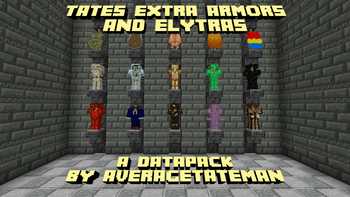
This pack adds 40 new armor sets you can obtain, each with unique abilities! Additionally, you can craft 20 new Elytras to fly in style!

Expand to see all additions!

New Armor Sets

New Elytras (Purely Cosmetic)

Installation Instructions to Get the Data AND Resource Packs:

  1. Click "Versions" Click "Versions"

  2. Select a Version Select a Version

  3. Under "Files", click "Download" on both the 'Primary' file (data pack) and 'Required resource pack' file (resource pack) Under "Files", click "Download" on both the 'Primary' file (data pack) and 'Required resource pack' file (resource pack)

  4. Unzip the files (optional, but recommended as that's how I use/test them).

  5. Add the resource pack to your Selected Packs (ideally at the top) in your Resource Packs menu.

  6. Add the data pack to either your Selected Packs in the Data Packs menu (if adding at world creation) OR put it in your world's 'datapacks' folder (if adding afterwards. Recommended to either not have world open at the time or to close and reopen it afterwards).

  7. You may get a prompt about experimental settings not being supported when opening the world. This can safely be ignored, but it's also never a bad idea to make a backup if it's a world you care about.

Quick facts

Install steps are the general flow for this file type — see the MC Java Mods guides for the full walkthrough.

Verified by MCModsHub

These come from our own check of the pack file, not from the source page.

Explore more