
GalaxyByne's Economy
I don't know my version or loader
! ! ! This is a deprecated data pack. Download the new version here.
Galaxy's Server Economy
Features:
- Balance System
- Pay System
- Stock Market
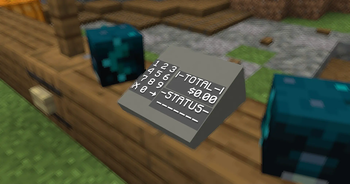
- Debit Cards / Payment Terminals
Usage Instructions:
Balance System:
Use /trigger ShowBalance to see your balance
To depoit / withdraw Diamonds from your account, you'll need to summon some interactions:
Use /function galaxyseconomy:summon_atm/[direction] to summon the preset ATM.
Use /kill @e[tag=ATM,distance=..1] to remove an ATM.
Note:
- Replace [direction] with either north, east, south, or west. Use the direction the ATM is facing.
You can also customize ATMs.
Use
/summon interaction ~ ~ ~ {width:[width here]f,height:[height here]f,response:1b,Tags:["bank_interaction","bank_diamond_sell"]}
to summon a deposit interaction.
Use
/summon interaction ~ ~ ~ {width:[width here]f,height:[height here]f,response:1b,Tags:["bank_interaction","bank_diamond_buy"]}
to summon a withdraw interaction.
Note:
- Replace [width here] and [height here] with a positive number describing the interaction's size
Pay System:
Use /trigger Pay set [amount] to pay the nearest Player in a 10-block radius
Stock Market:
The Stock Market also uses interactions to buy/sell stock (ores):
Use
/summon interaction ~ ~ ~ {width:[width here]f,height:[height here]f,response:1b,Tags:["bank_interaction","bank_[stock]_<sell/buy>"]}
to summon a stock interaction.
Note:
- Replace [width here] and [height here] with a positive number describing the interaction's size
- Replace <sell/buy> with either "sell" or "buy" depending on your needs
- Replace [stock] with any stock. Stocks include:
- redstone
- lapis
- iron
- copper
- gold
- emerald
- netherite
Set stock prices with /scoreboard players set [Stock] Stock [amount]
Note:
- Replace [amount] with the price in cents
- i.e. $3.79 -> 379
- Replace [Stock] with any stock
- First letter needs to be caps here
- emerald -> Emerald
Debit Cards / Payment Terminals:
Use
/give @s name_tag{display:{Name:'{"text":"Debit Card","color":"light_purple","italic":false}'},DebitCard:1b}
to give yourself a Debit Card.
Note:
- If you know how to, you may modify this item's attributes (like name, lore, etc.). Just make sure the tag
DebitCard:1bis still there.
Use /function galaxyseconomy:summon_payment_terminal/[direction] to summon a Payment Terminal.
Stand on it and use /trigger ClaimPaymentTerminal to claim it.
Use /kill @e[tag=PaymentTerminal,distance=..1] to remove a Payment Terminal.
Use
/give @s name_tag{display:{Name:'{"text":"Payment Terminal Key","color":"light_purple","italic":false}'},TerminalKey:1b}
to give yourself a Payment Terminal Key.
The Payment Terminal has its own "bank account". Use the Key on the Tap Card button to claim your earnings.
Note:
- Replace [direction] with either north, east, south, or west. Use the direction facing your customers
- This will spawn/kill a Payment Terminal at your feet
- If you know how to, you may modify the Key item's attributes (like name, lore, etc.). Just make sure the tag
TerminalKey:1bis still there.
Use /tag @s add EconomyBankSubscriber to "subscribe" to a premium subscription that allows you to:
Use /trigger SellAll[Stock] to sell all blocks of stock in your inventory.
Use /trigger BuyAll[Stock] set [amount] to buy stacks of blocks of stock.
Note:
- Replace [Stock] with any stock
- First letter needs to be caps here
- emerald -> Emerald
- Replace [amount] with any positive integer that describes the amount of stacks of blocks of stock you'd like to buy
Bugs / Questions:
Please report any bugs / suggestions / questions on the linked discord
- Edition: Minecraft Java
- File type: .jar
- Minecraft versions listed: 1.20, 1.20.1, 1.20.2
- How to install: Install the matching mod loader (Forge, Fabric or NeoForge) for your Minecraft version. → Download the .jar. → Put it in the .minecraft/mods folder and launch that loader profile.
- Where to get it: Opens on Modrinth — not every file is mirrored on our own servers.
Install steps are the general flow for this file type — see the MC Java Mods guides for the full walkthrough.
- Downloads as Galaxy's Economy.zip
- Download size: 39 KB
- Download link checked 29 Aug 2026 — working
These come from our own check of the pack file, not from the source page.