
LG's Command Items - Easy Custom Items
Java data pack listed for Minecraft 1.21–26.x. Downloads from the MC Java Mods app on Android.
This datapack adds a way to add commands directly as a component to items! Great way to add custom items with some additional features like cooldowns!
I don't know my version or loader

🔀 LG's Command Items datapack
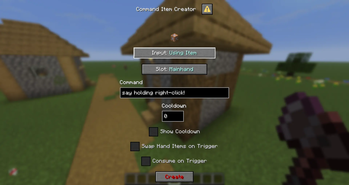
This datapack adds a way to add commands directly to items when triggering a specific event, events stacks meaning you can have a command for Right-Click as well as a command when attacking a mob or getting attacked!
Usage Tutorial
Use /function a:open_menu command, then click Add Commands button, select your input and slot, then confirm with the red "Confirm" button, it will add the command to your selected input + slot combination
Current Triggers & Slots
Triggers
- Tick (20 times per second)
- Use Item (on right-click, requires the item to be consumable, the Item Modifier makes it easy to turn an item into consumable, check commands)
- Using Item (Triggers whenever you're using the item)
- Player Hurt Entity (whenever player attacks an entity)
- Player Killed Entity (whenever player kills an entity)
- Entity Hurt Player (whenever the player gets damaged)
- Inventory Changed (whenever players' inventory changes)
Slots
- Mainhand
- Offhand
- Head
- Chest
- Legs
- Feet
Limitations
You can only put one command into each trigger + slot combo, to use several commands, it is recommended to use functions
For any ticking trigger, I recommend not using cooldowns simply for optimization purposes, it won't fry your ticks if you don't do so, but with several players using those, it may very likely affect your performance negatively
Other Additions
- Cooldowns - You can easily add cooldowns to your commands, they generate no scoreboards and are bound directly to items
- Swap Hand Items - Simply swaps your mainhand and offhand items
- Show Cooldown - When on cooldown, displays the cooldown on the chat, not recommended to use on ticking triggers so not to flood your chat
- Consume On Trigger - Once triggered, consumes 1 of the used items
⚠️ Important commands!
/function a:open_menu
/function a:copy_item
/function ci:reset_cds
🔴 YouTube Showcase
- Edition: Minecraft Java
- File type: .jar
- Minecraft versions listed: 1.21.6, 1.21.7, 1.21.8
- How to install: Install the matching mod loader (Forge, Fabric or NeoForge) for your Minecraft version. → Download the .jar. → Put it in the .minecraft/mods folder and launch that loader profile.
- Where to get it: Opens on Modrinth — not every file is mirrored on our own servers.
Install steps are the general flow for this file type — see the MC Java Mods guides for the full walkthrough.
- Downloads as lg_ci_1.0.2.zip
- Download size: 107 KB
- Download link checked 9 Oct 2026 — working
These come from our own check of the pack file, not from the source page.