
Game Rules Menu
I don't know my version or loader
🌐 ITITAN Hosting

Game Rules Menu
Since the features of this mod were added to the game in Update 26.1, the mod will no longer be updated in future versions
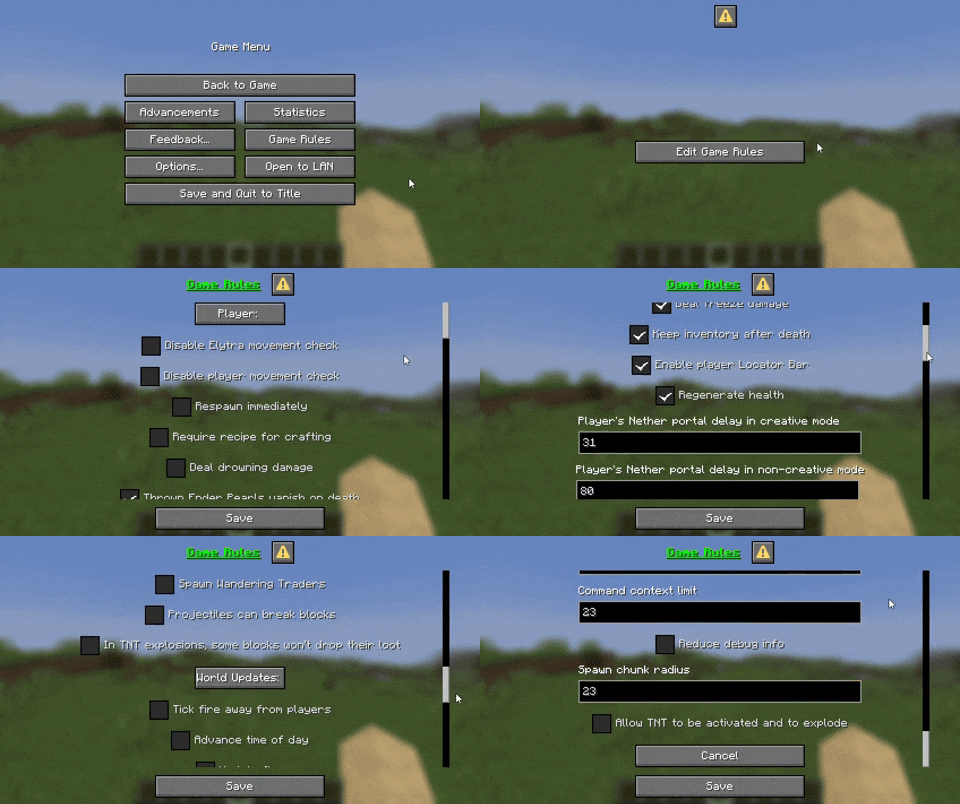
Game Rules Menu lets you tweak every gamerule in Minecraft through a clean, in-game interface. No commands, no hassle - just pure control at your fingertips. Perfect for mapmakers, server owners, or anyone who wants full rule over their world.
Easily accessible, fancy menu
You can access it from the Pause menu! (You can also type "/trigger openGameRules" in the chat)

All Languages in Game
The “Game Rules Menu” is available in all languages, it uses your selected language in the game!

All Gamerules
From this menu you can access all gamerules and change them as you wish. You can press the save button to save them or press the cancel button to cancel the changes you have made.
You must be op to use the menu!
This is just a datapack, so there are some restrictions on the menu. You can use this mod to remove the op command warning and you can use this mod to remove the annoying warning at the top right.
Your feedback is important to us. You can write on Discord. Discord name: tpcoffline
- Edition: Minecraft Java
- File type: .jar
- Minecraft versions listed: 1.21.6, 1.21.7, 1.21.8
- How to install: Install the matching mod loader (Forge, Fabric or NeoForge) for your Minecraft version. → Download the .jar. → Put it in the .minecraft/mods folder and launch that loader profile.
- Where to get it: Opens on Modrinth — not every file is mirrored on our own servers.
Install steps are the general flow for this file type — see the MC Java Mods guides for the full walkthrough.
- Downloads as game rules menu 1.2 MC 1.21.6-1.21.11.zip
- Download size: 62 KB
- Download link checked 29 Aug 2026 — working
These come from our own check of the pack file, not from the source page.