
DatapacksJava
Painted Blocks
Java data pack listed for Minecraft 26.x. File opened and checked on 15 Oct 2026; downloads from the MC Java Mods app on Android.
⬇ Download on Modrinth
⚠️ IMPORTANT: USAGE GUIDELINES If you're planning to use this on a server or modpack, please refer to: https://gamedash43.github.io/dash-mcl-licenses/#usage

This datapack provides a simple, vanilla-friendly way to create custom mini blocks using a crafting table.
🛠️Crafting Recipes
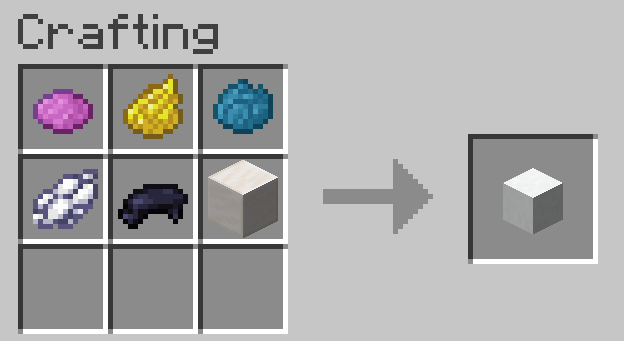
- Shapeless Quartz Block Recipe.
- Player Head Recipe (same as the quartz block recipe but replaces the quartz block with a player head).
📜How to Use
- Get a Book and Quill.
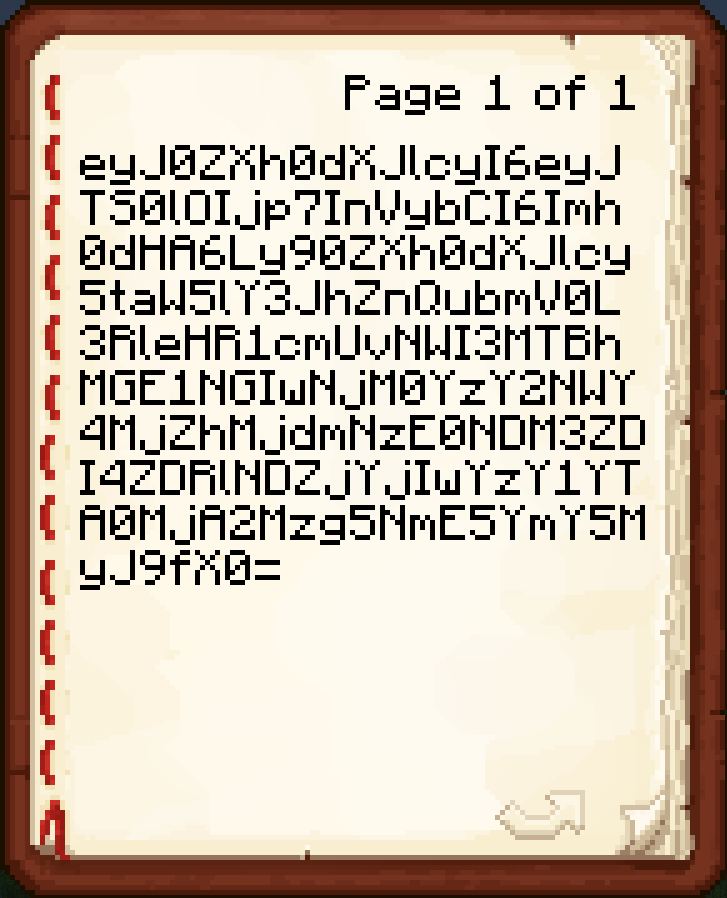
- Paste a Base64 texture value on the first page of the book from a site like https://minecraft-heads.com/.
- Hold the unsigned Book and Quill in your main hand.
- Craft the recipe to get a player head with the given texture.
❓FAQ
The painted block is either blank or displays a Steve/Alex/etc. skin. This means either you weren't holding a Book and Quill, or you were holding one but the pasted value was not valid. If rewriting the value does not work, join the Discord to ask for help. How do I report a bug? Join the discord and DM me or write a message in the reports channel. Do I need a resource pack? No, this datapack uses the vanilla player head functionality, so no resource pack is needed. How does this datapack impact performance? This datapack has no ticking functions, so it should have no performance impact. How do I uninstall this datapack? *Just run the command "/function dash.chead:uninstall" *This is only needed pre V2.0Quick facts
- Edition: Minecraft Java
- File type: .jar
- Minecraft version listed: 26.1
- How to install: Install the matching mod loader (Forge, Fabric or NeoForge) for your Minecraft version. → Download the .jar. → Put it in the .minecraft/mods folder and launch that loader profile.
- Where to get it: Opens on Modrinth — not every file is mirrored on our own servers.
Install steps are the general flow for this file type — see the MC Java Mods guides for the full walkthrough.
File checked by MCModsHub
- Downloads as dash_painted_blocks_V2.3.zip
- Download size: 34 KB
- Download link checked 10 Oct 2026 — working
These come from our own check of the pack file, not from the source page.