
Don't Drop XP
Disables dropping your XP when you die. Perfect for players who want to drop items upon death but not lose their levels.
⬇ Download on Modrinth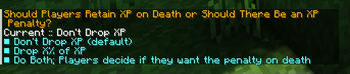
Overview
Drop Drop XP is a datapack that eliminates the hassle of losing your experience when dying. Unlike the gamerule keepInventory, players will drop their items upon death without worrying about losing their levels. It may be annoying to lose your XP when you want to enchant something, so this datapack removes players dropping XP while still losing their items. This datapack also has the option to have XP penalties when players die.
Scoreboard to Point Binary Decomposition by Cloud Wolf.
Optional Features
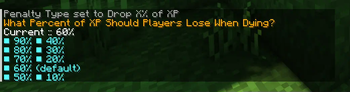
By default, the datapack's goal is to prevent any levels from being lost on death. However, there are a couple of options to have a penalty be applied upon death. By using the command, /function dont_drop_xp:_change_xp_penalty_type, you can change the type of XP penalty that will be applied when players die. Operators can additionally customize the percent of XP lost with /function dont_drop_xp:_change_xp_percent_lost.
Penalty Type Options:
- Don't Drop XP: Default option. Players will not lose any levels.
- Drop X% of XP: Players lose a percentage value of their XP ranging from 10% to 90%. Defaults to 60%.
- Do Both; Players Decide: A mixture of the two. Players will retain all XP by default. A new text message will appear and give players the option to take a penalty. This is to give more freedom to players to decide for fair or unfair deaths.
Installing and Uninstalling the Pack
This datapack can not be easier to install and uninstall.
Simply place the datapack file into the datapacks folder in your singleplayer or multiplayer world. Upon loading the world or by using the /reload command, the datapack will be installed.
To uninstall, use the command, /function #dont_drop_xp:uninstall. This will automatically remove all related objective scoreboards. You can then disable or delete the datapack from there.
- Edition: Minecraft Java
- File type: .jar
- Minecraft versions listed: 1.18, 1.18.1, 1.18.2
- How to install: Install the matching mod loader (Forge, Fabric or NeoForge) for your Minecraft version. → Download the .jar. → Put it in the .minecraft/mods folder and launch that loader profile.
- Where to get it: Opens on Modrinth — not every file is mirrored on our own servers.
Install steps are the general flow for this file type — see the MC Java Mods guides for the full walkthrough.
- Downloads as DontDropXP-1.0.0.zip
- Download size: 13 KB
- Download link checked 29 Aug 2026 — working
These come from our own check of the pack file, not from the source page.