
DatapacksJava
Proximity Lamp
Adds 4 light modes: proximity, nocturnal, permanent and proximity-nocturnal. Works with redstone_lamp, candles, copper_bulbs and campfires.
I don't know my version or loader
Open the Minecraft launcher and look at the profile you play on — it names both, like fabric-loader-1.21.4. The version also shows in the bottom-right corner of the game's main menu.
No loader in the profile name? Then it's plain Minecraft, and these mods won't run — you need Fabric or NeoForge installed first.


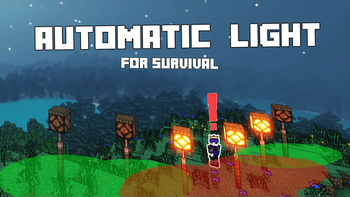
Proximity Lamp adds functionalities to manage lights. Works with redstone lamp, candles, copper bulbs and campfires.
/!\ BUKKIT is unsupported by this datapack. It seems to have troubles with "dropping item advancement", that are unfortunately required for this pack.
Procedure
- Place a lightable block (redstone lamp, candles, copper bulbs, campfires)
- Throw material on it
Materials
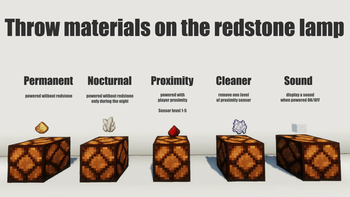
- Redstone: proximity mode. Can be stacked 1 to 5 to tweak distance detection.
- Quartz: night mode. Only enable at night.
- Redstone + Quartz: proximity mode, only during the night.
- Glowstone: permanent lit (only on redstone lamp). Alternative to redstone power.
- White Wool: toggle sound when enabling light.
- Bonemeal: decrease redstone proximity level. Finaly destroy it.
Datapack's Options
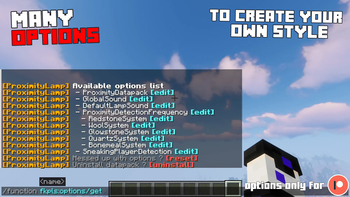
In game, use: /function fkpls:options/get

- 1.21.11 (30/01/2026): Azerxim, Setsu-P, varinyc, nfnpgllxhn
- 1.21.9 (02/12/2025): CYKLOPPS, Azerxim, varinyc, Setsu-P, Wani P, Lionel Felke, nfnpgllxhn
- 1.21.5 (2025-07-18): CYKLOPPS, Azerxim, Setsu-P, varinyc, Wani P
- 1.21.2 (2024-11-28): Delivator, Screaming Man, ZMH, Darklad32, CYKLOPPS, Azerxim, Aidan McCreary, varinyc, Setsu-P, Maximilian Adler, ODS, Jamie B
- 1.21 (2024-07-03): 아아앨, Screaming Man, ZMH, Darklad32, CYKLOPPS, Aidan McCreary, Azerxim, Setsu-P, Gaming Grotto, Kobe Prokopetz
- 1.20.5+ (2024-06-07): 아아앨, EXcore, Screaming Man, ZMH, Darklad32, CYKLOPPS, Memick Kung, Aidan McCreary, Setsu-P
- 1.20.4 (2023-12-26): Angelo Russo, 깔수, Screaming Man, ZMH, Darklad32, CYKLOPPS, God Emperor Leto II Atriedes
- 1.20 (2023-06-17): Delivator, Jonathan Fanelli, Angelo Russo, Phantom-Glitch-Wolf, John Stampe, Screaming Man, Dorian Dejean, ooF, ZMH, Yokie, Deadlot3, Darklad32
- V1 (2023-03-24): Jonathan Fanelli, Angelo Russo, Screaming Man, Dorian Dejean, ooF, ZMH, Darklad32
Becoming a Gold Patreon also means:
- Getting access to every Patreon versions of every projects.
- Getting your name listed in each project and on this page (see above).
- Supporting long-term development, updates, and new features 💛
Quick facts
- Edition: Minecraft Java
- File type: .jar
- Minecraft versions listed: 1.21.9, 1.21.10, 1.21.11
- How to install: Install the matching mod loader (Forge, Fabric or NeoForge) for your Minecraft version. → Download the .jar. → Put it in the .minecraft/mods folder and launch that loader profile.
- Where to get it: Opens on Modrinth — not every file is mirrored on our own servers.
Install steps are the general flow for this file type — see the MC Java Mods guides for the full walkthrough.
Verified by MCModsHub
- Downloads as ProximityLamp_FREE_1.21.11.zip
- Download size: 171 KB
- Download link checked 29 Aug 2026 — working
These come from our own check of the pack file, not from the source page.