
Akoi Meexx: Tombstones
Java data pack listed for Minecraft 1.21–26.x. File opened and checked on 25 Oct 2026; downloads from the MC Java Mods app on Android.
I don't know my version or loader
Tombstones
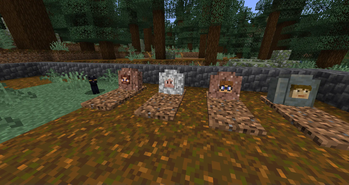
Tombstones is a datapack that retains items and remaining experience on death, without the hassle of having to depend on a modloader or mod!
Re-implemented from an old 1.14+ version datapack written for an SMP, Tombstones aims to be vanilla-friendly with very little in the way of gratuitous or overpowered features. At its core, Tombstones will place a headstone with the player's head on death, saving their items inside to be retrieved by returning to the location of a player's death and right-clicking on the tombstone.
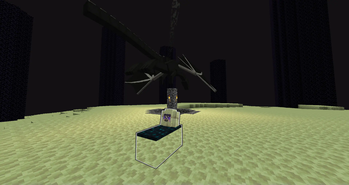
Fell in the void or died above build limit due to an ambitious Wither skull? Have no fear, Tombstones will place your death marker somewhere on the surface terrain of the dimension to make sure you can still retrieve your gear!
This pack aims to work in any dimension, even custom ones.
Features
- Item and experience retention on death
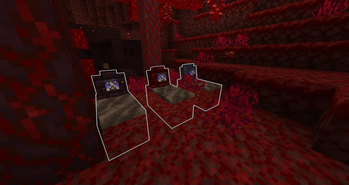
- Highlighted death locations utilizing max-lit display blocks and glowing outlines
- Chat-based death location logging to help identify where to go to retrieve items
- Built-in command suggestions in chat allow operators to return to where they died via command
- Dimension-specific headstone and soil variants
- Hidden mini-boss providing unique equipment and travel opportunities
Future Planned Features
- Tombstones User Manual
- Removing glowing outline
- Locking/unlocking tombstones
- Last death location reminders
- Placing decorative tombstones
- Nametagging for new player heads on generated tombstones
- Mob skull placement for generated tombstones
Technical Info
This pack utilizes advancements and functions to create several entities per death location: one minecraft:marker, one minecraft:interaction, three minecraft:block_displays, and one minecraft:item_display. Items and experience dropped by the player on death get recorded into the minecraft:marker entity for later retrieval.
All entities created with this pack are tagged with 'tombstone'; if a server operator feels the need to cull these entities from loaded chunks, it is easiest to target @e[tag=tombstone].
Many .mcfunction files will have included comments; this is to facilitate understanding in what is currently being achieved by the function in question, in order to provide a learning platform for anyone curious enough to dig through the files themselves.
- Edition: Minecraft Java
- File type: .jar
- Minecraft versions listed: 1.21.11, 26.1, 26.1.1
- How to install: Install the matching mod loader (Forge, Fabric or NeoForge) for your Minecraft version. → Download the .jar. → Put it in the .minecraft/mods folder and launch that loader profile.
- Where to get it: Opens on Modrinth — not every file is mirrored on our own servers.
Install steps are the general flow for this file type — see the MC Java Mods guides for the full walkthrough.
- Downloads as Tombstones.datapack.zip
- Download size: 65 KB
- Download link checked 10 Oct 2026 — working
These come from our own check of the pack file, not from the source page.