
Happy Ghast Scaffolding
I don't know my version or loader
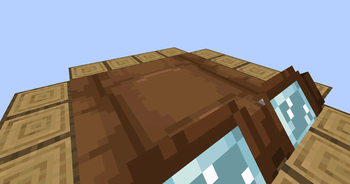
If a happy ghast has a player standing on their back, they will move to align themself with the coordinate grid. Once they do, right click an empty space next to the ghast in order to place a block from either your mainhand or your offhand. Since happy ghasts are exactly 4 blocks across, there's a total of 16 spaces wherein you can place a block.
While in survival or adventure mode, placing blocks will remove them from your inventory. If you're in creative mode, your inventory will be unaffected.
Compatibility:
This datapack supports both vanilla and modded blocks, however, the item ID and the block ID have to match. For example, a water bucket won't place a water block since its item ID is "minecraft:water_bucket" instead of "minecraft:water".
Sounds:
When placing blocks, the sound played won't correspond to the block type. Instead, it will always use the sound for placing scaffolding. Unfortunately, I couldn't find a good way to connect the sound played to the type of block placed.
If preferred, you can use "/function hgs:toggle_sound" to disable the scaffolding sounds.
Installing / Uninstalling:
Install As ModDownload the ".jar" file and drop it into your mods folder, or use Modrinth's big green "Install" button. Simple as that!
Install As DatapackTo add this pack to a pre-existing world...
- Select the world
- Click on "Edit"
- Then click "Open World Folder"
- Go into the "datapacks" sub-folder
- Place the datapack ZIP file inside
To add this pack to a new world...
- Select "Create New World"
- Click on "More"
- Then "Data Packs"
- And then "Open Pack Folder"
- Place the datapack ZIP file inside (the pack should then appear under "Available")
- Hover over the datapack icon and click the arrow to enable it
To fully uninstall this mod/datapack and remove all traces of it...
- Type in this command: "/function hgs:uninstall"
- Remove the mod/datapack from the folder you put it in during installation, or uninstall it via Modrinth.
- Edition: Minecraft Java
- File type: .jar
- Minecraft versions listed: 1.21.6, 1.21.7, 1.21.8
- How to install: Install the matching mod loader (Forge, Fabric or NeoForge) for your Minecraft version. → Download the .jar. → Put it in the .minecraft/mods folder and launch that loader profile.
- Where to get it: Opens on Modrinth — not every file is mirrored on our own servers.
Install steps are the general flow for this file type — see the MC Java Mods guides for the full walkthrough.
- Downloads as Happy Ghast Scaffolding.zip
- Download size: 9 KB
- Download link checked 30 Aug 2026 — working
These come from our own check of the pack file, not from the source page.