
Shop 'n Trade
I don't know my version or loader
Shop 'n Trade
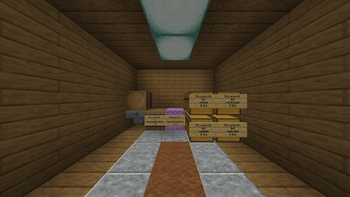
The Shop 'n Trade datapack enhances in-game trading by providing a streamlined system for shop creation and management. As a shopkeeper, you can efficiently set up and manage your shop with automated processes and user-friendly features.
Shop Creation and Setup
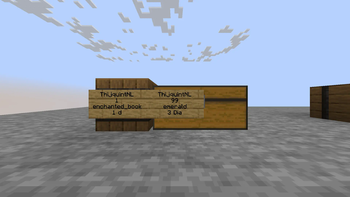
To create a shop, place a sign on a chest, barrel, or shulker box. The sign must include the shop owner’s name, the quantity of items available, and the pricing details. The system automatically detects and validates these details, determining the item to be sold based on the container’s contents. This setup eliminates the need for manual item configuration.
When you walk into the sign, the system automatically detects and sets up the shop based on these details and the container's contents.
Sign Format:
- 1: In-game username (must be exact).
- 2: Amount (number of items sold per batch).
- 3: Item (automatically detected based on container).
- 4: Price (in diamonds; starts with a number; additional letters optional; 0 means free).
Example:
Managing the Shop
- First Click: Unlocks the shop, allowing inventory management or even destroying the shop with the red chat message that appears. The shop updates automatically with any changes in the container.
- Second Click: Collects profits and waste items.
- Third Click: Relocks the shop, or it auto-relocks when the shopkeeper leaves the area.
Shop Maintenance and Notifications
Regularly restock items while the shop is unlocked. The system automatically updates the shop’s inventory with new items. If the shop runs out of stock, the shopkeeper is notified when online and not AFK. The scoreboard snt_total_profits stores the total amount of diamonds someone has ever made from their shops. /trigger view_shop_profit_scores_toggle toggles being able to view those total profits on the sidebar.
Automated Systems
Shops and inventories are automatically created and updated based on container contents. The system includes robust validation for items and stock levels, filtering out invalid entries and performing NBT data checks to ensure smooth operation.
Buying
Players purchase items by right-clicking the shop sign. For items with NBT data, a confirmation message with detailed information is provided before completing the transaction, ensuring accurate and transparent purchases.
Security and Anti-Griefing
Players near a shop are placed in Adventure mode to prevent unintended interactions. If trapped, use the /trigger trapped_in_shop command to escape. Shops are locked by default; the shop owner can unlock the shop by clicking the sign to manage it.
In-game help
running /trigger shop_help in-game will show a guide in chat with a link to the full wiki page.
The admin command /function shop:uninstall will give a chat message that when pressed removes scoreboards and breaks all shop functionality, so you can remove the data pack without bloat to your world (consider making a backup and be careful who you hand admin permissions on your server).
notice
- If you want to support small creators like me, you can turn off ad blocker.
- Check out my profile for more creations: https://modrinth.com/user/TQNL
- Follow the link to the full wiki and issues pages, please report issues with detail
Keep in mind:
- Ensure you're familiar with installing data packs. Verify compatibility with your Minecraft version.
Terms of use:
Do:
- Use and modify the data pack for private use.
- Credit me (ThijquintNL) as the creator when using the data pack in public, such as in video showcases, or when editing and redistributing the original material.
Don't:
- Redistribute the data pack for commercial purposes.
Under CC-BY-NC-SA 4.0 license
- Edition: Minecraft Java
- File type: .jar
- Minecraft versions listed: 1.21, 1.21.1
- How to install: Install the matching mod loader (Forge, Fabric or NeoForge) for your Minecraft version. → Download the .jar. → Put it in the .minecraft/mods folder and launch that loader profile.
- Where to get it: Opens on Modrinth — not every file is mirrored on our own servers.
Install steps are the general flow for this file type — see the MC Java Mods guides for the full walkthrough.
- Downloads as [1.21+] Shop 'n Trade V2.3.zip
- Download size: 78 KB
- Download link checked 30 Aug 2026 — working
These come from our own check of the pack file, not from the source page.