

It's finally here!
Entirely made in vanilla, this datapack adds ghosts that will haunt your world to the game! Equip yourself with sci-fi ghostbusting equipment replicated from the world of Ghostbusters and chase them down! In all seriousness, this pack is my personnal love letter to the Ghostbusters franchise. I tried my very best to bring the magic of hunting ghosts, just like Ghostbusters did in it's many movies and games, without breaking the core gameplay of Minecraft too much. This pack as a whole isn't much, but it's made by a fan for other fans. I hope you enjoy!
Features
- Ghosts that occasionally spawn around your world
- 5+ unique sci-fi gadgets to craft
- Exclusive creative items and commands for map making
- 10 advancements to obtain
- Multiplayer compatible
- A car cool car!! (beep beep)
- And more!
How to install/uninstall
Download "Ghostbusters (datapack)" and put the .zip file in the datapacks folder of the world you want to play in. Download "Ghostbusters (resourcepack)" and put the .zip file in your resourcepacks folder. Do not forget to enable the resourcepack in the settings and you'll be ready to go! To uninstall, enter the command "/function ghostbusting:uninstall" and remove the datapack from the datapacks folder or your world.
Getting started
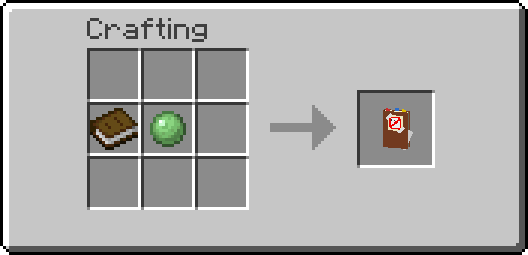
You can unlock the first advancement in the advancement tree of the pack by crafting the ghostbusters notebook. Right clicking with the book will also grant you the recipe for every item in the pack. Otherwise, the video provided above contains an extensive guide that goes over every single feature of the datapack!
Dislcaimer regarding datapack conflicts
I am not held accountable for any conflicts with other datapacks you have installed. It may be better to use this datapack standalone to avoid any problems or if you aren't sure of what you are doing.
License
This project is licensed under the Attribution-NonCommercial-ShareAlike 4.0 International (CC BY-NC-SA 4.0) license. You may use and modify the datapack as you please, as long as proper credit is given to the original author, do not use it for commercial purposes, and share any modifications under the same license.
- Edition: Minecraft Java
- File type: .jar
- Minecraft version listed: 1.21.3
- How to install: Install the matching mod loader (Forge, Fabric or NeoForge) for your Minecraft version. → Download the .jar. → Put it in the .minecraft/mods folder and launch that loader profile.
- Where to get it: Opens on Modrinth — not every file is mirrored on our own servers.
Install steps are the general flow for this file type — see the MC Java Mods guides for the full walkthrough.
- Downloads as Ghostbusters 1.0.0 (datapack).zip
- Download size: 138 KB
- Download link checked 31 Aug 2026 — working
These come from our own check of the pack file, not from the source page.