
Craftable Mushrooms
I don't know my version or loader


🍄About
Simple Mushroom Crafting is a lightweight Quality of Life (QoL) mod/datapack that makes mushroom building blocks fully craftable and reversible. Whether you need compact storage for your mushroom farms or easy access to mushroom blocks for building, this pack has you covered.
📋 Recipes
🟥-> Red Mushroom Block, 🟫-> Brown Mushroom Block
| Result | Ingredients | Recipe Pattern |
|---|---|---|
| Red Mushroom Block | 4x Red Mushroom | 🍄🍄 🍄🍄 |
| Brown Mushroom Block | 4x Brown Mushroom | 🍄🟫🍄🟫 🍄🟫🍄🟫 |
| 4x Red Mushroom | Red Mushroom Block | 🟥 |
| 4x Brown Mushroom | Brown Mushroom Block | 🟫 |
| 1x Mushroom Stem | 2x Red Mushroom 2x Brown Mushroom |
🍄🟫🍄 🍄🍄🟫 |
| 4x Mushroom Stem | 2x Red Mushroom Block 2x Brown Mushroom Block |
🟥🟫 🟫🟥 |
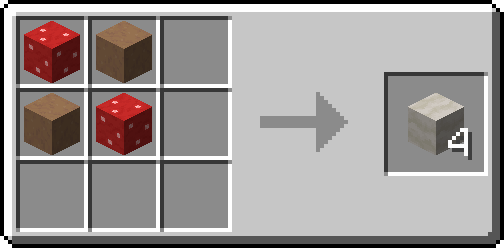
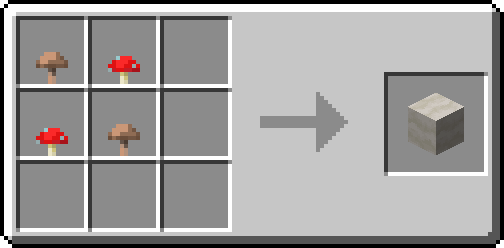
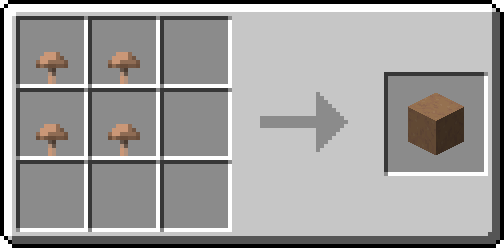
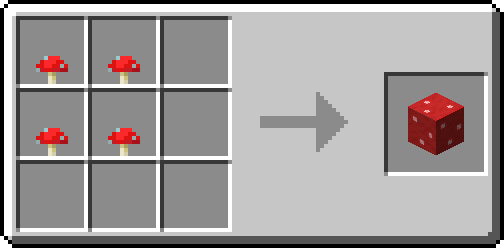

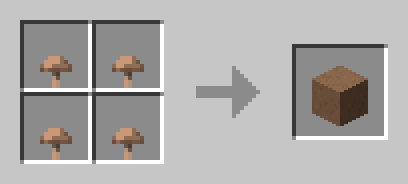
Tip: Use Just Enough Items(JEI) To View The Recipe In-Game
🧩 Installation Guide
How to Install the Mod (.jar)
- Download the Mod: Get the .jar file for Create: Veridium Recipe.
- Drop the File: Drag the downloaded .jar.
How to Install the Datapack (.zip)
- Download: Get the .zip file for the Datapack version.
- Open Your World Folder:
- Install: Open the datapacks folder and drag the downloaded .zip file inside.
⚙️ Supported Version
| Version | Loader | Support |
|---|---|---|
| 1.21.1+ | Forge/Neoforge/Fabric/Quilt | soon |
| 1.21.1 -> 1.13 | Forge/Neoforge/Fabric/Quilt | ✅ |
📦 Other Recipes


👀 Play with friends
Want to run a flawless modded server? Check out Godlike Host! Setting up a server through them is the absolute best way to support us right now.
Don't just take our word for it—read the community reviews here: Best Minecraft Server Hosting.
👉 Click the image below or use this link: Godlike Host to get 50% off your first month!

- Edition: Minecraft Java
- File type: .jar
- Minecraft versions listed: 1.13, 1.13.1, 1.13.2
- How to install: Install the matching mod loader (Forge, Fabric or NeoForge) for your Minecraft version. → Download the .jar. → Put it in the .minecraft/mods folder and launch that loader profile.
- Where to get it: Opens on Modrinth — not every file is mirrored on our own servers.
Install steps are the general flow for this file type — see the MC Java Mods guides for the full walkthrough.
- Downloads as craftable_mushroom_1.20-1.13.zip
- Download size: 3 KB
- Download link checked 1 Sept 2026 — working
These come from our own check of the pack file, not from the source page.