
Upgrade-everything



Upgrade all tools/armour/weapon in the smithing table
What is the purpose of this datapack?
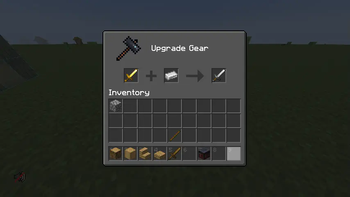
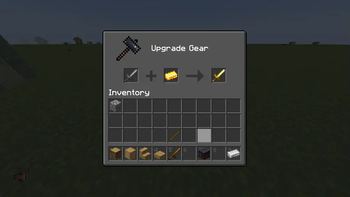
You can get a lot of tool drops from Minecraft mobs. and usually they come on iron or gold tools/weapons/armour; and that can be a pain becuase it renders then useless usually. But this pack here allows you to put any tool/weapon/armour piece in the smithing table and upgrade it to the next level
Features
- Inserting a Wooden item into the smithing table and adding a block of cobblestone returns a stone item
- Inserting a stone/chainmail item into the smithing table and adding a gold ingot returns a gold item
- Inseting a gold item into the smithing table and adding an iron ingot returns and iron item
- Inserting an Iron item into the smithing table and adding a diamond return a diamond items
- NETHERITE RECIPE IS UNAFFECTED
The Developers
| Author | Role | Links |
|---|---|---|
| NoComment1105 | Pack Lead | Contributions |
| doglol99 | Pack Assistant Lead | Contributions |
Versioning
This pack is 1.16.x at it's oldest. I am NOT going to back port any of these changes to any other versions I will try my hardest to updates this pack, in its latest release at the time, on the day of the next version release and will add further features as i get a chance to evaluate the difficulty of the new items
Compiling / Using this pack
If you choose to download the .zip of this repository, to correctly use this pack you need to do a couple of things
- You need to separate upgrade_everything_vx.x from the rest of the .zip
- Compress upgrade_everything_vx.x into a .zip file itself
- Put into your data packs folder in your Minecraft save/server files and you're ready to use
Contributing to this repo
If you want to contribute to this repo just follow the following steps
- Fork this repo
- Clone the repo to your local machine
- Optionally set up a symbolic link between your working directory and a minecraft folder
- Create the modifications you want
- Commit your changes
- Create a pull request
- Edition: Minecraft Java
- File type: .jar
- Minecraft versions listed: 1.16, 1.16.1, 1.16.2
- How to install: Install the matching mod loader (Forge, Fabric or NeoForge) for your Minecraft version. → Download the .jar. → Put it in the .minecraft/mods folder and launch that loader profile.
- Where to get it: Opens on Modrinth — not every file is mirrored on our own servers.
Install steps are the general flow for this file type — see the MC Java Mods guides for the full walkthrough.
- Downloads as upgrade_everything-v1.2.zip
- Download size: 92 KB
- Download link checked 1 Sept 2026 — working
These come from our own check of the pack file, not from the source page.