
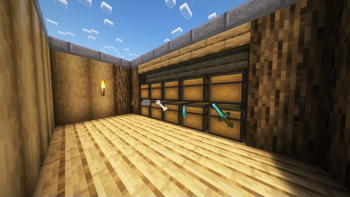
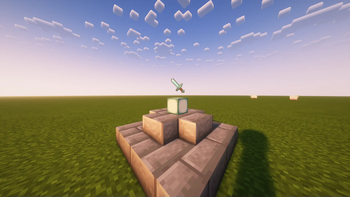
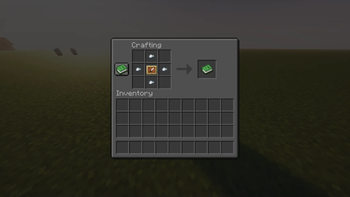
This pack adds a new way to display your items! These item displays can be crafted inside a crafting table, and the texture can be changed to match any block you like!
Simply place down the Item Display on any block and drop the item you wish to display onto the block! If you would like to change the appearance of the base, throw any block onto the Item Display after something has already been placed inside. Dropping any non-block item will result in the display turning invisible!
I plan on adding more types of item displays in future updates!
Thanks to Mushroom_cream for help fixing a bug with the pack!
More info can be found in the linked Discord server, or in the following video.
- Edition: Minecraft Java
- File type: .jar
- Minecraft versions listed: 1.19.4, 1.20, 1.20.1
- How to install: Install the matching mod loader (Forge, Fabric or NeoForge) for your Minecraft version. → Download the .jar. → Put it in the .minecraft/mods folder and launch that loader profile.
- Where to get it: Opens on Modrinth — not every file is mirrored on our own servers.
Install steps are the general flow for this file type — see the MC Java Mods guides for the full walkthrough.
- Downloads as item_displays.zip
- Download size: 5 KB
- Download link checked 1 Sept 2026 — working
These come from our own check of the pack file, not from the source page.