
ENG
To add to the server you need: 1.Download zip archive 2.Open the server folder /world/datapacks 3. Drop the downloaded zip archive into the open folder and restart the server or write /reload to the console, if you do not have a paper or spigot server core, then write /reload confirm
To start using it, just turn it on and it will configure itself, 3 scoreboards will be automatically created, 1 for each world and they will tune in themselves, if you want, for example, in the ordinary world, write scoreboard modifity overworld and write what you want to change
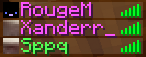
Changes the color of your nickname in the tab depending on the world. For example, if one of the players is in the general world, then the nickname in the tab will be green, if it is in the lower world, then red, and if in the end, then purple. This can be seen in the screenshot:
It shows that the first 2 people are in the end and the third in the ordinary world.
РУС
Что бы добавить на сервер нужно:
1.Скачать zip архив
2.Открыть папку сервера /world/datapacks
3.Перекиньте скачанный zip архив в открытую папку и перезапустите сервер или напишите в консоль /reload если у вас не ядро сервера paper или spigot то пишите /reload confirm
Что бы начать его использовать просто включите его и он сам настроится, автоматически создастся 3 таблицы счёта (scoreboard) по 1 на каждый мир и сами настроятся если вы хотите что бы например в обычном мире напишите scoreboard modifity overworld и пишите что вхотите изменить
Изменяет цвет вашего ника во вкладке в зависимости от мира. Например если кто-то из игроков будет в обычном мире то го никнейм в табе будет зелёным цветом , если будет в нижнем мире то красным а если в энде то пурпурным. Это видно на скриншоте:
На нём видно что первые 2 человека находятся в эндер мире а третий в обычном мире
- Edition: Minecraft Java
- File type: .jar
- Minecraft versions listed: 1.16.5, 1.17, 1.17.1
- How to install: Install the matching mod loader (Forge, Fabric or NeoForge) for your Minecraft version. → Download the .jar. → Put it in the .minecraft/mods folder and launch that loader profile.
- Where to get it: Opens on Modrinth — not every file is mirrored on our own servers.
Install steps are the general flow for this file type — see the MC Java Mods guides for the full walkthrough.
- Downloads as World Color by Sppq.zip
- Download size: 1 KB
- Download link checked 1 Sept 2026 — working
These come from our own check of the pack file, not from the source page.