
Slots SMP Remake
Overview
The Slots SMP Remake is a unique twist on the classic Minecraft Survival Multiplayer experience. In this SMP, your inventory management is more crucial than ever. When you die, you don't just lose items—you lose a whole inventory slot! But there's a way to get it back, thanks to the slots mechanic.
How It Works
- Slot Drops: When a player dies, one of their inventory slots (along with any item it contains) drops on the ground. This happens regardless of how the player dies.
- Slot Recovery: If another player picks up the dropped slot, they can use it to regain one of their own lost slots. This is particularly useful for players who have already lost inventory slots due to previous deaths.
- Slot Trading You can withdraw your slots and trade them to others. Remember, slots are very valuable resources.
- Strategic Gameplay: The Slots SMP Remake adds an extra layer of strategy to the game. Players must carefully consider the risks of dying and the potential rewards of retrieving and using dropped slots.
Features
- Slot Loss on Death: Every time you die, an inventory slot drops, adding a new penalty to death beyond losing items.
- Slot Recovery: Collect dropped slots to regain your lost inventory slots, making every death a potential opportunity.
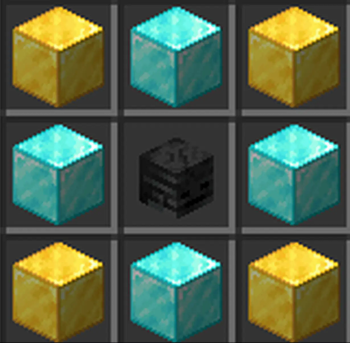
- Slot Crafting: Craft new slots to regain your lost inventory with 4 gold and diamond blocks and one wither skeleton skull (see gallery for more)
- Slot Trading: You can withdraw one of your slots with
/trigger withdraw, allowing you to trade with others - Constant Challenge: The game remains challenging as every death could reduce your carrying capacity, forcing players to adapt and survive with fewer resources.
Installation
It's easy to install the Slots SMP Remake datapack:
- Locate your server's datapacks folder.
- Upload the Slots SMP Remake file.
- Reload your server or use the /reload command in-game to apply the datapack.
Contributing
If you're interested in helping improve or test the Slots SMP Remake datapack, feel free to reach out. I'm open to feedback and suggestions, especially since I'm relatively new to creating datapacks. You can contact me at RandomCodingDude@outlook.com.
Goals
- Make the datapack more customizable
- Add texture pack (for carrot-on-a-stick)
- Edition: Minecraft Java
- File type: .jar
- Minecraft versions listed: 1.21, 1.21.1
- How to install: Install the matching mod loader (Forge, Fabric or NeoForge) for your Minecraft version. → Download the .jar. → Put it in the .minecraft/mods folder and launch that loader profile.
- Where to get it: Opens on Modrinth — not every file is mirrored on our own servers.
Install steps are the general flow for this file type — see the MC Java Mods guides for the full walkthrough.
- Downloads as Slots SMP Remake v1.3.zip
- Download size: 8 KB
- Download link checked 1 Sept 2026 — working
These come from our own check of the pack file, not from the source page.