
Revised Glass
Enhance your Minecraft experience with the Revised Glass data pack, which provides a simple and user-friendly way to recolor your existing colored glass.
⬇ Download on Modrinth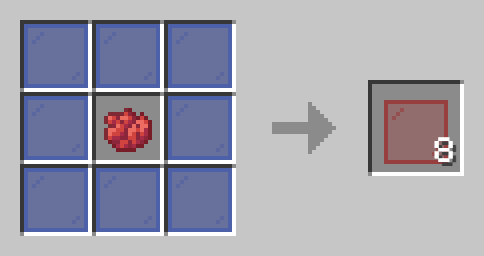
——————————————
Summary
Enhance your Minecraft experience with the Revised Glass data pack, which provides a simple and user-friendly way to recolor your existing colored glass.
How To Craft
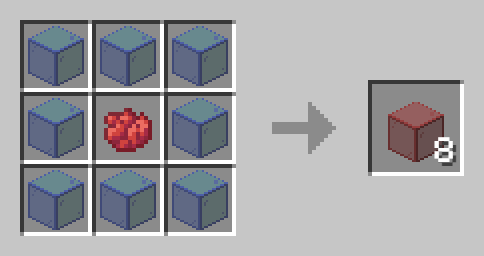
Simply open a crafting table and place your chosen dye color in the center slot. Then, surround the dye with eight pieces of colored glass. The crafting table will transform these materials into your newly recolored glass, allowing you to customize your glass blocks and panes with the desired color.
Installation
Installing the Revised Glass data pack on your server is straightforward. First, locate the data packs folder within your server files. Once found, simply drag the Revised Glass data pack, which should be in a .zip file format, into that folder. Afterward, restart your server, and you're all set to enjoy the changes.
——————————————
Have any questions or concerns please contact sunny223#0 on Discord.
- Edition: Minecraft Java
- File type: .jar
- Minecraft version listed: 1.21
- How to install: Install the matching mod loader (Forge, Fabric or NeoForge) for your Minecraft version. → Download the .jar. → Put it in the .minecraft/mods folder and launch that loader profile.
- Where to get it: Opens on Modrinth — not every file is mirrored on our own servers.
Install steps are the general flow for this file type — see the MC Java Mods guides for the full walkthrough.
- Downloads as Revised_Glass 1.21.zip
- Download size: 303 KB
- Download link checked 1 Sept 2026 — working
These come from our own check of the pack file, not from the source page.