
DatapacksJava
Three Slots Challenge
I don't know my version or loader
Open the Minecraft launcher and look at the profile you play on — it names both, like fabric-loader-1.21.4. The version also shows in the bottom-right corner of the game's main menu.
No loader in the profile name? Then it's plain Minecraft, and these mods won't run — you need Fabric or NeoForge installed first.
MAKE SURE TO NOT ENTER A WORLD YOU LIKE WITH THE MOD.
Welcome to THREE Slots Challenge!
- About the datapack
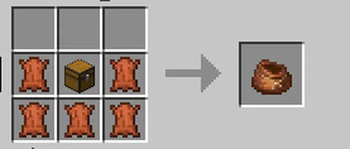
- You have 3 slots.
- Offhand is available!
How to Install Resource Pack
- Press the DOWNLOAD button
- Open the File
- Grab the resource pack and put it in Resource Pack Folder
- Activate the resource pack
How to Install Datapack
- If you already have the File, Open it and follow the instructions down below!
- Go to SINGLEPLAYER, CREATE NEW WORLD, MORE, DATA PACKS, OPEN PACK FOLDER and put the datapack inside.
- Activate the Datapack and you are ready to go.
Quick facts
- Edition: Minecraft Java
- File type: .jar
- Minecraft versions listed: 1.21, 1.21.1, 1.21.2
- How to install: Install the matching mod loader (Forge, Fabric or NeoForge) for your Minecraft version. → Download the .jar. → Put it in the .minecraft/mods folder and launch that loader profile.
- Where to get it: Opens on Modrinth — not every file is mirrored on our own servers.
Install steps are the general flow for this file type — see the MC Java Mods guides for the full walkthrough.
Verified by MCModsHub
- Downloads as TSC.zip
- Download size: 3 KB
- Download link checked 5 Sept 2026 — working
These come from our own check of the pack file, not from the source page.