
Mob Equipment
This is a datapack which make mobs gained better equipment.
Each player have their own difficulty value, the difficulty increases as the number mobs killed by player. The default difficulty limit is 5000.
The increase in difficulty will make mobs stronger.
Features:
Equipment(Armor & Mainhand Weapon)
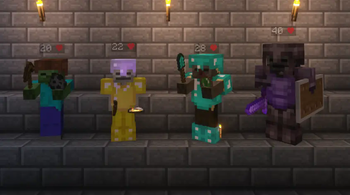
Affected mobs: Zombie, Zombie Villager, Husk,Drowned, Skeleton, Stray, Wither Skeleton.
These mobs gained better armor and weapon.
The increase in difficulty will increase the probability of iron and diamond equipment
Wither Skeletons may gained netherite equipment.
Wither Skeletons may use bow to shoot wither arrow to player.
Offhand Weapon
Affected mobs: Zombie, Zombie Villager, Husk,Drowned, Skeleton, Stray, Wither Skeleton, Pillager.
These mobs may carry special offhand weapons:
(Splash Potion, Ender Pearl, Lava Bucket, Shield, Silverfish Egg, Cobweb, TNT).
Silverfish Egg: Throw silverfish spawn egg to player and summon silverfish.
Ender Pearl: Throw ender pearl to player and teleport.
Lava Bucket: Place a short-lived lava on player.
Cobweb: Place a short-lived cobweb on player.
TNT: Place a TNT block below them. The TNT block will explode in 4 seconds if player did not break it. These weapons can be used continuously: Shield: Give mobs slowness and resistance effects when they are attacked, and make them to rebound arrows ahead.
Tipped Arrow(only skeletons): Make skeletons shoot tipped arrow.
Health Boost
Affected mobs: Zombie, Zombie Villager, Husk,Drowned, Skeleton, Stray, Wither Skeleton, Spider, Enderman.
As the difficulty increases, these mobs HP boosts.
Default maximum health boost by 10 (5❤).
Skeletons and Strays initially only have 16 HP (8❤).
Wither Skeletons initially have 16 HP (8❤).
Other Features
In high difficulty, Creepers become faster and probably charged. Spiders' damage and health increased.
Commands:
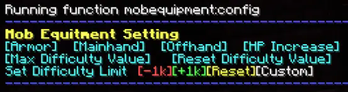
You can access a chat based configuration menu by running the command
/function mobequipment:config
You can use it to turn off some features or modify difficulty.
Lower version of Minecraft: https://modrinth.com/datapack/specmobs
- Edition: Minecraft Java
- File type: .jar
- Minecraft version listed: 1.20.4
- How to install: Install the matching mod loader (Forge, Fabric or NeoForge) for your Minecraft version. → Download the .jar. → Put it in the .minecraft/mods folder and launch that loader profile.
- Where to get it: Opens on Modrinth — not every file is mirrored on our own servers.
Install steps are the general flow for this file type — see the MC Java Mods guides for the full walkthrough.
- Downloads as [1.20.4]MobEquipment-1.4.zip
- Download size: 70 KB
- Download link checked 5 Sept 2026 — working
These come from our own check of the pack file, not from the source page.