
NotHunt - No Compass Manhunt!
Minecraft Manhunt, Tracker over all dimensions (even The End), Alerts, Multiple runners, Numerous Objectives, Tweaks, WHAT ELSE DO YOU WANT?
⬇ Download on Modrinth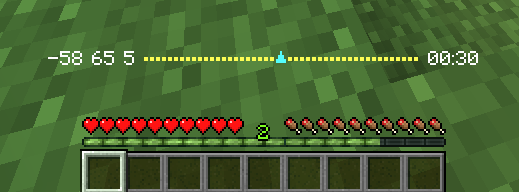
NotHunt Datapack
A comprehensive Minecraft manhunt datapack with extensive customization options, multiple game modes, and advanced tracking features.
📥 Installation
- Download the datapack
- Navigate to your Minecraft world's datapacks folder:
.minecraft/saves/[Your World Name]/datapacks/
- Place the
NotHuntfolder into the datapacks directory - Load or reload your world
Loading the Datapack
If the world is already running, reload the datapack using:
/reload
You'll see a yellow message in chat: "NotHunt Loaded. Click to open settings menu and start another game!"
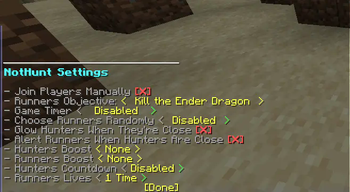
⚙️ Configuration & Settings
Opening the Settings Menu
Only operators (OPs) can configure the datapack. To open the settings menu:
/function nothunt:settings
This will display an interactive menu in chat where you can configure all game settings by clicking on options.
🎮 Game Settings Overview
Runners Objective
Choose what the runners must accomplish to win:
- Kill the Ender Dragon (Default) - Classic manhunt where runners must defeat the Ender Dragon
- Get a Diamond - Runners win when one player obtains a diamond
- Go to the Nether - Runners win when one player enters the Nether
- Survivor - Runners must survive for a set amount of time
Game Timer
Set a time limit for completing objectives (except Survivor mode):
- Disabled - No time limit
- 5, 10, 20, 30, 45, 60, 90, 120, or 180 minutes
If runners don't complete their objective within the time limit, hunters win.
Note: In Survivor mode, this setting determines how long runners must survive.
Choose Runners Randomly
Automatically select runners at the start of the game:
- Disabled - Manually choose runners
- 1-20 runners - Randomly select this many players to be runners
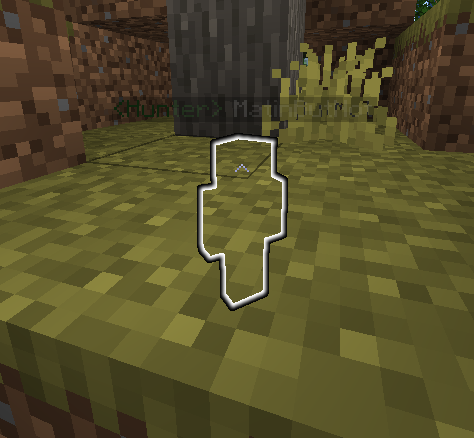
Glow Hunters When They're Close
- Enabled: Hunters glow (visible through walls) when within 15 blocks of a runner
- Disabled: No glowing effect
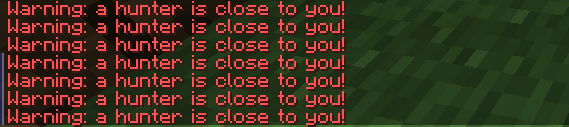
Alert Runners When Hunters Are Close
- Enabled: Runners receive a chat alert when hunters are within 20 blocks
- Disabled: No alerts
Hunters Boost
Give hunters a permanent effect throughout the game:
- None
- Fast Swimming (Dolphin's Grace)
- Fire Resistance
- Haste (faster mining)
- Invisibility
- Jump Boost
- Night Vision
- Water Breathing
- Double Hearts (40 hearts instead of 20)
- Speed Boost
Runners Boost
Give runners a permanent effect throughout the game (same options as Hunters Boost)
Hunters Countdown
Freeze hunters at the start to give runners a head start:
- Disabled - Hunters can move immediately
- 15 seconds, 30 seconds, 1 minute, 5 minutes, or 10 minutes
Runners Lives
Number of times each runner can die before being eliminated:
- 1-5 lives
👥 Managing Players
Adding Players to the Match
Automatic Selection
If "Choose Runners Randomly" is enabled in settings, runners will be selected automatically when the match starts.
Manual Selection
After configuring settings, click [Done] in the settings menu
The game will enter preparation mode
Players can join as runners using the trigger command:
/trigger JoinRunnersOperators can manually add players as runners:
/execute as <PlayerName> run trigger JoinRunnersExample:
/execute as Steve run trigger JoinRunnersOnce all runners are selected, start the match:
/function nothunt:preparation/start
Team Assignment
- Runners - Players who must complete the objective
- Hunters - All other players who joined the match (not selected as runners)
- Spectators - Players who join after the match starts or were not added to the match
Removing Players
To remove a runner during preparation phase, they can use:
/execute as PlayerName run function nothunt:preparation/leaverunners
This toggles their runner status.
🧭 In-Game Compasses (Hunter Tracking)
Hunters have access to a powerful tracking system to locate runners.
How to Use Tracking
Hunters can track specific runners using the compass system:
Open tracking menu:
/trigger TrackSelect a runner - Click on a runner's name in chat to track them
Switch targets - Use
/trigger Trackagain to change which runner you're tracking
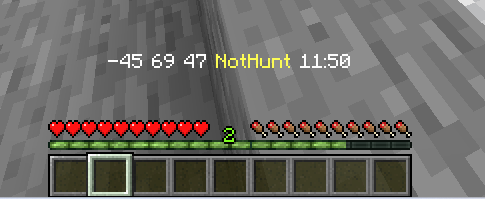
Toggle HUD
Runners can toggle their HUD on/off:
/trigger Hud
🏁 Ending a Match
Manual End
Operators can manually end the match at any time:
/function nothunt:endmatch
Automatic Win Conditions
The match ends automatically when:
Runners Win:
- All runners complete the objective (Kill Dragon/Get Diamond/Enter Nether)
- Runners survive the timer in Survivor mode
- In timed modes, if at least one runner is alive when time runs out (unless objective-specific)
Hunters Win:
- All runners are eliminated (die more times than their life count)
- Time runs out before runners complete their objective (in timed modes)
🔧 Troubleshooting
The datapack isn't working
- Make sure you have operator permissions
- Run
/reloadto reload the datapack - Check that the datapack is in the correct folder
Players can't join as runners
- Ensure the match hasn't started yet
- Make sure players have the trigger permission enabled
- Try using the manual command:
/execute as <Player> run trigger JoinRunners
Compass not working
- Make sure you're a hunter (not a runner or spectator)
- Use
/trigger Trackto initialize tracking - Ensure there are runners in the match
Game won't start
- Ensure at least one runner is selected
- Run
/function nothunt:preparation/startafter selecting runners - Check that you completed the settings configuration
📝 Commands Reference
| Command | Who Can Use | Description |
|---|---|---|
/function nothunt:settings |
OPs only | Open settings menu |
/reload |
OPs only | Reload the datapack |
/trigger JoinRunners |
All players | Join runners team (preparation phase) |
/trigger Track |
Hunters | Open runner tracking menu |
/trigger Hud |
Runners | Toggle HUD display |
/function nothunt:preparation/start |
OPs only | Start the match |
/function nothunt:endmatch |
OPs only | End the current match |
- Edition: Minecraft Java
- File type: .jar
- Minecraft version listed: 1.21.4
- How to install: Install the matching mod loader (Forge, Fabric or NeoForge) for your Minecraft version. → Download the .jar. → Put it in the .minecraft/mods folder and launch that loader profile.
- Where to get it: Opens on Modrinth — not every file is mirrored on our own servers.
Install steps are the general flow for this file type — see the MC Java Mods guides for the full walkthrough.
- Downloads as NotHunt.zip
- Download size: 480 KB
- Download link checked 6 Sept 2026 — working
These come from our own check of the pack file, not from the source page.