
DatapacksJava
EVE - Entity Visualization Editor
I don't know my version or loader
Open the Minecraft launcher and look at the profile you play on — it names both, like fabric-loader-1.21.4. The version also shows in the bottom-right corner of the game's main menu.
No loader in the profile name? Then it's plain Minecraft, and these mods won't run — you need Fabric or NeoForge installed first.
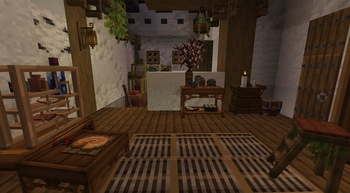
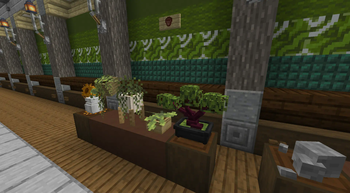
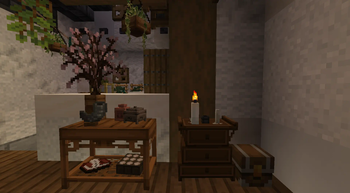
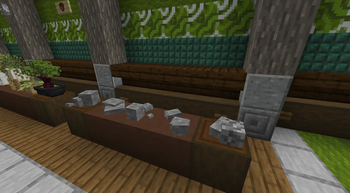
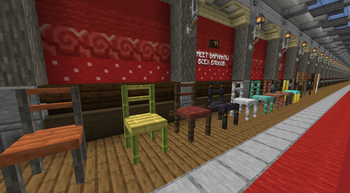
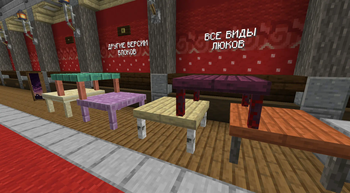
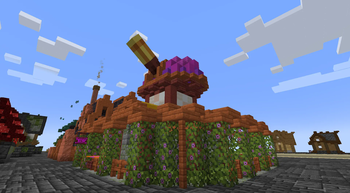
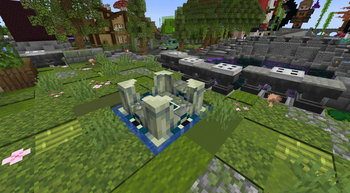
EVE — это инновационное решение, которое не только улучшает визуальную составляющую игры, но и предоставляет множество новых возможностей для творчества и управления игровым процессом, сохраняя при этом производительность и стабильность сервера.
Что может EVE:
- Этот инструмент позволяет использовать Item_Display и Text_Display в выживании и с их помощью добавлять в мир уникальный декор даже в ванильном майнкрафте.
- Есть возможность использовать дополнительный Ресурспак и добавлять в игру те предметы которые вы сами создадите через custom_model_data
- С помощью зелья невидемости можно превратить Предмет в Item_Display и редактировать его обычной палкой кликая кнопками мыши по зоне редактора
- С помощью зелья невидемости можно превратить Табличку или кафедру с книгой в Text_Display и редактировать его обычной палкой кликая кнопками мыши по зоне редактора
- С помощью зелья моментального урона можно жостко удалить Display из мира, но лучше использовать редактор для отмены с сохранением ресурсов
- С помощью зелья невидемости можно превратить Рамку с предметом в невидимую рамку
- В редакторе используеться управление через ЛКМ, ПКМ, ЛКМ + ПКМ, Шифт
- Перемещение по меню редактора держите в ведущей руке обычную палку и кликайте по редактору
Discord EVE
Discord Dom VP
EVE is an innovative solution that not only improves the visual aspect of the game, but also provides many new possibilities for creativity and game management, while maintaining server performance and stability.
What EVE can do:
- This tool allows you to use Item_Display and Text_Display in survival and with their help add unique decor to the world, even in vanilla Minecraft.
- It is possible to use an additional Resource Pack and add to the game those items that you yourself create through custom_model_data
- Using an invisibility potion, you can turn an Item into an Item_Display and edit it with a regular stick by clicking on the editor area with the mouse buttons
- Using an invisibility potion, you can turn a Tablet or a lectern with a book into a Text_Display and edit it with a regular stick by clicking on the editor area with the mouse buttons
- Using a potion of instant damage, you can severely remove Display from the world, but it is better to use the editor to cancel while saving resources
- Using an invisibility potion, you can turn a Frame with an object into an invisible frame
- The editor uses control via LMB, RMB, LMB + RMB, Shift
- Moving through the editor menu, hold a regular stick in your dominant hand and click on the editor
Quick facts
- Edition: Minecraft Java
- File type: .jar
- Minecraft versions listed: 1.21.4, 25w02a, 25w03a
- How to install: Install the matching mod loader (Forge, Fabric or NeoForge) for your Minecraft version. → Download the .jar. → Put it in the .minecraft/mods folder and launch that loader profile.
- Where to get it: Opens on Modrinth — not every file is mirrored on our own servers.
Install steps are the general flow for this file type — see the MC Java Mods guides for the full walkthrough.
Verified by MCModsHub
- Downloads as VPeve.zip
- Download size: 55 KB
- Download link checked 6 Sept 2026 — working
These come from our own check of the pack file, not from the source page.