
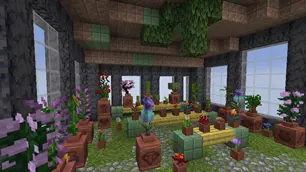
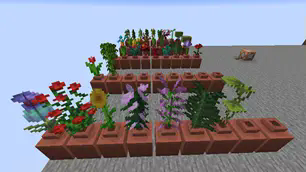
This datapack lets you place any flower in the Decorated Pots added in 1.20 to give pots more color and functionality!
Features:
- Place any flower (including double tall flowers) inside the decorated pot.
- Some flowers have a unique look.
- It does NOT require a resource pack making installation easier.
How to use:
First, you must place an item frame on the top of the Decorated Pot. Then place a regular flower pot inside the item frame. If done correctly the item frame should disappear. While holding a flower you can now Right Click on the top of the Decorated Pot to place the flower in it. To remove the flower Right Click on the top of the Decorated pot with an empty hand.
FAQ
Can I add this to my mod pack?
Sure, as long as you give proper credit and follow the license.
Are you going to downgrade to older versions (ie; 1.15, 1.12, 1.8)?
I will if there is enough demand for a certain version and I have time to.
- Edition: Minecraft Java
- File type: .jar
- Minecraft version listed: 1.21
- How to install: Install the matching mod loader (Forge, Fabric or NeoForge) for your Minecraft version. → Download the .jar. → Put it in the .minecraft/mods folder and launch that loader profile.
- Where to get it: Opens on Modrinth — not every file is mirrored on our own servers.
Install steps are the general flow for this file type — see the MC Java Mods guides for the full walkthrough.
- Downloads as Botanic Pots v1.1.0.zip
- Download size: 13 KB
- Download link checked 6 Sept 2026 — working
These come from our own check of the pack file, not from the source page.