
Minute of Madness - Random Inventory
I don't know my version or loader
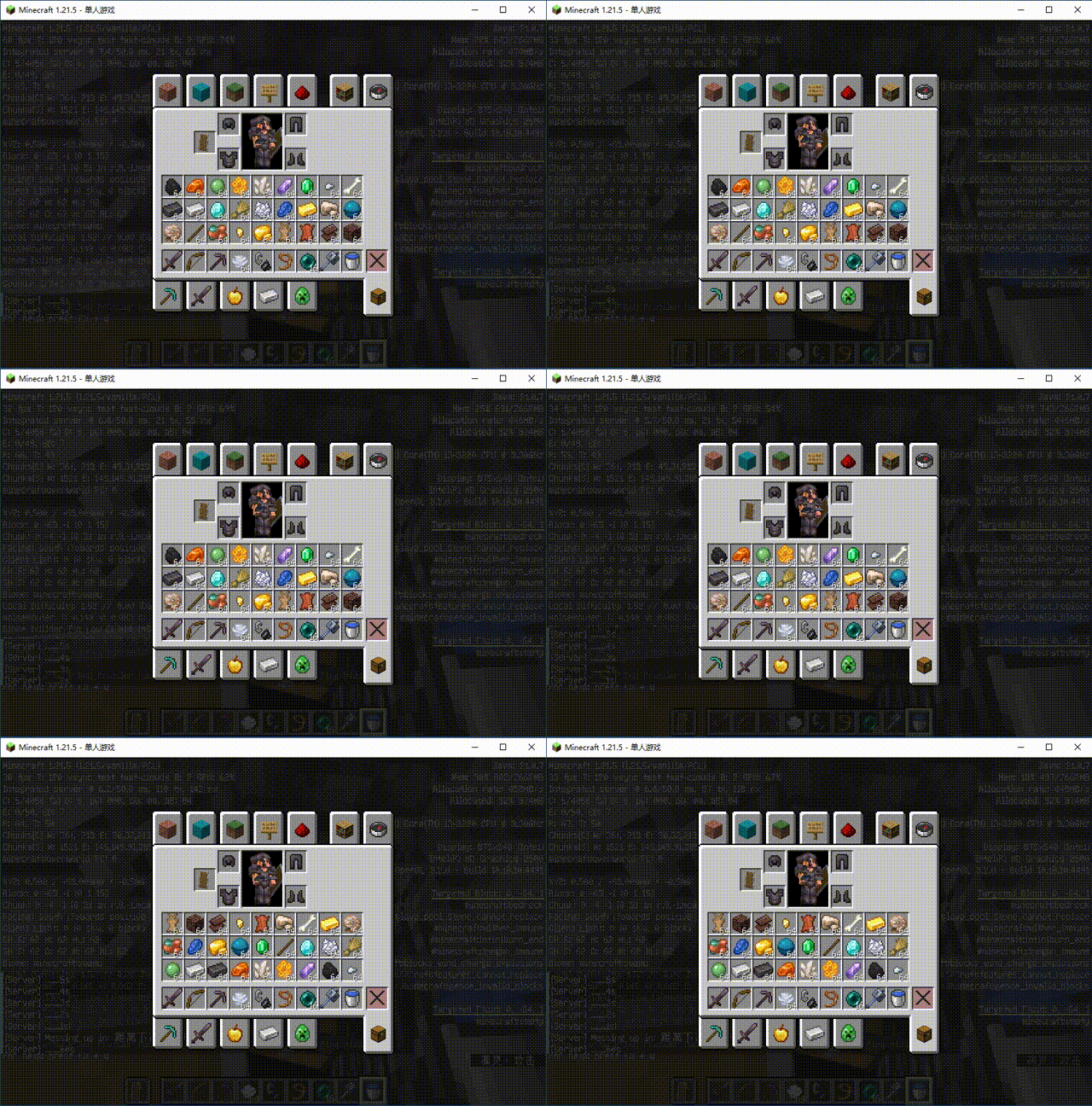
Datapack Introduction: Minute of Madness
Overview
Welcome to "Minute of Madness" — a fun and chaotic datapack designed to inject a dose of insanity and challenge into your Minecraft world! Every minute, the inventories of all online players will be completely scrambled. With eye-catching countdown titles and tense sound effects, each minute becomes a race against time and a test of survival strategy.
Core Features
- Periodic Chaos: The datapack automatically shuffles all items in players' inventories (including hotbar and main inventory) at precise one-minute intervals.
- Visual Countdown: A clear and nerve-wracking countdown is displayed in the chat during the final 5 seconds before each shuffle, ensuring you’re never caught completely off guard.
- Immersive Sound Feedback:
- Countdown Alert: Unique chime sounds play during the countdown to build tension.
- Shuffle Activation Sound: A magical sound effect plays the moment inventories are scrambled, marking the beginning of the madness!
- Multiplayer Compatibility: Fully supports multiplayer—every player on the server will experience this "surprise" simultaneously. Perfect for friendship-testing mini-games or hardcore survival servers.
Gameplay & Challenges
- Strategic Planning: You must efficiently use whatever tools and resources you currently have within each minute. The axe you were using to chop trees might suddenly turn into a cooked steak!
- Emergency Adaptation: Fighting a creeper? When the countdown ends, your sword might turn into a flower! This severely tests players’ quick thinking and adaptability.
- Fun Competitions: When playing with friends, see who can find diamonds first under these chaotic rules, or who will be the first to fall to monsters because they can’t find a weapon in time. Laughter and "screams" guaranteed!
Installation & Usage
- Download the datapack file (
.zipformat). - Place it into the
datapacksfolder within your world’s save directory. - Enter the world and run
/datapack enable <file_name>or restart the world to activate. - To pause or remove the effect, use
/datapack disable <file_name>in-game, or simply remove the datapack and reload.
Note
- This datapack is purely designed for entertainment and challenge—it may cause feelings of "frustration" or "uncontrollable laughter."
- Recommended for use in survival mode or custom fun maps to experience a unique flavor of Minecraft fun.
- Ensure your heart is strong enough to handle the unknown every passing minute!
Are you ready to embrace the madness every minute? Download the "Minute of Madness" datapack and put your true adaptability to the test!
数据包介绍:混乱一分钟 (Minute of Madness)
概述
欢迎来到“混乱一分钟”——一个为你的 Minecraft 世界增添一丝疯狂与挑战的趣味性数据包!每隔一分钟,所有在线玩家的物品栏将会被彻底打乱。伴随着醒目的倒计时标题和紧张的音效,每一分钟都将成为一场与时间赛跑的生存策略考验。
核心特性
- 周期性混乱: 数据包会以一分钟为精确周期,自动随机重排所有玩家物品栏内的物品(包括快捷栏和主物品栏)。
- 视觉化倒计时: 在每次打乱前的最后 5 秒,聊天栏会显示清晰且令人紧张的倒计时,确保你不会对这突如其来的变化措手不及。
- 沉浸式音效反馈:
- 倒计时提示音: 倒计时期间会播放独特的钟声,营造紧张氛围。
- 打乱生效音: 当物品栏被打乱的瞬间,会播放一个魔法般的音效,标志着混乱的开始!
- 多人兼容: 完美支持多人游戏,服务器内的每一位玩家都将同时体验到这份“惊喜”,非常适合用于挑战友情的趣味小游戏或极限生存服务器。
玩法与挑战
- 策略规划: 你必须在短短一分钟内高效地使用当前手头的任何工具和资源。刚刚还在砍树,下一秒你的斧头可能就变成了一块熟牛排!
- 紧急应对: 正在与苦力怕周旋?倒计时结束时,你手中的剑可能会突然变成一朵花!这极大地考验了玩家的临场反应和适应能力。
- 趣味竞赛: 与朋友一起玩时,看谁能在这种混乱的规则下最先找到钻石,或者谁会成为第一个因为找不到武器而被怪物淘汰的人。欢笑与“惨叫”并存!
安装与使用
- 下载数据包文件(
.zip格式)。 - 将其放入你的世界文件夹下的
datapacks文件夹中。 - 进入世界,执行命令
/datapack enable <文件名>或重启世界即可生效。 - 若要暂停或移除该效果,只需在游戏中输入
/datapack disable <文件名>或直接移除数据包并重载。
注意
- 本数据包纯粹为娱乐和挑战而设计,可能会让你感到“崩溃”或“哭笑不得”。
- 建议在生存模式或特定的趣味地图中使用,体验别样的 Minecraft 乐趣。
- 请确保你的心脏足够强大,能够接受下一秒的未知!
准备好迎接每分钟一次的疯狂了吗?下载“混乱一分钟”数据包,考验你真正应变能力的时候到了!
- For similar gameplay, please see: random-item-appearance
- 类似玩法请见:随机外观
- Follow it if you like ♥
- Edition: Minecraft Java
- File type: .jar
- Minecraft versions listed: 1.21.9, 1.21.10, 1.21.11
- How to install: Install the matching mod loader (Forge, Fabric or NeoForge) for your Minecraft version. → Download the .jar. → Put it in the .minecraft/mods folder and launch that loader profile.
- Where to get it: Opens on Modrinth — not every file is mirrored on our own servers.
Install steps are the general flow for this file type — see the MC Java Mods guides for the full walkthrough.
- Downloads as Minute_of_Madness.zip
- Download size: 126 KB
- Download link checked 6 Sept 2026 — working
These come from our own check of the pack file, not from the source page.