
Icea's Variants
I don't know my version or loader


GENERAL INFORMATION
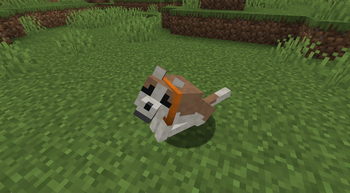
Do you like animal variants? Do you want MORE of them? This datapack is for you! This is a simple data-resource pack that adds more animal variants. This datapack is more than just a simple variants pack as there are a few other small changes I made to make the affected animals a little better
Here is a list of what this pack adds currently:
- 8 new wolf variants, all spawning in biomes wolves do not normally spawn in
- 8 new cat variants, all spawning in villages just like any other cat.
- changes to "The Whole Pack" and "A Complete Catalog" advancements to account for the new variants, making these variants feel truly a part of the game.
- Wolves now spawn on sand blocks, so the new Sandy variant wolf can be found.
- Wolves no longer sink in powdered snow (this was added in when i made a biomes o' plenty compatible version of this pack, but decided to leave it in since i felt it made sense. This may make Grove variant wolves from vanilla easier to find).
Potential future additions
- More pig, cow and chicken variants, if i get ideas for them.
- If mojang makes fox variants data driven, they will be added since i have fox variant textures i made for a entity texture features compatible resource pack.
- I plan to make a fresh animations compatible version of this datapack's resources, but that will come in the future once i'm more familiar with modrinth to upload such an alternate version.
Please see the gallery to see what the variants look like ^^
HOW TO DOWNLOAD
This datapack comes with two folders: a datapack and a resource pack. Both MUST be applied to their respective places for the pack to work. Please see below how to install both the data folder and the textures folder
APPLYING THE DATAPACK:
The datapack (listed as "[Minecraft version] Icea's Variants v(my pack's version) Data" goes into the datapacks folder within your world save
To access the "datapacks" folder, you can do this in two ways depending on if you are adding this to an existing world or a new world
For a NEW WORLD: When you click create world, go to the 'more' menu on the far right and select "data packs". Once in the menu, click the "Open Pack Folder" button and it will open up a folder. Drag and drop the data portion of the pack into this folder and it will pop up in the "available" slot. Hover over the pack and click the arrow that pops up over the pack's image and it will move over to "selected". After it is there, click done and the data will be applied. When you create the world the data will be applied
For an EXISTING WORLD: You will want to put the data folder in the "datapacks" folder within your world save. For most people, the file path will be this:
users/[your PC username]/appdata/roaming/.minecraft/saves/[your world name]/datapacks
to access appdata quickly, type %appdata% on your computer's search bar and it will take you directly to roaming.
Once inside the datapacks folder, drag and drop the data portion of this pack into the folder and you're good to go the next time you launch the world!
SOMETHING TO NOTE: unlike mods, datapacks are active per world, meaning for every world you create, you must re-apply the datapack every time you want to use it.
APPLYING THE RESOURCE PACK:
The resource pack is a bit simpler to apply and you do not need to apply it every time you want to use the data pack's textures, since resource packs persist across worlds as long as they are enabled.
The resource pack portion of this file is called something like "[Minecraft version] Icea's Variants v(my pack's version) Textures"
To apply and enable the resource packs, you can do this in game or in your files.
APPLYING INGAME: From the main menu or pause menu, click "options" and then "resource packs...". Once in the resource packs menu, click "Open Pack Folder". Once the folder opens, drag and drop the textures half of the pack into the resource packs folder. It will appear in the "available" tab once inside this folder. Hover over and click on the arrow that appears on the pack's icon and it will move over to "selected". Click "done" and the game will reload your resource packs and apply it.
APPLYING OUTSIDE OF GAME: navigate to your Minecraft instance (for most people the path will be users/[your PC username]/appdata/roaming/.minecraft/resourcepacks. Appdata can easily be accessed by typing %appdata% in your computer's searchbar and it will open your roaming folder which contains the .minecraft folder). Once inside resource packs, drag and drop the textures half of the pack into there. Then you open your game and apply the resource pack through options>resource packs.
Once both of these are enabled, you can enjoy extra variants!
FAQ
Q: I'm seeing the new variants.. but they're appearing as black and purple? A: Did you remember to put the resource pack in and enable it? the zip file "[Minecraft version] Icea's Variants v(my pack's version) Textures" is required to be enabled as a resource pack due to how data packs work, without it the textures won't work and will appear as black and purple textureless beings.
Q: I keep getting the experimental settings popup when I open the world! Should I back up my world file? How do I make it go away? A: I unfortunately can't/don't know how to do anything about the experimental settings warning. The warning appears because the pack makes changes to worldgen by making wolves able to spawn in biomes they do not spawn in normally. This is Minecraft's way to give you a chance to back up the world in case something goes horribly wrong. I've tested the pack and from my testing the pack doesn't break anything, but if you're unsure there is no harm in backing up your world before using my pack - encourage you do so because I am one person working on the pack. As far as i know there is no way to make the experimental settings popup go away permanently without mods (but if someone using this pack knows how feel free to share how and i can make it so it only asks once).
Q: I think i found something that doesn't seem intentional... what now? A: if you see something weird happening in direct relation to the pack - such as missing textures (after you have made sure the resource pack is enabled), wolf variants not spawning/spawning in the wrong areas or other general weirdness, please open an issue on the curseforge page and i'll take a look.
CREDITS AND SPECIAL THANKS
Big gushy special thanks to my bf for teaching me how to make data packs - this wouldn't be possible without him. Also special thanks to my friends for beta testing the pack and making sure it works fine c:
Most of the textures in this pack are made by myself, with the following exceptions consisting of re-used or modified versions of existing textures: Silver tabby variant is the regular brown tabby texture but desaturated and eyes changed, so credit for that goes to Mojang and Jappa. This texture may be changed in the future. Classic/Origin wolf variant reuses the old wolf texture pre-1.14 Spotted cat variant re-uses the ocelot texture (post 1.14) Colourpoint variant is a heavily modified Siamese variant texture, modifications made by myself with the original texture used as a base. Turkish Van variant is a modified Jellie texture, modifications made by myself with the original texture used as a base. I do not claim these exceptions as my own (or in the case of the two heavily modified textures, i do not claim completely as my own)
Pack.png image + Mod page icon drawn by myself.
- Edition: Minecraft Java
- File type: .jar
- Minecraft versions listed: 1.21.7, 1.21.8
- How to install: Install the matching mod loader (Forge, Fabric or NeoForge) for your Minecraft version. → Download the .jar. → Put it in the .minecraft/mods folder and launch that loader profile.
- Where to get it: Opens on Modrinth — not every file is mirrored on our own servers.
Install steps are the general flow for this file type — see the MC Java Mods guides for the full walkthrough.
- Downloads as [1.21.7-1.21.8] Icea's Variants v1.1 Data.zip
- Download size: 42 KB
- Download link checked 7 Sept 2026 — working
These come from our own check of the pack file, not from the source page.