
FTMC TouchSign Datapack
A datapack framework that gives your datapack the ability to tell which part of a wall sign that a player clicked on. Works in Vanilla Minecraft 1.13…
I don't know my version or loader
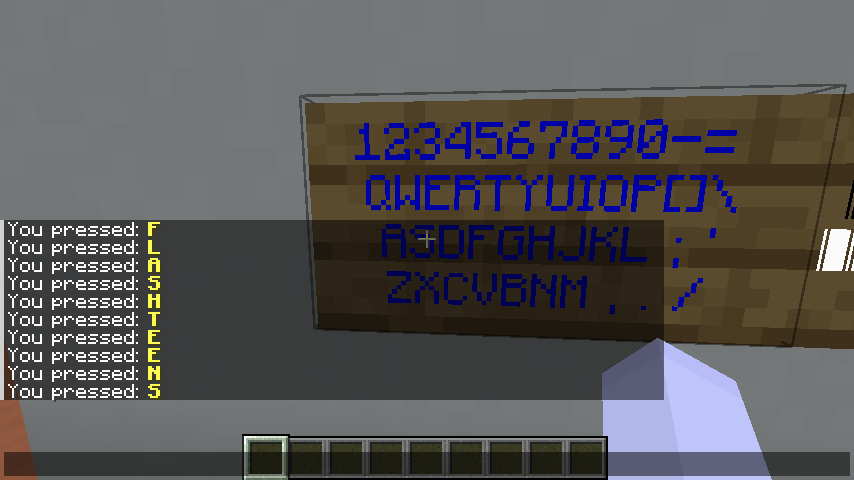
This is a datapack framework that lets you use a sign like a touchscreen. In other words, it gives your datapack the ability to tell which part of a wall sign that a player clicked on.
How to use this framework:
Step1. Download this datapack framework & put it into the datapack folder in your map. Please check your Minecraft version and download the corresponding datapack from one of the links on this page.
Step2. Make your own datapack and put it into the same datapack folder.
In your datapack, there must be an mcfunction file that invocates the FTMC TouchSign framework, so you will get some information about the clicking position.
For an example, we create a file called onclick.mcfunction and put it in your datapack:
function ftmc:touchsign/click_handler
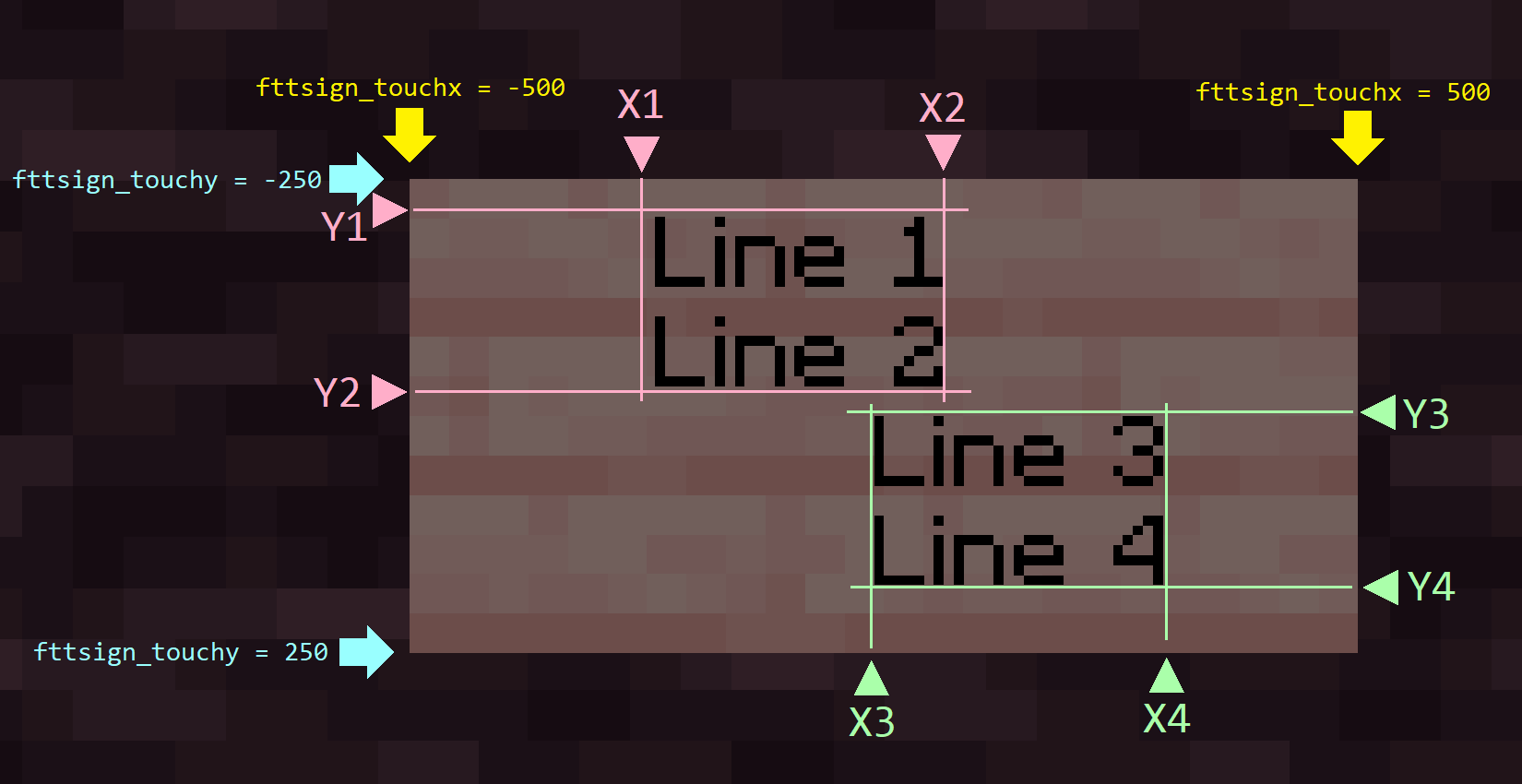
execute if score @s fttsign_touchx matches <X1>..<X2> if score @s fttsign_touchy matches <Y1>..<Y2> run <YourAction1>
execute if score @s fttsign_touchx matches <X3>..<X4> if score @s fttsign_touchy matches <Y3>..<Y4> run <YourAction2>
# Please replace X1 ~ X4 and Y1 ~ Y4 above with the exact coordinate values.
In this function, fttsign_touchx and fttsign_touchy refers to the coordinates that the player clicks onto the sign.
fttsign_touchxranges from-500(leftmost) to500(rightmost)fttsign_touchyranges from-250(top) to250(bottom)
The example above will make your sign run <YourAction1> when clicking on the pink zone of the following screenshot & and run <YourAction2> when clicking on the green zone below:
Step3. Make a clickable sign and obtain the sign with a /give command. Some examples can be seen on the demo folders of this project.
Click on the links below for the example in each corresponding Minecraft version:
When to use this framework in my project
This framework provides several demo examples as follows:
- A debug sign
- This is where you may check how the clicking positions on the sign may affect scoreboard values.
- A computer keyboard (with two variants available for whether or not the Force Unicode Font option is enabled)
- This simulates how a real computer keyboard behaves. By clicking onto the position of a letter, a debug message containing the letter will show on the chat.
- A piano keyboard
- Playing range: C3 - C5 (25 keys)
- By clicking onto different keys on the piano sign, it plays the sound in different frequencies, resembling how it acts on an actual piano.
All these examples can be found in the source code & you may obtain the sign items by running any of the commands like /function ftmc:touchsign/demo/give_xxxxx_sign (where xxxxx should be replaced.)
These usages are just a few examples. You might still discover quite some other interesting and practical usages. Feel free to publish your own datapack that uses this framework as long as you follow the "Usage Terms" section written below. Hope you enjoy! 😄
FAQs
I'm creating a new map and trying to import the FTMC TouchSign datapack, but it tells me "Incompatible!"
- Please first ensure that the datapack you downloaded corresponds to the correct Minecraft version.
- If correct, please ignore the "Incompatible" warning and import it into your world anyway. It should be still working.
- If you found any issues in the gameplay, please report it as a bug in the GitHub issues page.
The datapack doesn't correctly detect the clicking position when I'm going far away from the spawn point.
- Due to the limitations of scoreboard data types (32-bit signed integers) combining with some multiplication operations, we only expect it work properly when X and Z coordinates range within about ±2,147,000 blocks from the spawn point. This issue might happen if you go outside from this range.
Source Code
See on my GitHub repository.
Usage Terms
This project is licensed under a Creative Commons BY-SA 4.0 License.
Feel free to use and share this datapack for any public or private usages as long as:
- You ensure to credit the author of this datapack:
flashteensorFTMCwhen using this datapack in your public projects (ex: your Minecraft map or any derivative datapacks that use the FTMC TouchSign Datapack as a dependency.) - For those who manages to modify the FTMC TouchSign Datapack itself, it is suggested that you use it for private usages only. Do NOT re-distribute it to public except for the following scenarios:
- The case when you are publishing another non-datapack project (ex: a world save) that contains your modified version from the FTMC TouchSign Datapack.
- For this case, please still clarify the original author in the credit sections of your post.
- The case when you are publishing another datapack project (referred to as A) that contains your modified version from the FTMC TouchSign Datapack (referred to as B).
- For this case, your may provide the download links of both A and B in your post, but please focus on your datapack A in the description.
- Datapack A itself should NOT be a modified version from on the FTMC TouchSign Datapack.
- Also please clarify the original author of datapack B in your post.
- Forking/cloning the source code of FTMC TouchSign Datapack to your GitHub or other source code repositories for backup purposes.
- If it is a public repository, please also clarify the original author in your descriptions.
- The case when you are publishing another non-datapack project (ex: a world save) that contains your modified version from the FTMC TouchSign Datapack.
- DISCLAIMER: NOT to be confused with another Bukkit plugin named "Touchsigns", which also has similar features but is for Bukkit-based servers only. This datapack has no relation or source code references with that plugin. :)
- Edition: Minecraft Java
- File type: .jar
- Minecraft versions listed: 1.21, 1.21.1, 1.21.2
- How to install: Install the matching mod loader (Forge, Fabric or NeoForge) for your Minecraft version. → Download the .jar. → Put it in the .minecraft/mods folder and launch that loader profile.
- Where to get it: Opens on Modrinth — not every file is mirrored on our own servers.
Install steps are the general flow for this file type — see the MC Java Mods guides for the full walkthrough.
- Downloads as FTMC TouchSign Framework for 1.21.zip
- Download size: 40 KB
- Download link checked 7 Sept 2026 — working
These come from our own check of the pack file, not from the source page.