Per-Player Displays
I don't know my version or loader
Per-Player Displays
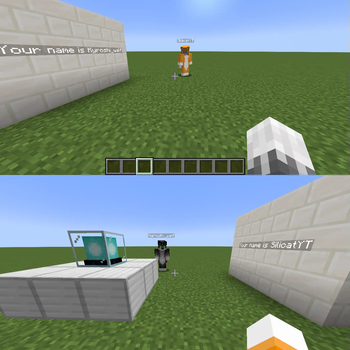
A Minecraft Data Pack library that lets you create display entities that are only visible to one player.
For inquiries, please contact @silicatYT on Discord.
Download: Modrinth
Issue tracker: GitHub
PSA (PLEASE READ)
Due to a bug in Minecraft's code, I am currently unable to port PPD to 1.21.5. Any upvotes on the bugreport are greatly appreciated!
How to use
This description can also be found in the ppd:how_to function.
- Summon a display entity
- Set its scores:
ppd.Pos.<x/y/z>: Where it should appear (Scaled by 10,000x)ppd.ID: The ID of the player it should be visible for
(The ID is automatically given to the player)
Important: It is advised that you tag the entity, so that it can be found after uninstalling PPD (Which deletes all scores).
How it works
PPD teleports your display entities into your head and sets their translation transformation accordingly so their models still appear at the desired location. It also sets their view_range NBT optimally to ensure that nobody else can see them, while also avoiding flickering if you move fast.
Good to know
- High ping, bad server performance or the
Entity Distancegraphics setting can impact the visibility of displays. This can be counteracted by the user by running/trigger ppd.ViewRangeMultiplier set .... The higher it is set, the bigger the range for other players to see your display entities. - Display entities will only be displayed in the dimension they're summoned in.
- Display entities will stay while the player is offline, but won't be visible.
- Display entities will not display farther than 160 blocks away from the destination position.
Caveats
- If another player stands very close to you, they may be able to see your display entities.
- The display entities receive the light from your head position, so it may look off at times if you don't manually set the light NBT.
- PPD uses the translation field to achieve the per-player visibility. This means that all translations need to be combined with the marker's destination Pos. Interpolated transformations are not possible!
- The display entity's
Rotationmust not be changed. Use theleft_rotationandright_rotationtransformations instead. - The display entities are not visible in F5.
- PPD doesn't work more than 100,000 blocks out in each axis.
- If the player is teleported to a far away chunk and it unloads before the display entities can teleport to the player, the entity can get stuck there, so the displays no longer show up for that player.
- Billboards other than
fixedare not supported.
Credit
From CMDred:
- SilicatYT
License
As per the MIT License, you are allowed to redistribute, modify and use PPD as long as you provide credit for the original work.
- Edition: Minecraft Java
- File type: .jar
- Minecraft versions listed: 1.21.2, 1.21.3, 1.21.4
- How to install: Install the matching mod loader (Forge, Fabric or NeoForge) for your Minecraft version. → Download the .jar. → Put it in the .minecraft/mods folder and launch that loader profile.
- Where to get it: Opens on Modrinth — not every file is mirrored on our own servers.
Install steps are the general flow for this file type — see the MC Java Mods guides for the full walkthrough.
- Downloads as Per-Player Displays.zip
- Download size: 13 KB
- Download link checked 7 Sept 2026 — working
These come from our own check of the pack file, not from the source page.