
DatapacksJava
Craft Light Blocks
I don't know my version or loader
Open the Minecraft launcher and look at the profile you play on — it names both, like fabric-loader-1.21.4. The version also shows in the bottom-right corner of the game's main menu.
No loader in the profile name? Then it's plain Minecraft, and these mods won't run — you need Fabric or NeoForge installed first.
Craft Light Blocks
This project adds a crafting recipe which allows you to craft light blocks, supporting the latest 1.21 versions!
Crafting Recipe
Surround a torch with 8 glass panes in a crafting table.
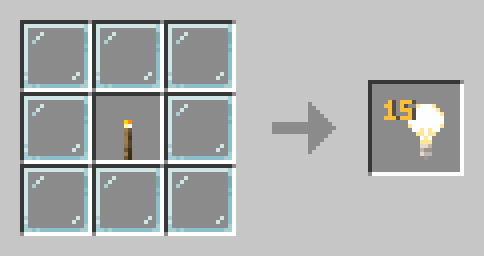
The recipe will show up in your recipe book after you craft it for the first time.
Features
- No configuration needed, just drop it in and play
- Recipe automatically appears in your recipe book after crafting once
- Lightweight and performance-friendly
Installation
Datapack
Works on both singleplayer worlds and servers.
- Download the datapack .zip file
- Place it in your world's
/datapacksfolder- Singleplayer:
.minecraft/saves/[WorldName]/datapacks - Server:
[ServerFolder]/[WorldName]/datapacks
- Singleplayer:
- Run
/reloadingame or restart your server - Check with
/datapack listto verify.
Roadmap
- Add support for older versions (1.20.x, 1.19.x, etc.)
- Standalone mod version for Forge/Fabric
- Config file for customizing the recipe!
- Customizing the Light Block brightness via recipe
Enjoying this project? Support us by leaving a ❤️ and share it with your friends!
Quick facts
- Edition: Minecraft Java
- File type: .jar
- Minecraft versions listed: 1.21.2, 1.21.3, 24w44a
- How to install: Install the matching mod loader (Forge, Fabric or NeoForge) for your Minecraft version. → Download the .jar. → Put it in the .minecraft/mods folder and launch that loader profile.
- Where to get it: Opens on Modrinth — not every file is mirrored on our own servers.
Install steps are the general flow for this file type — see the MC Java Mods guides for the full walkthrough.
Verified by MCModsHub
- Downloads as §6Craft Light Blocks.zip
- Download size: 1 KB
- Download link checked 7 Sept 2026 — working
These come from our own check of the pack file, not from the source page.