
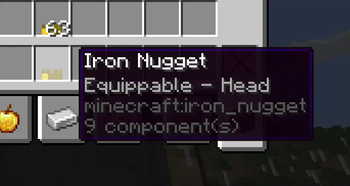
Wear any item in your head with custom models!
With WearMe2 now you can wear your own custom models in your head easier than ever! Goodbye pumpkins!
You just need to have a renamed item in your offhand (the example comes with one), and your main item in your mainhand, then press [ Change Model ]. Then press [ Make wereable ] and you can use your new custom item!
How to get started
First of all download the datapack and the example RP. (the example RP is in the versions tab)
Once everything is isntalled, in-game run the command /trigger wearmetoo and then press any of the buttons you wanna use!
[ Change Model ]
- This button allows you to change the item's model in you main hand with the name of the item in your offhand! In the example we have a model in
chimeradev:models/item/crownand the texture inchimeradev:textures/item/crown.pngso we need to rename our item tochimeradev:crown. Once we have the item ready, we put it on our offhand, and then get the item we want as a helmet in our main hand. Once that's done, press[ Change Model ]in the menu (accesible with/trigger wearmetoo)
[ Make weareable ]
- This button makes the item that you're holding be able to be equipped in your head! It can also be triggered with
/trigger helmet
[ Make unweareable ]
- This button makes the item that you're holding not able to be equipped. It can also be triggered with
/trigger unhelmet
How do I add my own models? My old CustomModelData aren't working!
In this new version, we have "Item Models", this wont work with old minecraft custom models, as they use a different format!
now custom items are in <namespace>/models/item/<id>, and their texture are in <namespace>/textures/item/<id> so the custom models are basically :``
This means that your custom models don't need to be tied to any specific item!
Can i do this to armor?
Sadly as of the 24w26a we can only modify texture on armors, so not for now! If this changes, it will be added to the datapack ASAP :)
- Edition: Minecraft Java
- File type: .jar
- Minecraft versions listed: 1.21.2, 1.21.3
- How to install: Install the matching mod loader (Forge, Fabric or NeoForge) for your Minecraft version. → Download the .jar. → Put it in the .minecraft/mods folder and launch that loader profile.
- Where to get it: Opens on Modrinth — not every file is mirrored on our own servers.
Install steps are the general flow for this file type — see the MC Java Mods guides for the full walkthrough.
- Downloads as WearMe2.zip
- Download size: 9 KB
- Download link checked 7 Sept 2026 — working
These come from our own check of the pack file, not from the source page.