
Quinn's Better Noteblocks - Datapack
A datapack/resourcepack that overhauls note block functionality in a non-intrusive way. Note blocks are much easier to tune and have a much larger pitch…
⬇ Download on Modrinth

THIS IS ONLY THE DATAPACK- you need the resourcepack for anything to work!
Quinn's Better Noteblocks
A vanilla friendly datapack/resourcepack that adds better functionality to noteblocks in Vanilla minecraft, such as noteblock editing tools, more octaves, etc.
If you've ever tried to make a jingle or a song using noteblocks but gave up because Minecraft's noteblocks can't pitch high or low enough, this project is for you! While vanilla Minecraft only supports 2 octaves, Quinn's Better Noteblocks adds support for 9 octaves, which is more than enough to create any song! This pack is fully vanilla-friendly and only requires the installation of a resourcepack and a datapack.
Demo
Features
- Change the octave of noteblocks
- Custom texture
- Custom tuning wrench item
- Shift + Right Clicking on non-note block changes mode
- Shift + Right Clicking on note block upgrades noteblock
- Tuning Mode
- Left Click decreases note
- Right Click increases note
- Shift + Left Click decreases octave
- Shift + Right Click increases octave
- Clipboard Mode
- Left Click plays note
- Shift + Left Click pastes a random note
- Right Click pastes into note block
- Shift + Right Click copies note block
- Placing noteblock from offhand pastes into it
Better Note Block
This is an upgraded noteblock! It has an octave associated with it and plenty of useful information. 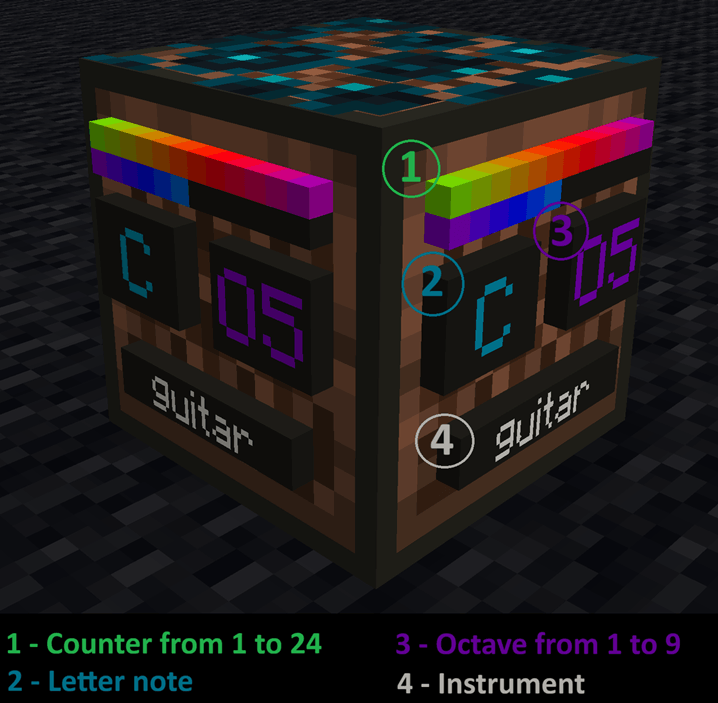
Note Block Wrench
Use this to unlock the potential of Better Noteblocks! Shift + Right Click converts any regular note block into an upgraded one.
Recipe
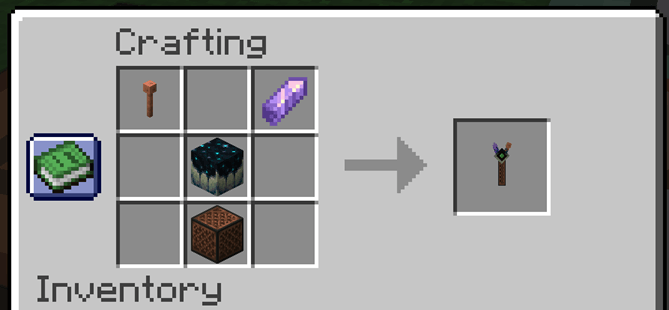
Tuning Mode
Shift+Right Click the ground to change modes! 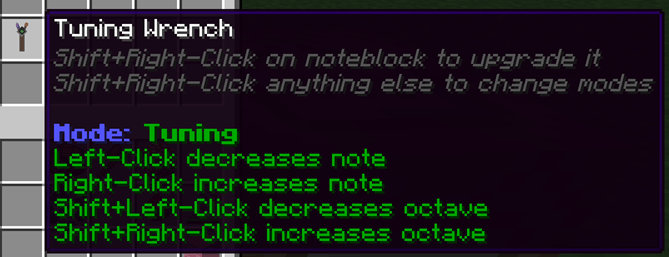
Clipboard Mode
Shift+Right Click the ground to change modes! 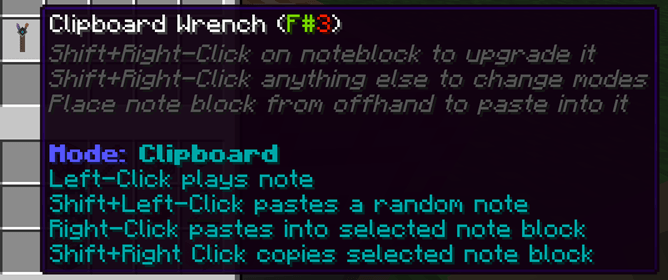
Planned Features
- 'Advanced Settings' for wrench for things like tuning key, pasting a series of notes, etc
- Custom paintings that provide informational note block posters (like chords, notes, etc)
- New instruments
- Songmaker mode
Installation
Singleplayer
- Download the latest release from Releases or your platform of choice
- Navigate to your .minecraft folder
- Drop
QuinnsBetterNoteblocks_resourcepackinto theresourcepacksfolder - Open
saves - Open the world you want to add it to
- Drop
QuinnsbetterNoteblocks_datapackinto thedatapacksfolder - Make sure you equip the resourcepack
Multiplayer
Use these instructions if you are a server owner and would like to add QuinnsBetterNoteblocks to your server so any player can use it.
- Download the latest release from Releases or your platform of choice
- In your server, open the
worldfolder - Move
QuinnsbetterNoteblocks_datapackinto thedatapacksfolder - Upload
QuinnsBetterNoteblocks_resourcepackto a resource pack hosting website like https://mc-packs.net - Open your
server.propertiesfile and fill in theresource-pack=field with the download link and theresource-pack-sha1=field with the SHA-1 Hash. (if you use https://mc-packs.net these fields are auto-generated for you)
FAQ
- Q: Why both a datapack and a resourcepack?
- A: The resourcepack holds the sound files and the datapack handles the logic, both are needed.
- Q: Will this cause performance issues?
- A: Any noteblock that is upgraded will spawn in 1 entity. There are also commands running every tick to check this entity. You can expect at least some extra impact on performance per note block. The performance impact of this has yet to be stress tested, but it seems like the overall impact is low unless you are making a very large note block contraption. That being said, it seems to have no impact on my frames or TPS in my testing world. I am also trying my best to keep this as optimized as possible while still providing the best features.
- Q: Why is there a sculk vein above my note block?
- A: When you upgrade a noteblock using the wrench, the vanilla note block noises need to be disabled to allow for the new BetterNoteblocks noises to play. The only way to achieve this is putting a block on top- the sculk vein.
- Q: Will this work in multiplayer?
- A: Yes! Just make sure other players have the resourcepack too.
Disclaimers
- This pack works by spawning entities at upgraded noteblocks that hold extra information. If a command is run that kills all entities, the noteblocks will cease to function.
- Since every note block is an entity, it could possibly have an impact on performance.
- The resourcepack is necessary to hear the notes. If a player on the server doesn't have the resourcepack, they won't be able to hear the note blocks
- Sculk veins have been modified to not drop anything if they are broken with a note block between them. This is so you can't 'cheat in' sculk veins by upgrading note blocks.
- Setblock commands are used in some parts of the code. They should be harmless- but I haven't stress tested trying to break or abuse this yet. It's possible players could abuse this.
- Since holding a wrench causes an interaction entity to surround the note block, the noteblocks can't be broken while a wrench is held near them. This could be abused by players to trap or grief.
Known Bugs
- Better Noteblocks have an extra 1 tick delay
- As far as I know, there is no way around this due to how the datapack commands execute
- Sometimes pasting from offhand using the clipboard wrench doesn't work (likely a latency issue)
- Item display entity for the better noteblock has a set brightness (will appear to 'glow' in dark areas)
- Some instruments may be tuned an octave or two off from where their default -should- be
- Edition: Minecraft Java
- File type: .jar
- Minecraft versions listed: 26.1, 26.1.1, 26.1.2
- How to install: Install the matching mod loader (Forge, Fabric or NeoForge) for your Minecraft version. → Download the .jar. → Put it in the .minecraft/mods folder and launch that loader profile.
- Where to get it: Opens on Modrinth — not every file is mirrored on our own servers.
Install steps are the general flow for this file type — see the MC Java Mods guides for the full walkthrough.
- Downloads as QuinnsBetterNoteblocks_datapack_26.1_v1.3.zip
- Download size: 163 KB
- Download link checked 7 Sept 2026 — working
These come from our own check of the pack file, not from the source page.