
DISCLAIMER: IF YOU ARE IN A VERSION HIGHER THAN 1.21.5, THE PACK WILL SAY IT IS INCOMPATIBLE WITH YOUR VERSION. IGNORE THAT, IT STILL WORKS AS INTENDED (And also, I'm not quite sure if it will work in the 26.1 update, but give it a try, it might)
This is DINGUS DISCS. A Minecraft Datapack made for my Minecraft Server: Dumb### SMP that I decided to release to the public, because why not?
This mod is very simple; it adds new music discs that may or may not be weird or peak. There really isn't an in-between.
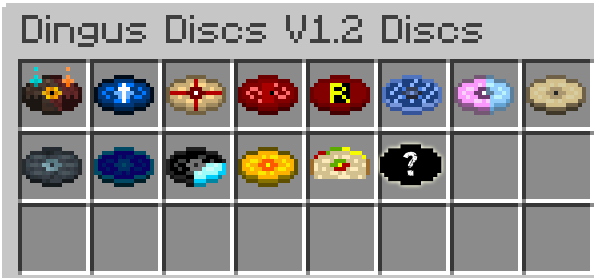
All this data pack does is retexture and edit the components to several copies of Disc 13s, adding custom textures, songs, labels, etc., giving the illusion of new music discs (I mean, technically they are, but their Minecraft ID says Disc 13).
Now, here is the real question. How do you obtain them? Well, it's best if you find them yourself, but if you really want to know, view this spoiler:
Spoiler- Whatdoyousee -> Obtainable via Skeleton killing a Creeper
- We Are Charlie Kirk -> Obtainable via Killing a Warden
- Choaz Mirage -> Obtainable via Skeleon killing a Creeper
- Relaxed Scene -> Obtainable via Skeleton killing a Creeper
- Order -> Get Rarely from Normal Trail Vaults
- Fort-Stress -> Obtainable in Nether Fortress Chests
- California Girls -> Obtainable from brushing Suspicious Sand in Warm Ocean Ruins
- It's Raining Tacos -> Obtainable via Skeleton killing a Creeper
- GET OUT -> Obtainable from Woodland Mansion Chests
- My Superhero Movie -> Obtainable from Jungle Temple Chests
- Chaos Construct -> Obtainable from Ominous Trial Vaults
- Abandon Ship -> Obtainable from killing a Drowned
- The Wither -> Obtainable from killing a Wither Skeleton
- Secret Disc -> Obtainable from killing a SU TO UP TR TS T5 (good luck decoding that)
To get these discs in Creative, you can't just open the Creative menu and look them up; you HAVE to do a function command. Here is the command to give yourself every new disc in the game:
/function new_music:give_all_disc
Should be simple enough, if you want individual discs given, just replace the 'give_all_disc' with the name of the disc you want.
Don't ask where the base V1 is, let's just say it's lost media
- Edition: Minecraft Java
- File type: .jar
- Minecraft versions listed: 1.21.5, 1.21.6, 1.21.7
- How to install: Install the matching mod loader (Forge, Fabric or NeoForge) for your Minecraft version. → Download the .jar. → Put it in the .minecraft/mods folder and launch that loader profile.
- Where to get it: Opens on Modrinth — not every file is mirrored on our own servers.
Install steps are the general flow for this file type — see the MC Java Mods guides for the full walkthrough.
- Downloads as DingusDiscsV1_2.zip
- Download size: 27.8 MB
- Download link checked 9 Sept 2026 — working
These come from our own check of the pack file, not from the source page.