
Draconic Guard Expansion
Java data pack listed for Minecraft 26.x. Downloads from the MC Java Mods app on Android.
Expand your gear with 7 powerful element-infused armors! Adds endgame dragon gear, situational buffs, active abilities, and advancements.
⬇ Download on Modrinth
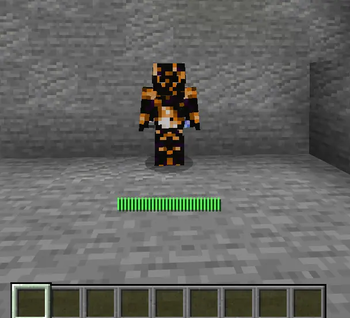
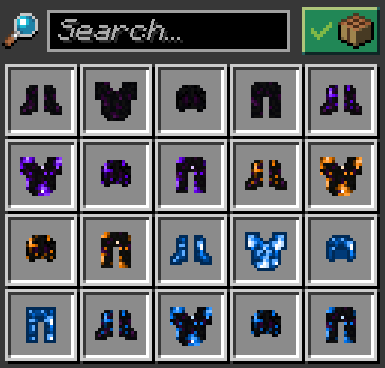
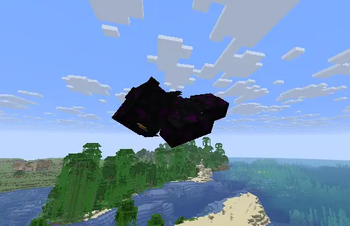

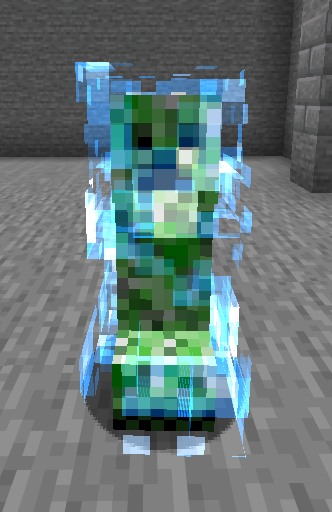
🐉 The Draconic Guard Expansion
Enhance your Minecraft journey with seven new element-infused armors! The Draconic Guard Expansion introduces the powerful Dragon Armor, its five elemental variations, and the standalone Lightning Armor.
With the Dragon Armor and its variations, you harness the power of the Ender Dragon and the elements to dominate the battlefield. With the Lightning Armor, you channel pure energy to electrify your enemies.
⚒️ How it Works
This datapack is tailor-made for the endgame. You will need specialized boss drops and rare materials to forge these powerful sets.
🐉 The Dragon Armor: Defeat the Ender Dragon to obtain Dragon Eggs, which now reliably drop upon every defeat.
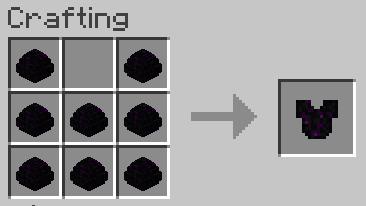
🔥 The Elemental Variations (Fire, Wind, Water, Ender, Lightning): Upgrade your base Dragon Armor by adding a unique elemental resource on top of the base recipe.
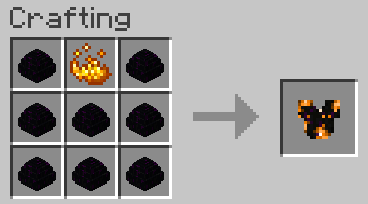
📊 Standard vs. Variations: The base Dragon Armor offers the highest base armor points. The Variations offer slightly less armor, but grant massive situational buffs depending on your current location (e.g., dimension or weather) and unique active abilities.
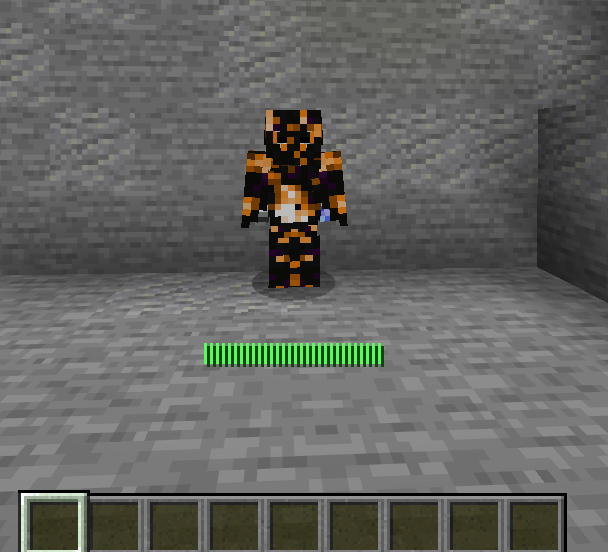
⚡ The Lightning Armor: Hunt down Charged Creepers to obtain rare Lightning Shards and forge them into shocking defenses.

📖 Quality of Life: All recipes are displayed directly in the vanilla crafting table, and you can track your progress with a brand-new set of in-game advancements!
💎 Featured Items
Here is a showcase of all seven new armor sets added by this datapack:
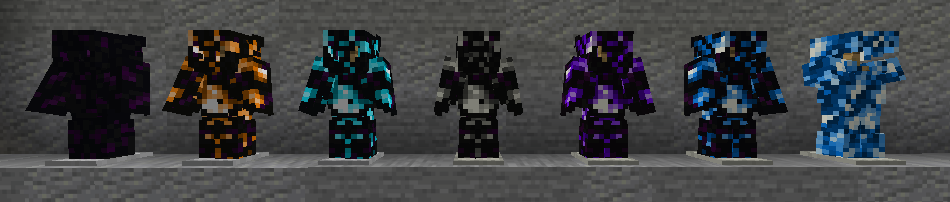
🌌 Base Draconic Traits (shared by all Dragon Armors)
- Fire Resistance I (Permanent)
- If in The End: Strength II / Resistance II
- If standing on End Stone: Speed I
- Anti-Void Safety Net: Levitation VIII if y < 0 (The End) or y < -100 (Overworld)
- Elytra Dragon Chestplates can be used as Elytras
🐉 1. Draconic Armor Set
- Features all Base Draconic Traits listed above.
🔥 2. Fire Draconic Armor Set
- Base Draconic Traits included.
- In Lava: Strength II / Resistance I / Haste bosses II
- In Fire / Burning: Strength II / Speed III (Speed I if just burning)
- In Nether: Strength I / Haste II / Resistance I
- In Water / Rain: Slowness II / Weakness II / Wither II
- Passive Attack: Deals fire damage to hit entities.
- Active Ability (Sneak): Deals fire damage to all entities within a 3-block radius. (10s Cooldown)
💨 3. Wind Draconic Armor Set
- Base Draconic Traits included.
- Permanent: Slow Falling VI
- Active Ability (Sneak): Grants Levitation III for quick vertical movement.
💧 4. Water Draconic Armor Set
- Base Draconic Traits included.
- Permanent: Dolphin's Grace II / Conduit Power II
- In Water: Strength II / Resistance I (Saturation I while swimming)
- In Rain: Strength I
- In Lava / Fire: Slowness III / Weakness II
- Active Ability (Sneak): Shoots a Guardian beam that deals damage. (2.5s Cooldown)
🔮 5. Ender Draconic Armor Set
- Base Draconic Traits included.
- Permanent: Strength I / Speed I
- In Water / Rain: Wither II (Danger!)
- Active Ability (Sneak): Randomly teleports you within a 50-block radius. (10s Cooldown)
⚡ 6. Lightning Draconic Armor Set
- Base Draconic Traits included.
- Permanent: Speed III
- In Rain: Strength II
- Active Ability (Sneak): Summons a lightning bolt 5 blocks ahead of you. (10s Cooldown)
⚡ 7. Standalone Lightning Armor Set
- Permanent: Fire Resistance I / Speed III
- In Rain: Strength II
- Active Ability (Sneak): Summons a lightning bolt 5 blocks ahead of you. (10s Cooldown)
⚠️ IMPORTANT REQUIREMENTS
This datapack requires its corresponding Resource Pack to display textures correctly. Without it, items will appear as default vanilla objects or broken textures.
💡 Note on Recipe Previews: Due to technical limitations, checking a recipe in the crafting book without having the required lightning shards in your actual inventory will temporarily display the underlying vanilla base item instead of the custom lightning shard texture.
🛠️ Installation
- Datapack: Place the
.zipfile into yourworld/datapacksfolder. - Resource Pack: Place the
.zipfile into yourresourcepacksfolder and enable it in-game.
- 💡 Note: Ensure you download both files. You can find them under the Versions tab inside your preferred release.
⚙️ Compatibility & Technical Notes
Expansion Compatibility: Fully compatible with my Armor & Tools Expansion Datapack.
Potential Conflict (Admins Beware): The new Lightning Shard is based on the vanilla Structure Block using a custom
item_model.
It cannot be placed in Survival Mode. However, please be cautious with Creative Mode or specific plugins/mods that interact with structure blocks to prevent player exploits.
Potential Loot Conflict: Issues may arise with other packs that modify the Creeper's and Ender Dragon's loot table (due to the custom drop).
Load Order Fix: If you use multiple packs that alter Creeper and Ender Dragon drops, ensure this pack is prioritized (placed at the top) of your datapack list to guarantee its specific items drop correctly.
📝 Behind the Scenes
- This project is a modernized, completely reworked version of a private server feature developed between late 2024 and 2025 (originally for versions 1.21.3–1.21.4).
- It was initially planned to debut as part of the Armor & Tools Expansion Part 2, but has now been optimized as a standalone experience for newer Minecraft versions.
- Edition: Minecraft Java
- File type: .jar
- Minecraft versions listed: 26.1, 26.1.1, 26.1.2
- How to install: Install the matching mod loader (Forge, Fabric or NeoForge) for your Minecraft version. → Download the .jar. → Put it in the .minecraft/mods folder and launch that loader profile.
- Where to get it: Opens on Modrinth — not every file is mirrored on our own servers.
Install steps are the general flow for this file type — see the MC Java Mods guides for the full walkthrough.
- Downloads as Draconic_Guard_Expansion-DP-v1.0.1.zip
- Download size: 55 KB
- Download link checked 21 Oct 2026 — working
These come from our own check of the pack file, not from the source page.