Tophat's Death Swap


A highly-customizable Death Swap datapack.
🕹 Installation
Death Swap can be installed multiple ways. The simplest is through Modrinth, while Github can offer experimental versions.
Modrinth- Download the correct version of the datapack
- Follow this guide to complete installation
Releases
- Navigate to Github Releases
- Find the version of Death Swap you want
- In Assets, find and click the zip that has the version of Minecraft you're playing on
- Follow this guide to complete installation
Continuous Updates
- Install Git
- Open a terminal in your datapacks folder (follow step 4 in Releases if you need help)
- In the terminal, enter
git clone https://github.com/Team-NPM/Tophats-Death-Swap.git - In the terminal, enter
git checkout $(VERSION), replacing$(VERSION)with the datapack version you want (rungit branch -lto see all branches) - If the datapack ever updates, open a terminal in your datapacks folder and run
git pullto update it quickly!
🎛 Running
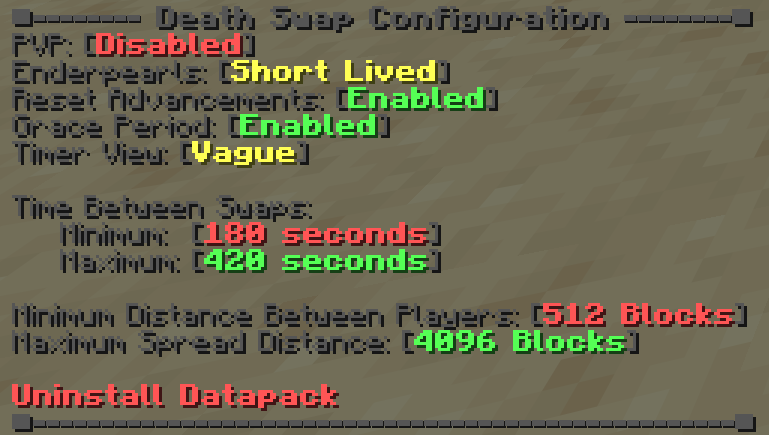
To configure Death Swap, run /function config:deathswap or /function deathswap:.config to open the configuration menu. To begin a game, run /function deathswap:.begin.
- PVP Whether or not players can directly damage each other during a game
- Enderpearls Prevent ender pearl usage by removing them entirely or after 4 seconds (or not at all)
- Reset Advancements Whether or not players will have all their advancements revoked at the beginning of a round
- Grace Period If enabled, the first swap happens after twice the amount of maximum swap time. Allows players to get kitted out to avoid low-effort drop or lava traps
- Timer View Whether or not players can see how long until the next swap. Vague tells players whether it's longer than a minute, less than a minute, or less than 10 seconds until a swap
- Time Between Swaps The minimum and maximum amount of time between swaps. Will randomize between these 2 values after each swap
- Minimum Distance Between Players How many blocks each player must be away from each other at minimum. Prevents players from running into each other
- Maximum Spread Distance The maximum amount of blocks away from 0 0 a player can be teleported
- Uninstall Datapack A button that removes all datapack data from the world and gives instructions on how to finish cleanup
🖫 Updating
Due to the nature of this datapack, if you wish to update it, completely delete the world you were in and follow the install instructions again.
🗑 Uninstalling
If you wish to continue using a world after playing with this datapack, uninstall the datapack. To uninstall the datapack, either enter the config and click the uninstall button, run /function uninstall:deathswap, or run /function deathswap:uninstall. Doing any of these options will remove all data from the world. Make sure to disable it afterwords.
🖇 Compatibility
This datapack will be incompatible with anything that uses Minecraft's team system. It also clears all players inventories and removes any items on the ground. Due to the nature of this datapack, this is intentional and will not be fixed.
🖂 Reporting Issues
Have a problem? Report it! There are 2 ways to report issues.
Github Issues Head to https://github.com/Team-NPM/Tophats-Death-Swap/issues and create an issue. You can also make suggestions there as well! Discord Join the Discord and make a bug report in the correct channel. Once it's seen, a Github Issue will be created and linked.




- Edition: Minecraft Java
- File type: .jar
- Minecraft versions listed: 26.1, 26.1.1, 26.1.2
- How to install: Install the matching mod loader (Forge, Fabric or NeoForge) for your Minecraft version. → Download the .jar. → Put it in the .minecraft/mods folder and launch that loader profile.
- Where to get it: Opens on Modrinth — not every file is mirrored on our own servers.
Install steps are the general flow for this file type — see the MC Java Mods guides for the full walkthrough.
- Downloads as Tophats-Death-Swap_26.1_R1.0.0.zip
- Download size: 24 KB
- Download link checked 22 Aug 2026 — working
These come from our own check of the pack file, not from the source page.