
DatapacksJava
DayCounter Epic
I don't know my version or loader
Open the Minecraft launcher and look at the profile you play on — it names both, like fabric-loader-1.21.4. The version also shows in the bottom-right corner of the game's main menu.
No loader in the profile name? Then it's plain Minecraft, and these mods won't run — you need Fabric or NeoForge installed first.
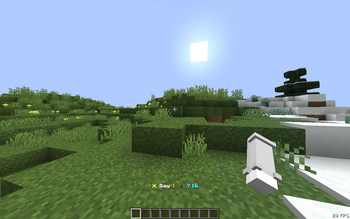
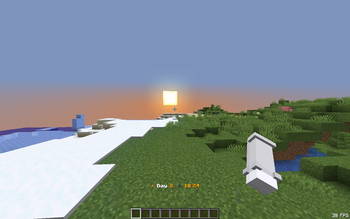
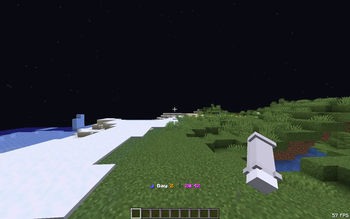

☀ DayCounter Epic
A lightweight datapack that displays the current day and in-game time on your action bar — no mods required.
✨ Features
- Action bar shows current day + in-game time (e.g.
☀ Day 4 | 14:30) - Time-aware icons — ☀ daytime, ⛅ sunset, ☽ night, ☀ sunrise
- Day-change title with subtitle when a new day begins
- Fully configurable — toggle features and customize sounds in-game
- Config persists across reloads and server restarts
- Zero performance impact — pure vanilla scoreboard math
📦 Installation
- Download the
.zipfile - Place it in your world's
datapacks/folder - Run
/reloador restart your world
⚙️ Config Commands
View all commands
/function daycounter:config/help
View current settings
/function daycounter:config/status
Title & Chat
/function daycounter:config/title_on/title_off/function daycounter:config/subtitle_on/subtitle_off/function daycounter:config/chat_on/chat_off
Milestone (Special title at Day 7, 30, 100)
/function daycounter:config/milestone_on/milestone_off
Sound
/function daycounter:config/sound_on/sound_off/function daycounter:config/sound_bell/function daycounter:config/sound_toast(Advancement sound)/function daycounter:config/sound_totem/function daycounter:config/sound_levelup/function daycounter:config/sound_xp/function daycounter:config/volume_low/volume_medium/volume_high/function daycounter:config/pitch_low/pitch_normal/pitch_high
🕐 In-game Time Reference
| Time shown | Minecraft moment |
|---|---|
| 6:00 | Sunrise |
| 12:00 | Noon |
| 18:00 | Sunset |
| 0:00 | Midnight |
🔧 Compatibility
- Minecraft 1.17 – Latest
- Singleplayer & Multiplayer
- No dependencies
Quick facts
- Edition: Minecraft Java
- File type: .jar
- Minecraft versions listed: 26.1, 26.1.1, 26.1.2
- How to install: Install the matching mod loader (Forge, Fabric or NeoForge) for your Minecraft version. → Download the .jar. → Put it in the .minecraft/mods folder and launch that loader profile.
- Where to get it: Opens on Modrinth — not every file is mirrored on our own servers.
Install steps are the general flow for this file type — see the MC Java Mods guides for the full walkthrough.
Verified by MCModsHub
- Downloads as daycounter-epic-26x.zip
- Download size: 2.6 MB
- Download link checked 21 Aug 2026 — working
These come from our own check of the pack file, not from the source page.