SpaceFrog's Frog Variant Changer
Java data pack listed for Minecraft 1.21–26.x. Downloads from the MC Java Mods app on Android.
Change a frog's variant type using a vanilla/survival-friendly method. Works with vanilla (cold, temperate, warm) and optionally 'More Frogs 2' variants…
I don't know my version or loader
Version 1.3 Update: check notes of the version you download for details about the update. The most important change for users is an update to the structure of the datapack - this changes some of the commands used to configure the datapack. New commands are shown below.
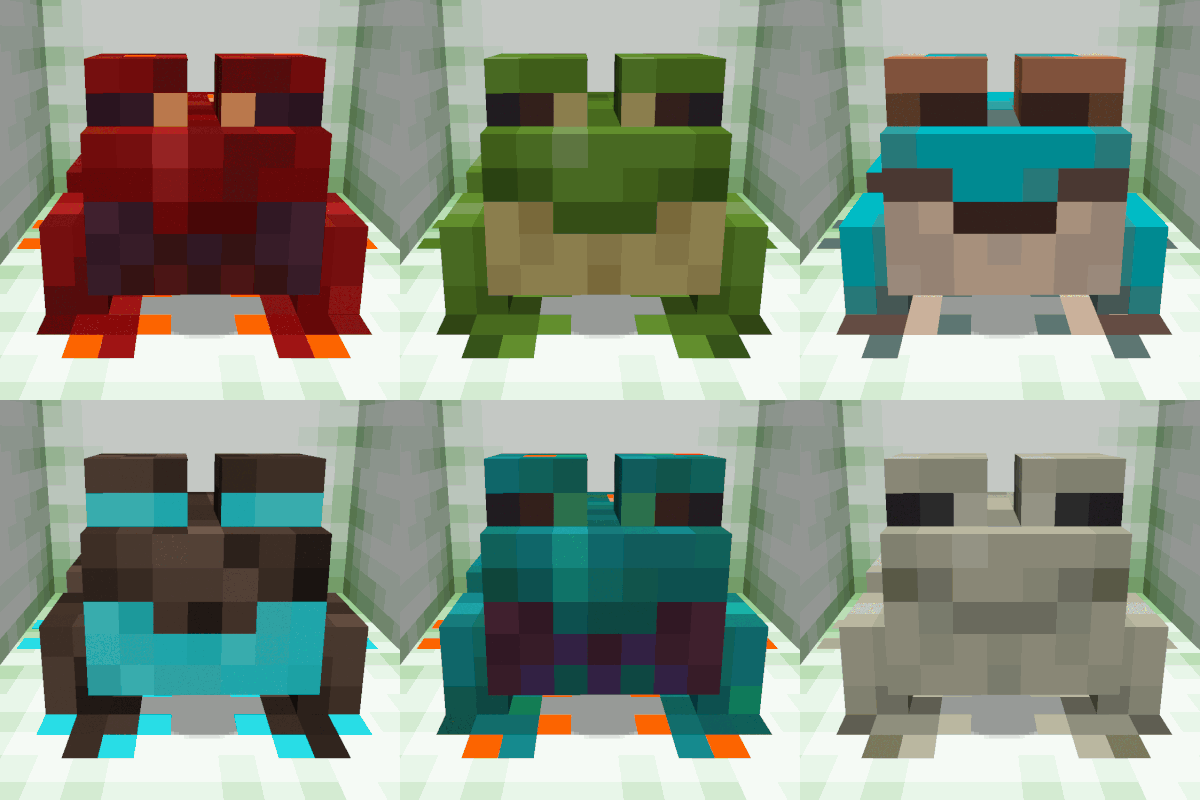
Have you ever wished you could change a frog's color/type? Well now you can just by using a name tag! This works with vanilla and is compatible with the More Frogs 2 mod's custom frog variants (this mod is not required for the datapack to function). Since More Frogs 2 hasn't been released for Minecraft versions later than 1.20.1, running this datapack on these later versions without the mod will only give you access to the standard vanilla frogs.
Survival Mode
Name Tag Mechanics For survival mode, hold the 'payment' in your off-hand (more on that later) while using a name tag to rename the frog with one of the following variant names: cold, crimson, ender, infernal, poison dart, purpur, sculk, spirit, temperate, warm, warped, wood. If you don't have the payment in your off-hand, the frog will not change to the new variant.
Advancement Lockouts By default, players are locked out through advancements from being able to reassign a frog variant until the player has encountered that frog variant in the world and fed it a slime ball. This is a nice way to force the player to explore or work on breading specific frog variants but gives players a convenient way to make more of the same type of frog after they've gone through the process at least once. Creative players and server admins can override this lockout by giving players all needed advancements using the command /function frog_variant_changer:advancement_unlock/all_grant.
Special Randomize Feature You can also randomize a frog's variant type - just rename a frog 'random' and every couple of seconds it will change variant type, cycling through all the variants you have advancements for (i.e., the types you've fed a slime ball to at least once, see above). Use command /function assign_frog_variant:_set_random_frog_loop_length to set the length of time before the random frog jumps to the next variant type as it cycles through variants (default is 2 secs).
Payment The default payment for reassigning a frog variant in survival is 1 diamond for vanilla variants, 1 diamond block for More Frogs 2 variants, and 1 netherite ingot for a random variant. To change the payment type, first get server op status or switch to creative. While holding the payment item in your off-hand, type command /function frog_variant_changer:payment/set/ followed by the frog variant you want to set the payment for (example: /function frog_variant_changer:payment/set/temperate). If your off-hand is empty, then the payment is free. Also, you can use /function frog_variant_changer:payment/set_all to set the payment for all frog variants; there is a similar function to set payment for just the vanilla variants and a function to set just the variants from More Frogs 2.
An option to set payments without needed to allow cheats/commands is coming soon.
Creative Mode Shortcuts
For creative mode players, you can change a frog's variant type by standing next to the frog you want to change, then type the command /function assign_frog_variant: followed by the frog variant type. You'll see the available variants when you type out this command; for example use /function assign_frog_variant:cold to change the frag to the cold variant type. If you have multiple frogs in the area, the one closest to the player will be converted to the variant you choose, and repeated use of the function will change each frog in the area one-by-one to the new variant out to a radius of 20 blocks.
You can give yourself access to all frog variants for the randomized frog using the command /function frog_variant_changer:advancement_unlock/all_grant or reset the lockout with /function frog_variant_changer:advancement_unlock/all_reset.
Troubleshooting- The payment can only be a singular item, so if you want the payment to be more than say 1 emerald, you can make the payment an emerald block instead. If you want to block access to a specific variant type, just use a block that's impossible to get in survival like a barrier block when you set the payment type for that variant.
- Edition: Minecraft Java
- File type: .jar
- Minecraft versions listed: 1.21.5, 1.21.6, 1.21.7
- How to install: Install the matching mod loader (Forge, Fabric or NeoForge) for your Minecraft version. → Download the .jar. → Put it in the .minecraft/mods folder and launch that loader profile.
- Where to get it: Opens on Modrinth — not every file is mirrored on our own servers.
Install steps are the general flow for this file type — see the MC Java Mods guides for the full walkthrough.
- Downloads as SpaceFrog_Frog-Variant-Changer_v1.3_for_MC1.21.5+.zip
- Download size: 87 KB
- Download link checked 21 Oct 2026 — working
These come from our own check of the pack file, not from the source page.