
Armor & Tools Expansion
Expand your gear with over 30+ new custom armor & tool sets made from vanilla materials! Complete with unique tooltips, custom advancements & crazy set…
⬇ Download on Modrinth
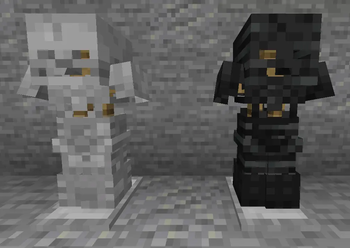
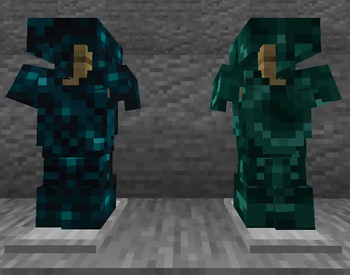
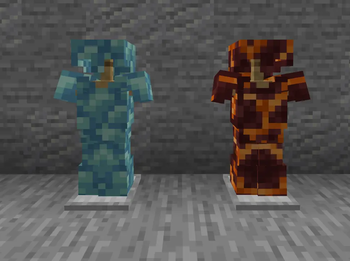
🛡️ The Armor & Tools Expansion
Enhance your Minecraft journey with a massive variety of new equipment! The Armor & Tools Expansion introduces numerous custom armor and tool sets crafted entirely from classic vanilla materials. This pack is meticulously designed to bridge the gaps in vanilla progression, offer alternative playstyles, and bring a unique new layer of tactical depth to your survival world.
✨ Core Features
- ⛏️ Vanilla-Style Crafting: No complex machines or custom blocks to learn. Forges use the familiar vanilla shapes and crafting grids you already know.
- 📊 Unique Stats: Every tier features carefully balanced armor points, armor toughness, and custom durability values.
- 🎨 Visual Variety: Includes gorgeous material variations for basic tiers like Wood (Oak, Spruce, Jungle, etc.) and Stone (Cobblestone, Blackstone, etc.) to match your personal aesthetic.
- ⚡ Powerful Set Bonuses: Equipping a full set unlocks game-changing traits, situational passive abilities, or devastating offensive/defensive powers with balanced cooldowns.
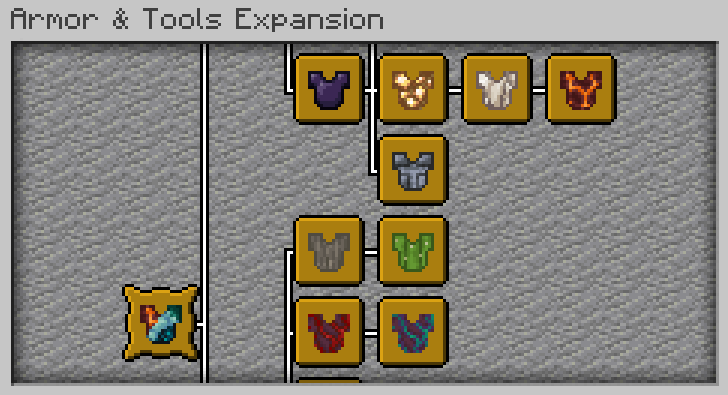
- 🏆 Custom Advancements: Track your ultimate blacksmithing checklist! Unlock a unique custom advancement for every full armor set you successfully craft and wear.
⚒️ How it Works
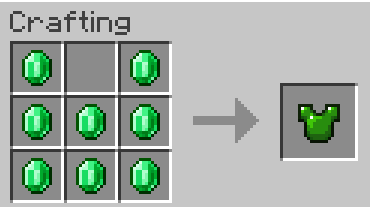
Crafting is entirely seamless. For example, to craft a durable Emerald Chestplate, simply replicate the standard vanilla armor layout using Emeralds:
💎 Featured Sets
While some materials provide a full tools-and-weapons arsenal, others focus exclusively on powerful, specialized armor utility:
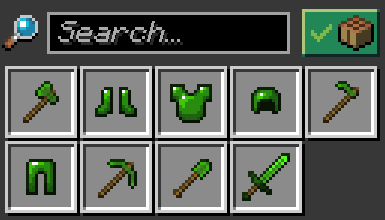
🟢 Emerald Tier: A complete endgame-ready arsenal including a full Armor Set, Sword, Pickaxe, Axe, Shovel, and Hoe.
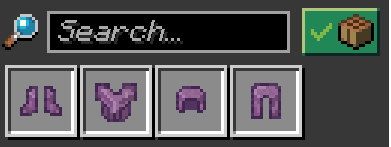
🐚 Shulker Tier: A protective armor-only set designed specifically around dimensional endurance and end-game navigation.
🎭 Visual Variations & Set Bonuses
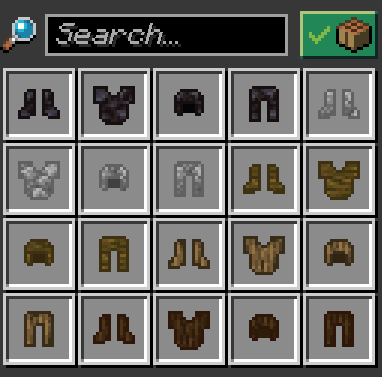
🪵 Material Variations: Match your biome or build! Discover unique textures for different types of stone and timber to fully customize your in-game appearance.
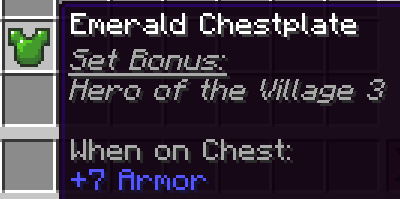
🛡️ Dynamic Tooltips: No need to memorize complex abilities. Simply hover over any custom armor piece in your inventory to see its exact full-set abilities, active status, and active cooldowns!
📖 Full List of Sets & Bonuses (Spoilers)
🔍 Click to reveal all 30+ sets and their exact abilities🪵 Basic Cosmetic Tiers (No Set Bonus)
- Wood Variations: Acacia, Bamboo, Birch, Cherry, Crimson, Dark Oak, Jungle, Mangrove, Oak, Pale Oak, Spruce, Warped.
- Stone Variations: Stone, Cobblestone, Andesite, Granite, Diorite, Deepslate, Blackstone, End Stone, Sandstone, Red Sandstone.
- Special: Glass Armor — All pieces are completely invisible. Grants standard protection without hiding your custom player skin!
- Vanilla Tweak: Chainmail Armor — Is no longer just loot! It can now be crafted using standard Iron Chains.
🧪 Mid-Game Utility Sets
- 🪨 Coal: Grants Luck V. If you are burning/on fire, you gain Strength III and Glowing I.
- ⚡ Copper: Grants permanent Haste III (Great for miners!).
- 🔴 Redstone: Grants permanent Absorption I (Provides extra golden hearts).
- 🔵 Lapis: Grants Night Vision I and Saturation I. Sprinting slowly generates free XP points over time.
- 🔮 Amethyst: Creates a protective shield that automatically destroys incoming arrows within a 3-block radius.
- 🟢 Emerald: Grants permanent Hero of the Village III.
- 🪙 Quartz: Grants permanent Resistance I and Fire Resistance I.
- 🖤 Obsidian/Crying Obsidian: Standing on Obsidian grants Resistance I. Being in Lava grants Fire Resistance I. Being in Water inflicts Slowness II.
- 🟨 Glowstone: Grants permanent Night Vision I and Glowing I.
🌊 Element & Environmental Sets
- 🔱 Prismarine: Grants Dolphin's Grace II and Conduit Power II.
- In Water: Strength II / Resistance I / Fire Resistance (for 15s).
- While Swimming: Saturation I | In Rain: Strength I.
- In Lava/Fire: Inflicts Slowness III and Weakness II (Slowness II / Weakness I if just burning).
- Active Ability (Sneak): Shoots a high-damage Guardian Beam. (2.5s Cooldown)
- 🔥 Magma: Grants permanent Fire Resistance I.
- In Lava: Strength II / Resistance I / Haste II.
- In Fire / Burning: Strength II / Speed III (Speed I if just burning).
- In Nether: Strength I / Haste II / Resistance I.
- In Water / Rain: Inflicts Slowness II, Weakness II, and Wither II.
- Passive Attack: Inflicts fire damage on hit enemies.
- Active Ability (Sneak): Deals fire damage to all entities within a 3-block radius. (10s Cooldown)
- 🧊 Ice:
- On Ice / Packed Ice: Speed III | On Blue Ice: Speed V.
- On Snow Blocks / Powder Snow: Strength II (Powder Snow also grants Resistance IV).
- Passive Attack: Inflicts freeze damage on hit entities.
- Active Ability (Sneak): Summons a solid 3x3x3 ice cube directly in front of you. (5s Cooldown)
- ⏳ Soulsand: Grants permanent Weakness I and Slowness I.
- On Soul Sand / Soul Soil: Grants Speed II (for 5s).
- Passive Attack: Inflicts Slowness II (for 10s) and Weakness II (for 5s) on hit entities.
🌵 Mob & Combat Drops
- 🏜️ Cactus:
- Active Ability (Sneak): Deals immediate Thorns damage to all nearby entities within a 3-block radius. (2.5s Cooldown)
- 🐇 Rabbit Hide: Has no passive set bonus, but every single piece increases your raw Attack Damage by +2.
- 🟢 Slime: Grants Jump Boost X. Standing on a Slime Block grants Strength II (for 30s).
- Passive Attack: Spawns a friendly small slime on hit.
- 👻 Phantom: Grants Slow Falling V, Jump Boost V, Resistance I, and permanent Invisibility I.
- 💣 Creeper:
- Active Ability (Sneak): Takes 5 seconds to charge up, then detonates a massive TNT explosion. It damages nearby entities, blocks, and yourself!
- ⚠️ Warning: The countdown automatically triggers if the player is set on fire! (Griefing Hazard!)
- 🛡️ Resin:
- Active Ability (Sneak): Grants Resistance II while sneaking.
- 🍄 Red/Brown Mushroom Armor:
- Active Ability (Sneak): Deals immediate Thorns damage to all nearby entities within a 3-block radius. (2.5s Cooldown)
- 🐢 Turtle: Grants permanent Resistance III and Slowness II.
- While Swimming: Grants Dolphin's Grace V.
- 👻 Ghast:
- While in Air: Grants Gravity 0 (if sprinting) and Slow Falling I.
- Active Ability (Sneak): Activates a Gravity Reset while sneaking.
- Special Holding Item: Holding the new "Ghast Star" in your main hand unlocks Negative Gravity (full flight).
- 🏹 Skeleton: Doubles all damage dealt by your arrows.
- ☠️ Wither: Grants absolute Immunity to the Wither effect. Automatically inflicts Wither II on nearby hostile undead/monsters (Zombies, Skeletons, Creepers, Spiders, Wardens, etc.) within a 3-block radius.
- Passive Attack: Inflicts Wither II (for 2s) on targets.
🌌 Dimensional & End-Game Tiers
- 🔮 Ender: Grants Strength I and Speed I (Upgrades to Strength II / Resistance II while in The End).
- In Water/Rain: Inflicts Wither II.
- Active Ability (Sneak): Randomly teleports you within a 50-block radius. (10s Cooldown)
- 🔥 Blaze: Grants Fire Resistance I, Slow Falling II, and Resistance II (Nether only). Sneaking activates Levitation III for vertical flight.
- 🐚 Shulker: Grants Slow Falling VI and Resistance II (End only). Sneaking activates Levitation III for vertical flight.
- 🧭 Heavy: Increases your gravity (massively boosting the damage dealt with the Mace weapon), but decreases your base movement speed.
- ⭐ Nether Star: Grants Fire Resistance I. While in the Nether, you unlock Strength II, Haste I, and Resistance I.
- 🔊 Echo: Grants permanent Speed II and Jump Boost II.
- Underground (Overworld y < 0): Grants Resistance I.
- Active Ability (Sneak): Gives every entity within a 20-block radius Glowing I (for 5s). (10s Cooldown)
- 🏛️ Bedrock (Ultimate): Note: Bedrock is now a rare drop from the Warden upon death!
- Active Ability (Sneak): Shoots a high-tech energy beam capable of destroying bedrock blocks. (2.5s Cooldown)
⚠️ IMPORTANT REQUIREMENTS
This datapack requires its corresponding Resource Pack to display textures correctly. Without it, items will appear as default vanilla objects or broken textures.
🛠️ Installation
📂 Datapack
- Place the
.zipfile into yourworld/datapacksfolder. - ⚠️ Updating: If you are installing a newer version, delete the old version completely first. Do not overwrite files.
- Recommendation: Always create a backup of your world before updating or deleting data files.
🎨 Resource Pack
- Place the
.zipfile into yourresourcepacksfolder. - Enable it in your in-game settings.
- 💡 Note: Ensure you download both files. You can find them under the Versions tab inside your preferred release.
⚙️ Compatibility & Load Order
This datapack is designed to be lightweight and should run smoothly alongside almost any other project.
- Universal Support: Works seamlessly with the vast majority of custom datapacks and mods.
- Potential Loot Conflict: Issues may arise with other packs that modify the Warden's loot table (due to the custom Bedrock drop).
- Load Order Fix: If you use multiple packs that alter Warden drops, ensure this pack is prioritized (placed at the top) of your datapack list to guarantee its specific items drop correctly.
📝 Behind the Scenes
- Project History: This is a heavily modernized version of a Datapack originally created for a private Minecraft server between late 2024 and 2025 (originally targeting versions 1.21.3–1.21.4). It has been completely overhauled, re-balanced, and optimized for newer Minecraft versions.
- Pixel Art Style: To maintain that classic, cozy Vanilla feel, all armor textures are based entirely on original Minecraft assets. Custom sprites either utilize existing block/entity assets or carefully re-color standard Iron/Diamond sets to perfectly match their material themes.
- Edition: Minecraft Java
- File type: .jar
- Minecraft versions listed: 26.1, 26.1.1, 26.1.2
- How to install: Install the matching mod loader (Forge, Fabric or NeoForge) for your Minecraft version. → Download the .jar. → Put it in the .minecraft/mods folder and launch that loader profile.
- Where to get it: Opens on Modrinth — not every file is mirrored on our own servers.
Install steps are the general flow for this file type — see the MC Java Mods guides for the full walkthrough.
- Downloads as Armor&Tools_Expansion-DP-v2.1.0.zip
- Download size: 270 KB
- Download link checked 7 Sept 2026 — working
These come from our own check of the pack file, not from the source page.