
WorldColor Teams
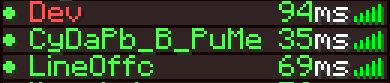
Overview WorldColor Teams is a lightweight and vanilla-friendly datapack that automatically changes a player's name color based on the dimension they are currently in. Perfect for RPG servers, SMPs, or just adding a touch of immersion to your world!
Features
Automatic Synchronization: Your name color updates instantly as you pass through portals.
Unique Colors for Each Dimension:
Overworld: Vibrant Green The Nether: Fiery Red The End: Mystical Purple
No Commands Needed: Once installed, everything works automatically in the background.
Vanilla System: Uses the native Minecraft /team system, ensuring compatibility with the Tab list and nameplates above heads.
How it Works
The datapack creates three teams (overworld, nether, and end) and continuously checks the player's location. As soon as you switch dimensions, the pack seamlessly moves you to the corresponding team.
Installation
Download the datapack.
Place the .zip file (or folder) into your world's datapacks folder.
Use /reload in-game or restart your server.
Enjoy your new dynamic identity!
- Edition: Minecraft Java
- File type: .jar
- Minecraft versions listed: 1.16, 1.16.1, 1.16.2
- How to install: Install the matching mod loader (Forge, Fabric or NeoForge) for your Minecraft version. → Download the .jar. → Put it in the .minecraft/mods folder and launch that loader profile.
- Where to get it: Opens on Modrinth — not every file is mirrored on our own servers.
Install steps are the general flow for this file type — see the MC Java Mods guides for the full walkthrough.
- Downloads as worldscolor.zip
- Download size: 2 KB
- Download link checked 21 Aug 2026 — working
These come from our own check of the pack file, not from the source page.