
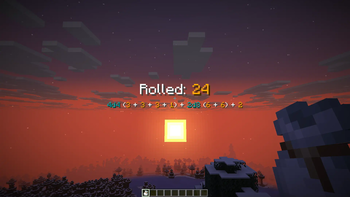
This is a datapack that lets you roll polyhedral dice in Minecraft, aimed at players of tabletop games.
Usage
To roll dice, a player needs a dice bag. You can obtain the dice bag by entering the command /trigger dice_bag.
To use the dice bag, place it in the hotbar, select it, and right click.
The following interface should pop up:
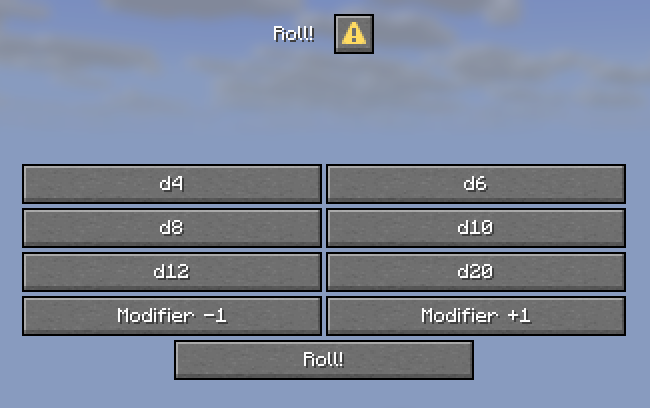
To add a die to the roll, press the d4 through d20 buttons. The number after the "d" indicates how many sides each die has.
To add a positive or negative modifier, press the Modifier +1 or Modifier -1 buttons.
The forumla being rolled will show be shown as follows:
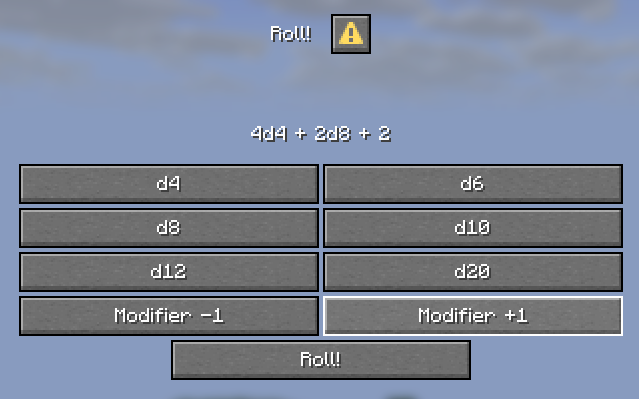
To abandon the roll, click Cancel or the ESC key. To roll the dice, click Roll.
Dice rolls will appear to the player who rolled them as follows:
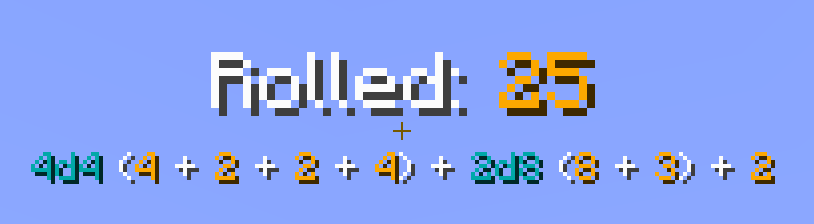
Suppressing command output
The datapack uses /trigger commands to update the UI, and these send a message to the user in the chat each time these are used. To suppress these while using the datapack, you can use /gamerule sendCommandFeedback false to disable feedback from all commands - but be aware that this affects all players on the server.
- Edition: Minecraft Java
- File type: .jar
- Minecraft versions listed: 1.21.6, 1.21.7, 1.21.8
- How to install: Install the matching mod loader (Forge, Fabric or NeoForge) for your Minecraft version. → Download the .jar. → Put it in the .minecraft/mods folder and launch that loader profile.
- Where to get it: Opens on Modrinth — not every file is mirrored on our own servers.
Install steps are the general flow for this file type — see the MC Java Mods guides for the full walkthrough.
- Downloads as mojos-dice-roller-0.0.2-mc-1.21.6-26.2.zip
- Download size: 33 KB
- Download link checked 11 Sept 2026 — working
These come from our own check of the pack file, not from the source page.